Some iProcess procedure entities map to XPDL entities and some do not. Therefore, you need to understand how iProcess procedures are transformed into XPDL and vice versa. This is especially true if you are going to perform the transformation more than once. For example, transforming an iProcess procedure to XPDL and then back to iProcess. This is because you may lose something that you have configured in the iProcess procedure because it is not recognized in XPDL.
When transforming XPDL into an iProcess procedure, if the XPDL source uses concepts or entities that are not supported by iProcess, the concept is either ignored or converted to the nearest possible concept within iProcess. This means that usually an incomplete procedure is created. The procedure can be edited in the TIBCO iProcess Modeler to make it complete.
When transforming an iProcess procedure into XPDL, where the iProcess procedure and XPDL entities map, the iProcess procedure entities are converted to XPDL entities. The parts of the iProcess procedure that do not map are stored as extended attributes.
To understand how XPDL transforms into an iProcess procedure and vice versa, you need to understand how iProcess entities map to their equivalent XPDL entities. The following table gives a general description of how iProcess entities map to their equivalent XPDL entities. For more detailed information about how iProcess entities transform into XPDL entities, see
How iProcess Transforms to XPDL.
If you have any activity sets in your XPDL source, they are ignored by iProcess when the XPDL source is transformed into an iProcess procedure. In iProcess, all sub-processes are defined as sub-procedures. Therefore, you have to use sub-procedures instead of activity sets for each process that you wanted to define as a sub-procedure in iProcess.
If your XPDL source contains package level applications, participants and data fields, they are ignored when the XPDL source is transformed into an iProcess procedure. This is because iProcess applications, participants and data are defined for each procedure. iProcess has no concept of global data. Therefore, you need to duplicate package level applications, participants and data for each iProcess procedure in the TIBCO iProcess Modeler once you have loaded the XPDL source.
Both XPDL and iProcess procedures enable you to process your data from one activity to another depending on a condition. However, XPDL and iProcess handle conditions differently from each other.
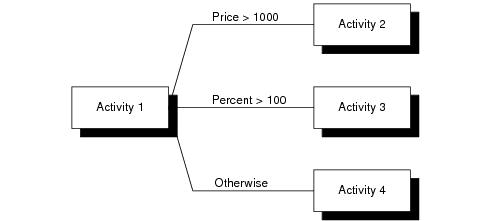
In XPDL, conditions are defined as part of a transition. Each transition can have its own condition and an activity can have multiple branches. The diagram below demonstrates an example of a condition in XPDL:
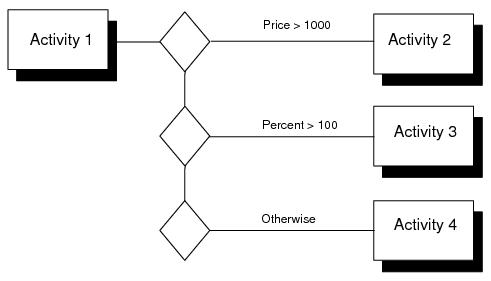
iProcess uses a condition object to define conditions. Conditions cannot be defined as part of a link. This means that in iProcess, each step that requires a condition must have its own condition object. The same example above would be represented in an iProcess procedure as follows:
See Understanding XPDL Produced From an iProcess Procedure for information on how iProcess conditions are transformed into XPDL entities.
In XPDL and iProcess, you can define a synchronization point in the process where parallel paths join together again. However, XPDL and iProcess handle this differently from each other.
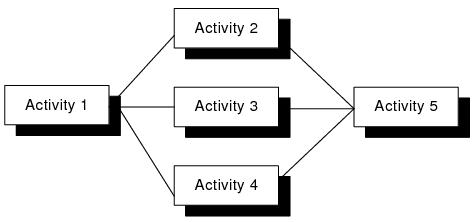
In XPDL, you need to define an AND join as part of a transition between two activities. Each activity can have a join and an activity can have multiple branches. The diagram below demonstrates an example of a join in XPDL:
In this example, when Activity 1 completes then Activity 2, 3 and 4 are processed. Activity 5 does not start processing until Activities 2, 3 and 4 have completed. It is activity 5 that specifies the XPDL and Join.
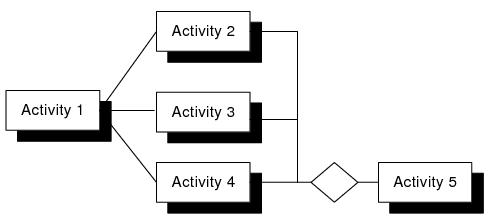
iProcess uses a wait object to define joins. A join cannot be defined as part of a link. This means that in iProcess, each step that requires a join must have its own wait object. The same example above would be represented in an iProcess procedure as follows:
See Understanding XPDL Produced From an iProcess Procedure for information on how iProcess Wait objects are transformed into XPDL entities.
The naming of some iProcess entities is more restrictive than their equivalent entities in XPDL. This means that when transforming XPDL source into an iProcess procedure, if the names of the XPDL entities do not match the naming conventions of the iProcess entities, they are transformed in iProcess as follows:
See TIBCO iProcess Modeler Getting Started and
TIBCO iProcess Modeler Basic Design for information about the naming conventions of iProcess entities.
See Understanding XPDL Produced From an iProcess Procedure for information on how iProcess names are transformed into XPDL entities.
iProcess has no equivalent concept to FormalParameters and ActualParameters that can be defined in XPDL. In XPDL, FormalParameters and ActualParameters define the input and output parameters to sub-process calls (both the sub-process that is calling and the sub-process that is being called). If you transform an XPDL source that has FormalParameters and ActualParameters defined, iProcess transforms these as follows:
See Understanding XPDL Produced From an iProcess Procedure for information on how iProcess fields are transformed into XPDL entities.
If the XPDL source you are using has come from another vendor that has defined some extended attributes, these are ignored when you transform the XPDL into an iProcess procedure. To work around this, you can amend the XPDL source so that it transforms the extended attributes into valid iProcess extended attributes. You can do this either by: