Copyright © Cloud Software Group, Inc. All Rights Reserved


Chapter 13 Transforming iProcess Procedures into the Workflow Standard XML Process Definition Language (XPDL) : Interpreting the Logs Produced From the Transformation Process

Interpreting the Logs Produced From the Transformation Process
This section describes the log files that are produced from the transformation process.
Logging the Transformation Process
To log the transformation process, do the following:
1.
Highlight the Procedure Manager panel from iProcess Workspace (Windows). Then select Options > Windows Options.... The Procedure Management Configuration dialog is displayed.
2.
Check the Full Transformation Logging checkbox from the Load From/Save As section of the dialog. Click OK.
Understanding Progress Logs
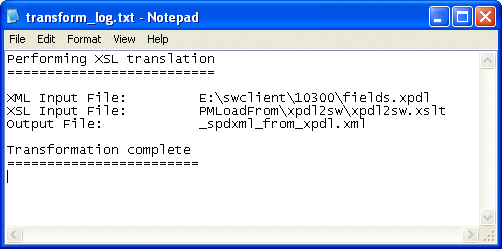
The swclient\xslTransform_log.txt logs the progress of each transformation. The file is overwritten each time a Load From or Save As operation is performed. The file logs all messages, for example, if the transformation was successful or if errors were reported during the process.
An example of a swclient\xslTransform_log.txt file is shown below:
Understanding Errors Loading XPDL into iProcess Workspace (Windows)
If there are any errors or warnings generated in the translation process, these are processed as follows:
The errors and/or warnings are reported to the swclient\xslTransform_log.txt. You can choose to view the log file at this point, or open it in a text editor later.
the XML input or output source stream is output to the following files, depending on whether you are loading from or saving to iProcess Workspace (Windows):
swclient\_loadfrom_spdxml.xml
swclient\_saveas_spdxml.xml
If any errors are generated by the translation process, TIBCO recommend that you take copies of these files and contact TIBCO Support.
Loading Invalid XPDL
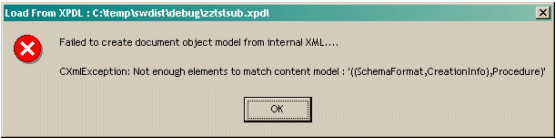
If the XPDL you are trying to load is invalid or contains no valid procedure, the loading operation may fail and you will receive an error message similar to the one below:
If you receive an error like this you should check that your XPDL is valid and matches the iProcess XPDL XML schema format. See Understanding XPDL Produced From an iProcess Procedure for more information about the iProcess XPDL XML schema format.

Copyright © Cloud Software Group, Inc. All Rights Reserved