Copyright © Cloud Software Group, Inc. All Rights Reserved


Appendix A Understanding XPDL Produced From an iProcess Procedure : Using Extended Attributes

Using Extended Attributes
XPDL has the concept of extended attributes. Extended attributes can be defined by the user or vendor to capture any additional entity characteristics that need to be exchanged between systems. Entities in iProcess that do not have an equivalent in XPDL are saved as extended attributes during translation. This section describes how to use extended attributes between iProcess and XPDL.
About iProcess Extended Attributes
Entities in iProcess that do not have an equivalent in XPDL are saved as extended attributes. The benefit of this is that you do not lose parts of the procedure. This is especially true if you are transforming an iProcess procedure more than once. For example, if you transform an iProcess procedure into XPDL and then transform it back into iProcess, you could lose parts of the iProcess procedure if they were not defined as extended attributes.
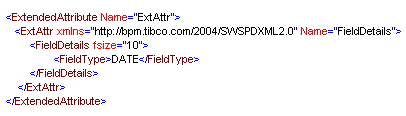
Extended attributes are intended to be used by any user or vendor who wants to capture additional entity characteristics. This means that other XPDL vendors could name their extended attributes with the same name as an iProcess extended attribute. To overcome this, iProcess extended attributes are defined within an ExtAttr element from the iProcess namespace. For example:
This means that the TIBCO iProcess Workspace (Windows) can distinguish between iProcess procedure extended attributes and other vendor extended attributes even if they have the same names.
Types of iProcess Extended Attributes
There are two types of extended attribute definition:
About the XPDLExtrAttr.XSD Schema Format
When you install the TIBCO iProcess Workspace (Windows), the XPDLExtrAttr.xsd schema is copied to the directory where you installed iProcess Workspace (Windows).
If your XPDL source contains some iProcess Extended Attributes, then when you load the XPDL source into the TIBCO iProcess Workspace (Windows), it is validated against the XPDLExtrAttr.xsd schema. If the extended attributes are not valid, the XPDL will not load.
Understanding the iProcess Extended Attributes
The following table describes the extended attributes that are used by iProcess:
Defines the expression for the value of an EAI Step Call-Out Completed message in a case audit trail.
Defines the expression for the value of an EAI Step Call-Out Initiated message in a case audit trail.
Defines EAI type for run-time processing because this may be different from the EAI type at design-time.
Defines the workflow process links that have no XPDL equivalent (see WithdrawStepLink for more information).
Defines procedure objects not involved in the process (see non-workflow objects for more information).
Defines the version of the iProcess Extended Attributes schema you are using. If it is not present when the XPDL document is loaded then it is assumed to be compatible with the schema format currently employed by the loading software.
Defines reference to the sub-procedure I/O parameter template procedure used by this object.
Note that:
You can define some or all of the extended attributes, depending on your requirements. For example, you could specify the LinkStyleFlags extended attribute without specifying the LinkFlags extended attribute.
Some extended attributes are ignored in the absence of another extended attribute. For example, the TextPosition attribute is ignored if the ObjType extended attribute is not present.

Copyright © Cloud Software Group, Inc. All Rights Reserved