Sending a Message
This option is used for synchronization. When data is synchronized, a record can be published from one enterprise to another using the Send Message utility.
Note: For information about sending a message for Effective Date records, see Sending a Message.
- Procedure
- Click Browse and Search. From the Repository Name drop-down list, select the name of the repository.
- Click View All . A list of records are displayed.
- Click the record ID of the record that you want to publish to the retailer enterprise. The View Record page is displayed.
- Click
 . The Send Message page is displayed.
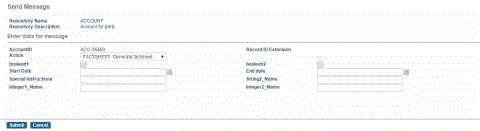
- Enter the appropriate date in the fields.
Note: If you do not specify any values in all the fields, values are retrieved from one of the following files:
- SharedStringResources.properties file: If the key values are specified in this file, then values are retrieved from this file.
- rbsendmessage.xml file: If the key values are not specified in the SharedStringResources.properties file, then they are retrieved from the rbsendmessage.xml file. This file is located in the $MQ_HOME/common/standard/rulebase folder. For more information about this file, see the Rulebases section in ibi MDM Installation and Configuration Guide
- Click Submit to publish the record. The View Record page is displayed.
- Click Ok. The record is published.