Changing or Resetting Forgotten Passwords
Depending on how a system administrator configured the system, you can reset the password. When you forget your password, you can reset it. Additionally, if you are logging in to ibi MDM for the first time, then after clicking Login, the Reset Password page is displayed. You must change the password provided by your administrator.
- Procedure
- Log in to ibi MDM.
If you are logging in to ibi MDM for the first time, then after clicking Login, the following Reset Password page is displayed: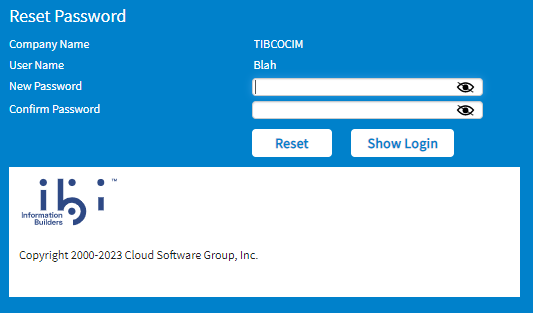 Note: Read the procedure about filling this page at step 6.
 - If you have forgotten your password, click the Forgot Password link.
The following Reset Password page is displayed.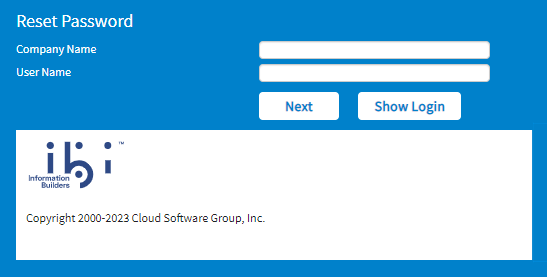
- In the Company Name field, type the name of your company.
- In the User Name field, type your username.
- Click Next.
- If the email is not configured, the Reset Password page is displayed with the New Password and Confirm Password fields.
- If the email is configured by the system administrator, a message is displayed stating that an email has been sent to your email address to reset your password. Check the email received in your inbox and click the URL provided in the email. The Reset Password page is displayed with the New Password field and the Confirm Password field.
- If you use the URL after the specified expiration time, the URL expiry message is displayed. You have to resend the request for the new reset password email.
- If concurrent users are logged in at a time and the Reset Password URL is opened in the browser, the session of the already logged-in user is terminated.
- If security questions are configured, security questions are asked. Enter your answers, click Submit. The Reset Password page is displayed with the New Password and Confirm Password fields.
Warning: - In the
New Password field, type your new password.
Ensure that the new password meets the strong password criteria. For information, see Characteristics of Strong Password and Password Restrictions. - In the Confirm Password field, retype the new password.
- Click
Reset.
ThePassword changed successfullymessage is displayed. - Click Ok.
The login page is displayed. Log in to ibi MDM using the new password.
Subtopics