Datapool Profiles (GDSN Only)
Datapool profiles and credentials are used to establish new Datapools and manage Datapool activities. A Datapool Profile defines an electronic sales channel, data pool, or hub - where backend systems can exchange goods. A Datapool Profile correlates to a workflow associated with the Datapool and you can subscribe to or unsubscribe from a Datapool as desired. Datapool credentials are provided automatically. However, you can define additional credentials.
There are 2 forms of Datapool profiles. The most common form is when a company wants to communicate with a Datapool. In this case, the only data elements visible are:
- Subscribe to this Datapool.
- Define any integration URL, if applicable.
- Define credentials. Here, the credentials of the Datapool are being defined (and not the company as company credentials are defined in the Company Profile).
- Some pre-existing credentials may show up as read only. These credentials are global and can only be modified by a super user.
A supplier organization Datapool Profile consists of:
- Documents for communication - such as Item Add, or Item Publish.
- A document format - such as EANUCC, XML, WWRE, 1Sync, or the like.
This is the first page you see when you click Administration > Datapool Profiles. It displays all data pools that you can subscribe to and that are supported by ibi MDM.
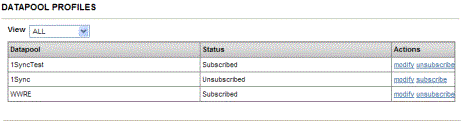
Use this page to:
- Modify a Datapool Profile -You can modify the data pool profile by clicking Modify. The Datapool Profiles - Synchronization Formats page is displayed. From this page, you can:
- Modify supported synchronization formats. ibi MDM supports formats specific to data pools, and default formats can be set for each data pool. If custom formats are required, they can be created using synchronization formats.
- Create credentials. A Datapool credential uniquely identifies a data pool or backend system within a Datapool. This establishes message origination and destination for that backend system.
For example, if a supplier wants to do business with a backend system through a data pool like 1Sync, the data pool provides UserIDs and Password or credentials to both the supplier and backend system, and identifies itself to both using its own password and credentials.
- Subscribe or unsubscribe to a data pool.
- Filter Datapools - The page displays all Datapools by default. However, you can sort them by subscribed and unsubscribed by selecting the appropriate option from the View drop-down list.