Managing the AI Model
After settings are applied to the AI model, manage the model on an ongoing basis by using various options provided on the AI Matching UI. Managing models includes deploying models, monitoring previously deployed models, and rolling back models.
Before you beginSee Applying Settings to the AI Model
- Procedure
- In ibi MDM, click Administration > AI Matching.
- On the Projects tab, select the project.
- On the Manage Selected Project tab, click Approve.
The model is deployed to the ibi Patterns - Search server. The Active instance type is changed to Deployed and its version is increased.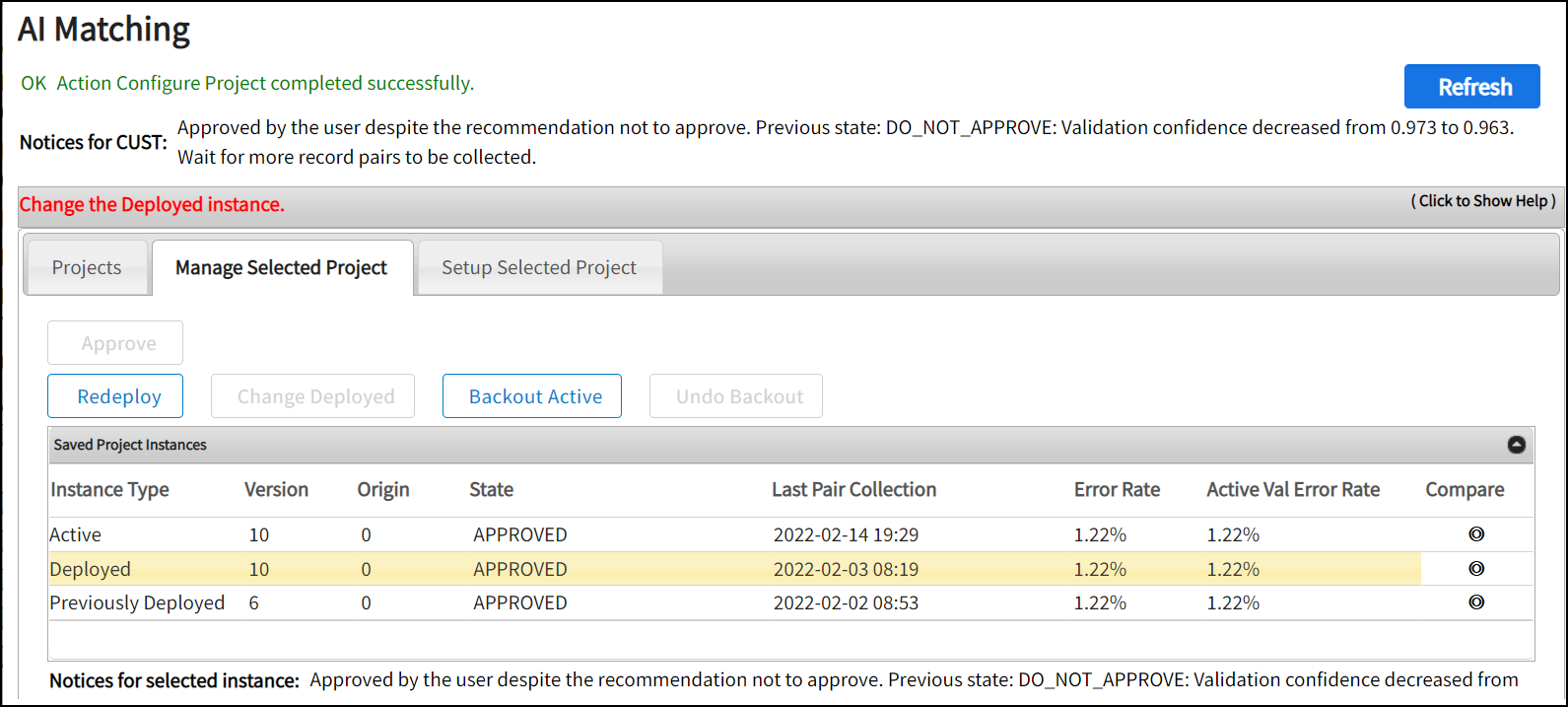
- If any issues occur during deployment of the model such as system failure, click Redeploy to resend the currently deployed project to the ibi Patterns - Search server.
- To revert to the previously deployed version, select the previously deployed instance and click Change Deployed and confirm the action.
- To use a pair of records of the deployed or previous deployed instance, click Backout Active.
- On the Confirm Action window, click one of the following options:
- Skip Pairs: Backs out the project and skips collecting new pairs. The previously collected pairs are used.
- Recollect Pairs: Backs out the project and recollects new pairs from the match and merge tables.
A new Backup instance type is created and the version of Active instance is decreased. You can roll back the Backup instance by clicking Undo Backout.
What to do nextSee Using the AI Model