Searching Records Using the AI Search
You can search records across a repository for attribute-based search using the AI search feature, which is powered by the AI Matching functionality. By using the AI search, you can filter and find records that best match your search based on the similarity scores.
Before you beginTo search records across a repository
by using a trained AI Model, you must first configure and deploy an AI Matching project for that repository in ibi Patterns - Search.
- Procedure
- Click Browse and Search . The Browse and Search page is displayed.
- Click the Text Search link. The Text Search page is displayed.
- Click Attribute Based Search. The attribute-based Text Search page is displayed.
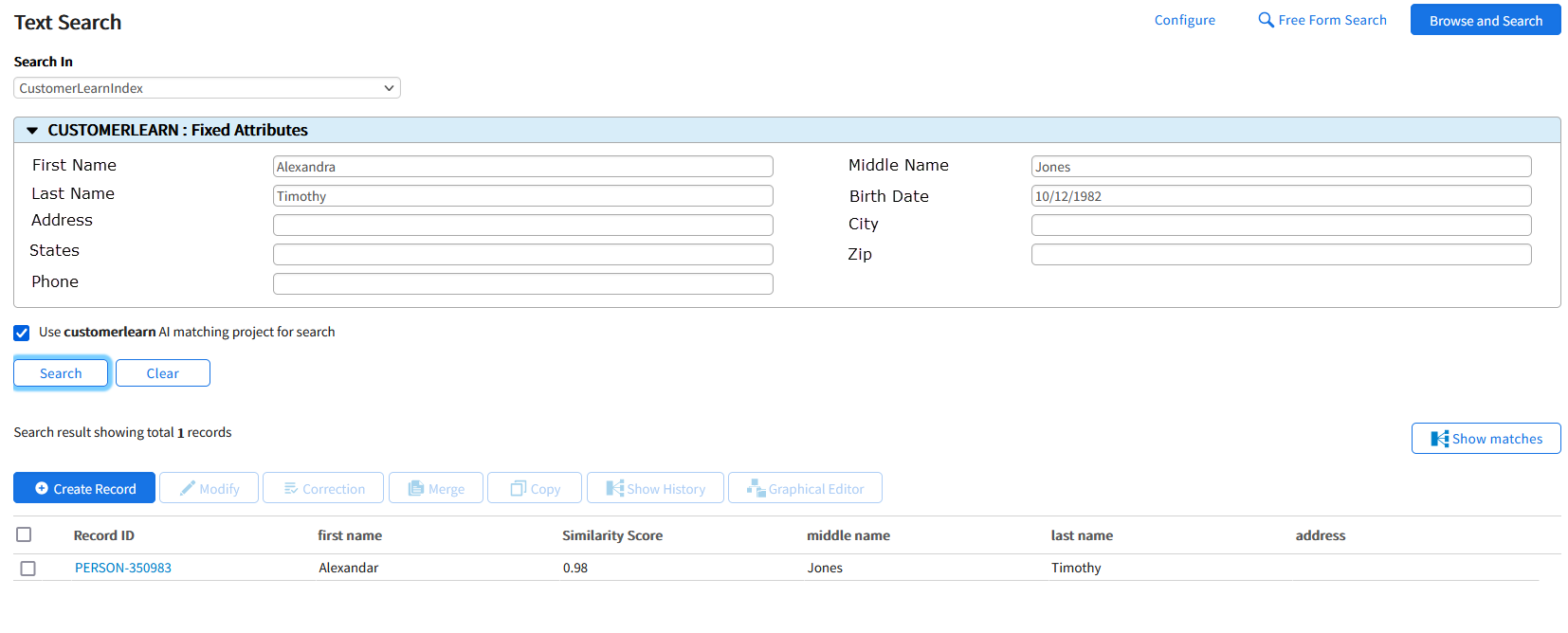
- From the Search In dropdown list, select an index entity that is configured and deployed in ibi Patterns - Search.
- To search using the AI search functionality, select the Use <AI project name> AI Matching project for search checkbox.
- Enter an attribute value that you want to search.
- Click Search. The most accurate search results are displayed based on the similarity scores.
- Click Clear to clear the attribute values and perform a new attribute-based search.
Note: This checkbox is only displayed for the AI projects that are configured and deployed as an AI Model in ibi Patterns - Search.
Note: The AI Model search is only available for attribute-based search and not for free-form search.