Importing Records
Before you begin
Read the following considerations before importing records:
- If the Import Records permission is denied, you cannot import records from the user interface. However, no security is applied when import is initiated from FileWatcher.
- If you change the input map when import is in progress, this results in import failure or incorrect results.
- The ImportCatalogRecords activity is not supported for in-memory workflows.
- Procedure
- Select a specific input map on the Input Map page and click
Import.
The Start Import page is displayed with the available data sources.
Based on the selection of the Approval Options when creating an input map, the different options are displayed on the Start Import page.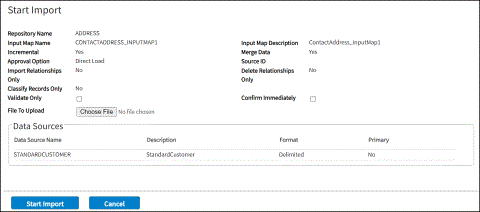
- Click
Start Import
to import records.
The import process is initiated and the Import Status page is displayed. See Actions on Import Status Page.
If an input map comprises a cross-repository relationship, all the related input maps are also imported.
Subtopics