Appendix A: High Availability
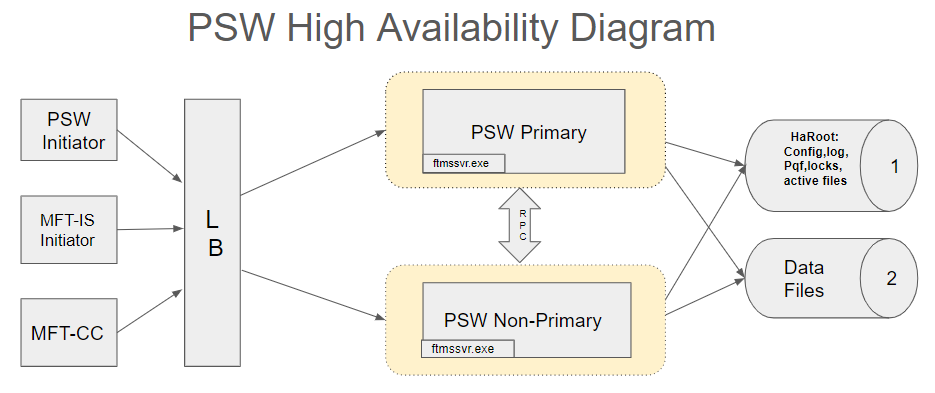
TIBCO MFT Platform Server for Windows (PSW) now supports High Availability (HA) when running behind a load balancer. This allows multiple systems to appear to the transfer partner as a single system. The following figure illustrates how high availability works:
-
Platform Server clients, Internet Server clients, and Command Center administrative functions connect to a load balancer.
-
The load balancer connects the client to any of the Platform Server instances in the cluster.
The Platform Server Responder side of implementation is Active/Active meaning that any active server can respond to incoming requests.
The Platform Server Initiator side of HA implementation is Active/Passive, meaning that only one active server can initiate transfers. This server will be the Primary server.
There is a load balancer in front of the HA cluster, which can redirect incoming requests to either machine in a HA setup.
Most of the files and folders used in a HA setup are from shared networks. If a server stops running, another server will have identical access to those files and folders.
TIBCO MFT Command Center requests can be directly sent to any machine in the cluster, or to the load balancer in front of it. However, any Command Center initiate transfer request will be redirected to the primary HA server, because this is the only server that handles Initiator requests.
You can see all active transfers in a HA cluster from the TIBCO MFT Commad Center's Active Transfer option. With the necessary rights, you can cancel any active transfer in Platform Server for Windows, if the CommandCenter= “Alter” right is assigned for this node.
Cfinq.exe utility can be run on any HA machine, and will display all active (cfinq act) or all history (cfinq) transfers. You do not need to restart cfinq.exe to see fresh active or log entries, now there is an "r" option simply to refresh the display and print out all current updates.
If the primary HA server goes down, or if it loses access to the haRoot folder (ftmssvr.pqf file) then any other server in the cluster will become the primary server. Every non-primay server will try to gain write access to haRoot\servers\pqf.prm every 10 seconds, if the server is able to get the write access it becomes the primary server.
To initiate a transfer from a non-primary HA server, you must run a CMD application ftmscmd.exe or cfsend.exe/cfrecv.exe. Transfer will run on the non-primary machine. However, ftmscmd.exe with /submit option will always redirect transfer request to a primary HA server, regardless of /fs parameter.