Data Flow of Monitoring Data and Log Messages
The following diagram illustrates the flow of TIBCO messaging system monitoring data and log messages.
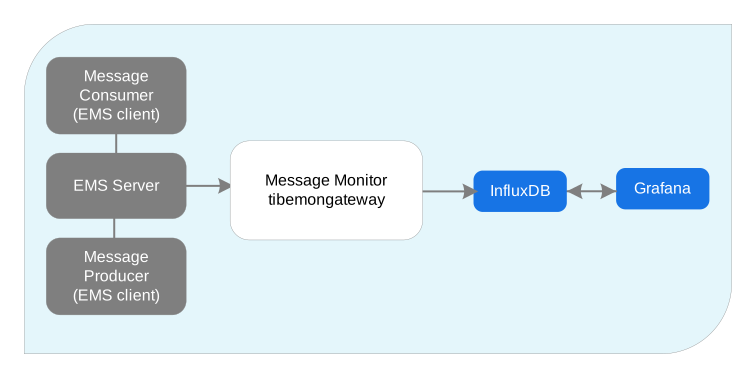
Monitoring data is sourced from the EMS server. When the EMS server receives monitoring data from any of its clients, it immediately publishes that data on a monitoring stream. When the EMS server receives log messages or advisory messages from any of its clients, it publishes these on a logging stream.
The monitoring gateway,
tibemsmon, process collects statistics from the EMS services driven by the configuration settings. (By default, all available statistics are collected but the specific statistics collected can be controlled through configuration.) It posts the collected statistics to an InfluxDB database.
InfluxDB is an open-source database. You can access the data directly from InfluxDB, or use other tools that manipulate and display the data, such as Grafana.
Grafana is included with TIBCO MSGMON Core and provides data visualization for dashboards. Dashboards specific to the type of messaging system are provided with the corresponding extension component.
Plain Text Versus Obfuscated Passwords
Plain text passwords are used unless you generate an obfuscated (managed) password. Use tibemsadmin to generate an obfuscated password. For example, in tibemsadmin:
daxxiss@DAXXISS-MBP15 ~ % /opt/tibco/ems/10.1/bin/tibemsadmin -mangle admin

{}TIBCO Enterprise Message Service Administration Tool.
Copyright 2003-2021 by Cloud Software Group, Inc.
All rights reserved.

Version 10.1.0 V4 11/9/2021

$man$2ztdxbpfgPSYz+49lGm29eqxPiC

daxxiss@DAXXISS-MBP15 ~ %{}
Then, in the MSGMON-EMS YAML file, use the string as the password. In the example, the string is: $man$2ztdxbpfgPSYz+49lGm29eqxPiC
For details, see the Enterprise Message Service User's Guide, Options for tibemsadmin, -managle option.