Data Flow of Monitoring Data And Log Messages
The following diagram illustrates the flow of TIBCO messaging system monitoring data and log messages.
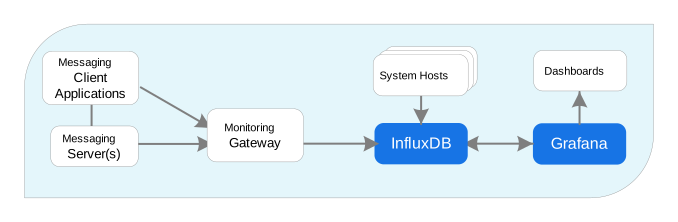
Monitoring data is sourced from the messaging servers/brokers and the client applications. When the messaging server or broker receives monitoring data from any of its clients, it immediately publishes that data on a monitoring stream. When the server receives log messages or advisory messages from any of its clients, it publishes these on a logging stream.
The monitoring gateway is specific to the type of messaging system, and is provided with the corresponding extension component. The monitoring gateway subscribes to these streams and collects statistics from the data sources as specified by configuration settings. The gateway then posts the collected statistics to an InfluxDB database.
TIBCO MSGMON includes a system monitoring component that you install and run on host computers that are part of the messaging system. These system hosts then report machine performance metrics directly to MSGMON.
Component log levels:
-
When running the start command (
msgmon start), the‑log-leveloption applies only to the command itself. See MSGMON Configuration And Command Examples. -
The log level for the collector tool (
tibsys,tibpmon,tibkmon) is set only in the corresponding YAML configuration file and defaults toINFO. It is not affected by the-log-levelcommand option. -
The log level for Grafana is controlled by the Grafana configuration file, and is not affected by either of the above options.
InfluxDB is an open-source database. You can access the data directly from InfluxDB, or use other tools that manipulate and display the data, such as Grafana.
Grafana provides data visualization for dashboards. Dashboards specific to the type of messaging system are provided with the corresponding extension component.
Grafana is required to run TIBCO Messaging Monitor Core version 1.1.0 and later. Starting with version 1.1.0, Grafana is no longer supplied with the MSGMON installation package and must be downloaded and installed separately. Version 9.3+ Enterprise Edition is recommended, with version 7.5.15 being the earliest supported version. For details, see the Installation guide, Preparing for Installation, section Installing Grafana.