Alerts Tab
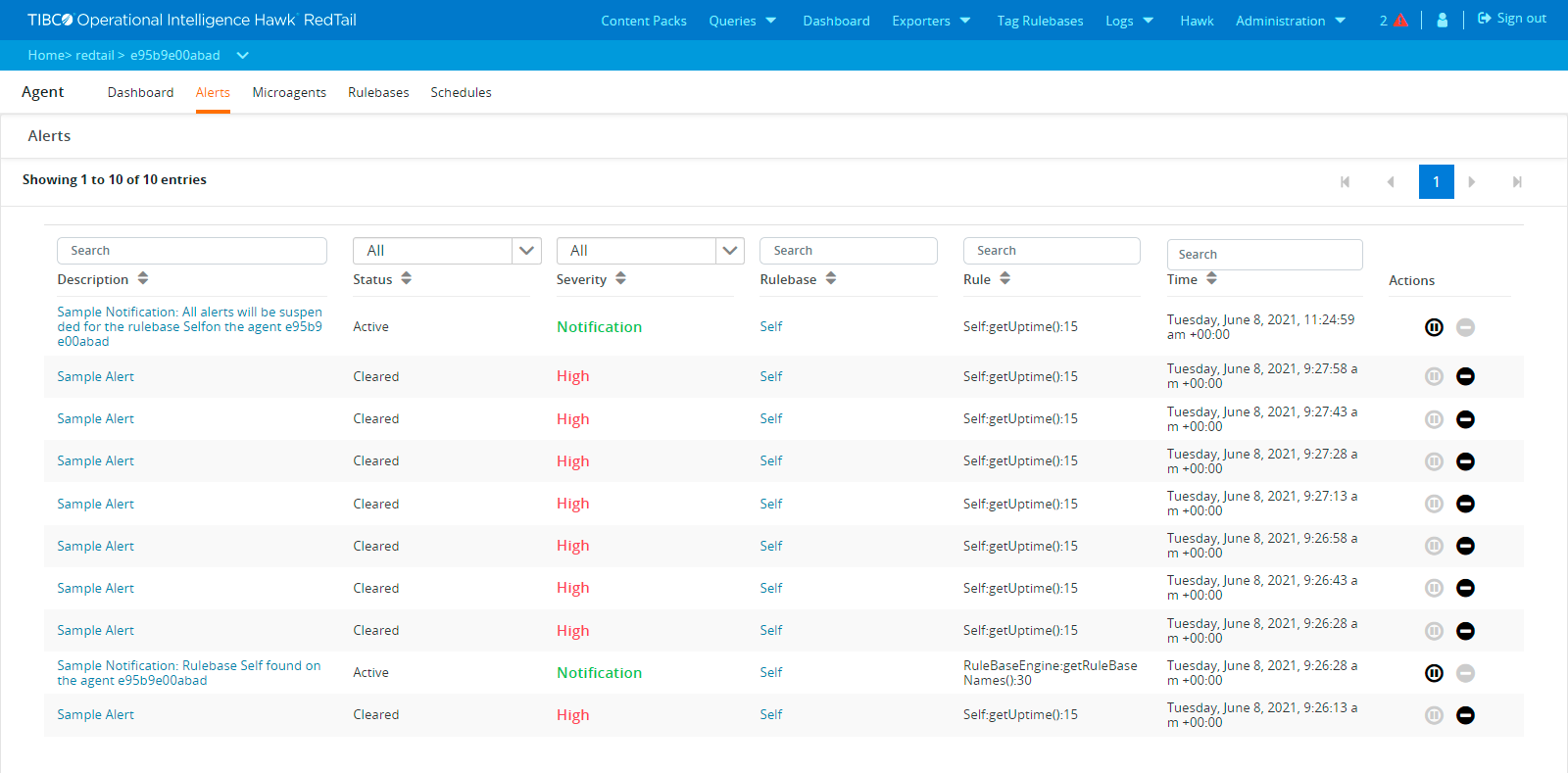
The Alerts tab lists all the alerts for the Hawk agent in a table. You can sort and filter these alerts by using these columns.
The Alerts Tab for the Hawk Agent
For each alert, the following details are provided and you can filter out the results based on these details:
|
•
|
Description - A string that describes the alert. Clicking the description link shows more details about the alert. The following details are displayed: |
|
—
|
Rule (that triggered this alert) |
|
•
|
Status - It specifies if the alert has been cleared or whether it is active. |
|
•
|
Severity - The type of severity which can be one of High, Medium, Low, or Notification. |
|
•
|
Rulebase - The name of the rulebase that generated this alert. Click the Rulebase link to get the details of the rulebase that triggered the alert. The rulebase details are displayed in the Rulebase tab. |
|
•
|
Rule - The name of the rule that triggered the alert. |
|
•
|
Time - Timestamp when the alert was generated. For filtering alerts based on their timestamp, you can use the date and time picker to select a range. |
|
•
|
Actions - The action that you want to take on this alert. |