Test Details Page
In the Test details page, you can view details of the test condition and add an action for the test condition.
Test Details Page
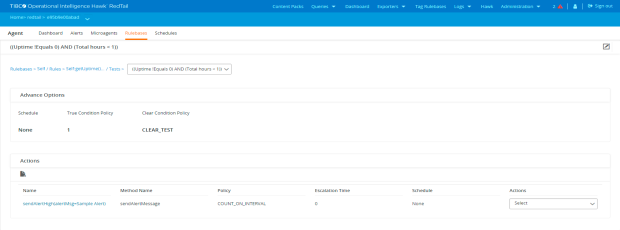
Details
| • | Schedule - The schedule applied to the rule. For details about schedule, see Schedule Management. |
| • | True Condition Policy - A counter which specifies after how many times, when the condition is true, the action is triggered. |
| • | Clear Condition - The condition which when true triggers a clear action. |
| • | Actions - List of all the actions, associated with the test condition, and their details. |
| — | Name |
| — | Method Name |
| — | Policy |
| — | Escalation Time |
| — | Schedule |
| — | Actions |
Click the action Name to view the Action details page, see Actions Details Page.
Actions
| • | Add an action - Click the Add Action icon ( ) to add a new action to be taken when the test condition is true. For details, see Creating an Action for a Test Condition. ) to add a new action to be taken when the test condition is true. For details, see Creating an Action for a Test Condition. |
| • | Edit the test condition - Click the Edit Test icon ( ) to edit the details of the test condition. ) to edit the details of the test condition. |
| • | Deploy the rulebase - Click the Deploy Rulebase icon ( ) to deploy the rulebase. ) to deploy the rulebase. |
| • | Edit an action - Select the Edit option under the Actions column for an action to edit it. |
| • | Derive an action - Select the Derive option under the Actions column to duplicate the action. |
| • | Delete an action - Select the Delete option under the Actions column for an action to delete it. |