Kingdom 2021
Select the option to create a new Kingdom 2021 data source. It displays the below panel on the right side of the Data Source Configuration tool.
Figure 10: Kingdom 2021
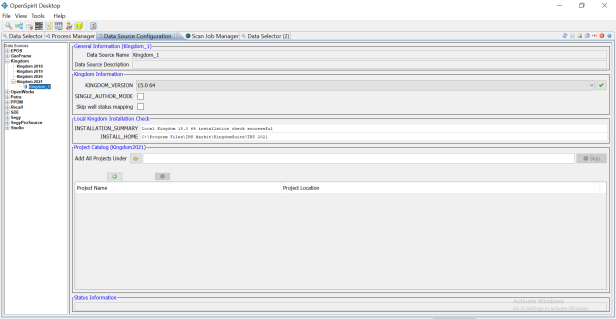
The descriptions of the values and some guidelines for filling out this panel are explained below:
|
Name |
Description |
Hints & Finding Values |
|---|---|---|
|
Data Source Name |
Free form name for data source |
Names may NOT contain blanks, the period character (“.”), or other special characters that are not allowed in UNIX file names. Also, the data source name must be unique within the same OpenSpirit installation. |
|
KINGDOM_VERSION |
The version of Kingdom to be used to access the Kingdom projects assigned to the data source. |
Check Help > About in the Kingdom application to verify the Kingdom version. |
|
SINGLE_AUTHOR_MODE |
Controls the interpretation data that is available. |
When checked only the interpretation data that is owned by the Kingdom Author specified in the user's User Setup Wizard settings will be available. When un-checked the data source will provide interpretation data for all Kingdom Authors in the Kingdom project. |
|
Skip well status mapping |
Selecting this option causes well status values to be passed through as is on both read and write rather than converting them to the OpenSpirit canonical status values. |
Enabling this option will likely prevent successful copying of well status information when using the OpenSpirit Copy Manager to copy data from one data store type to a different data store type. Copying between dissimilar data store types usually requires well status information to be mapped from the source data store's well status values to the OpenSpirit well status values and then to the target data store's allowable values. Disabling this mapping may cause copied wells to have an UNKNOWN status. The skip option is typically used when importing well status information from a data store to an application such as Petrel. Select this option if you want to preserve the original well status value rather than using the OpenSpirit canonical well status values. |
|
INSTALLATION_SUMMARY |
Displays the status of your Kingdom installation settings. |
This is a display only field. Automatically checks to verify that the Kingdom application is installed. An error message will be displayed if your Kingdom installation folder cannot be found or if the GLOBAL_SEISMIC_FILE setting does not exist. |
|
INSTALL_HOME |
Displays the Kingdom installation that will be used to access the Kingdom projects. |
This is a display only field. Automatically retrieves installation directory. You must run the Kingdom DBAdmin application and choose the OpenKINGDOM > Set Installation Directory menu option to set this. |
Project Catalog Section
|
Name |
Description |
Hints & Finding Values |
|---|---|---|
|
Add All Projects Under |
Top-level folder of Kingdom project data. |
Use the file selector browse to a top-level folder containing Kingdom projects. The entire folder tree below the selected folder will be scanned and rows added for each Kingdom project found. |
|
Project Name |
Name of Kingdom Project. |
Populated by the folder scanner or created using the add project button |
|
Project Location |
Folder path of the Kingdom project. |
Populated by the folder scanner or created using the add project button |
 . The project name can be changed by typing in the field. Project names must be unique within the data source.
 .
.