Application Configuration
Fields can be edited if this dialog is invoked from the Configuration pane. If invoked from the Deployed Configuration pane, the fields are read-only. The following tabs are available: General and Advanced .
General Tab
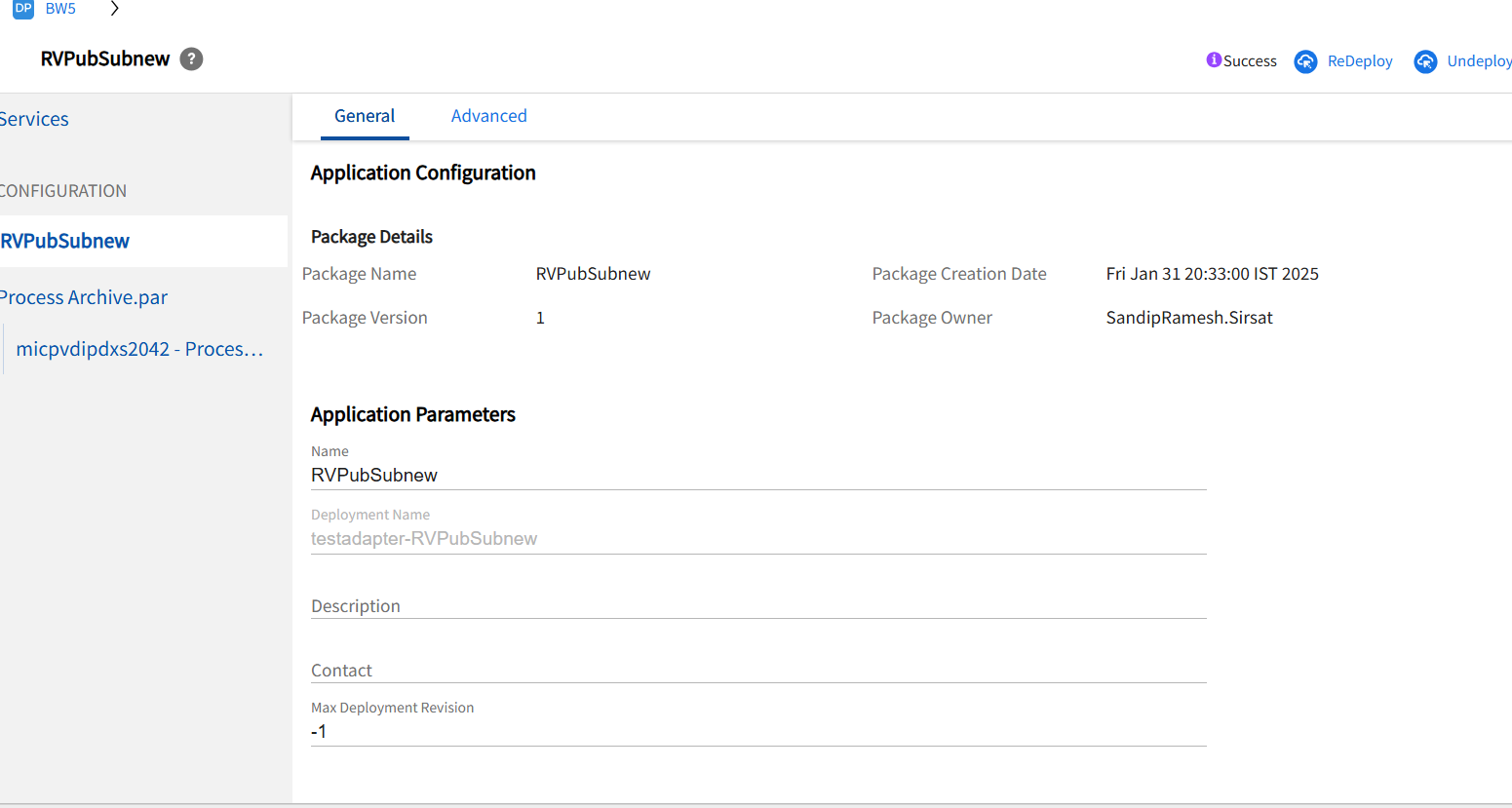
Application Archive provides information about the enterprise archive file including the package name, version, description, creation date, and owner.
By using Application Parameters you can specify the application name, associated deployment name, a simple description, and contact name for the application. You can also specify the maximum number of revisions to keep for this application in the revision history.
Advanced Tab
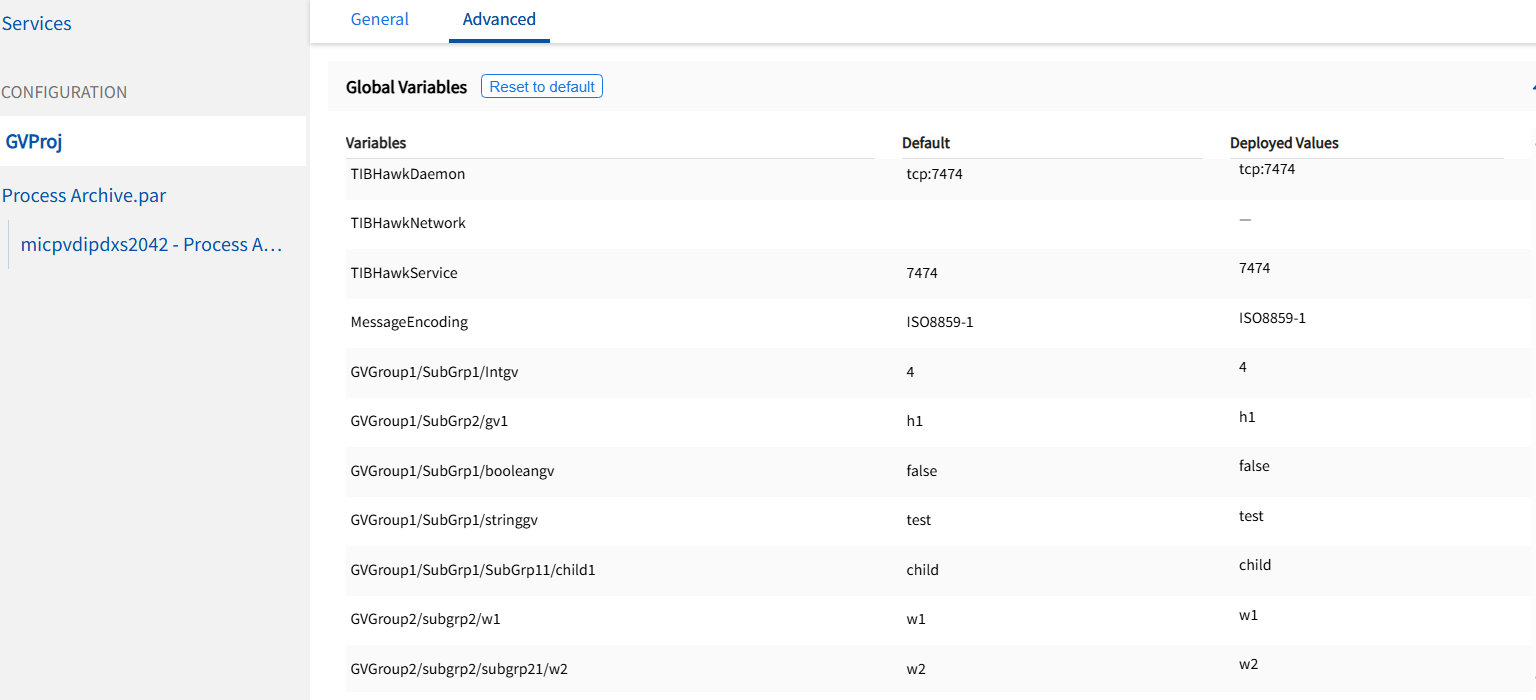
Global Variables show the global variables set in the enterprise archive file for this application.
The Reset to Defaults button resets all global variables to default settings as set in the enterprise archive file.
Changing Global Variables at Deployment
An application’s EAR file can contain global variables with values set at design-time. The global variables can be changed at deployment at the application level, service level, or service instance level.
If there are no changes to the values of variables from the default values which are set in the designer, the subsequent uploading of the EAR file will reset the variables default and configured values by new designer values of the new EAR file.
To Change Application Properties:
- Procedure
-
In the TIBCO Control Plane GUI, click Applications.
-
Click Applications > Configuration, where Application is the application created when you loaded the enterprise archive file.
-
In the left pane, select the level at which you want to change the variable, the Application name, service name or service instance name. Click the Advanced tab to change values set for global variables. Use valid XML characters only. See Global Variables for descriptions. The Reset to Defaults button restores all properties to the values defined in the enterprise archive file.
-
Click Save.
- After you’ve made your changes, the Configuration Builder indicates that the deployment is out of date.
Global Variables
The following global variables are predefined by default.
| Fields | Description |
|---|---|
| DirLedger | Used by the system when defining the path name of the TIBCO Rendezvous certified messaging ledger file. The default is the root installation directory. |
| DirTrace | Used by the system to partially create the path name for log file used by the adapter. The default is the root installation directory. |
| HawkEnabled | Used by the system to indicate whether TIBCO Hawk is used to monitor the adapter. True indicates that a Hawk microagent is defined for the adapter. False indicates the microagent is not to be used. Default is False. |
| JmsProviderUrl |
A JMS provider URL tells applications where the JMS daemon is located. Setting this value mostly makes sense in early stages of a project, when only one JMS daemon is used. |
| JmsSslProviderUrl | Specifies where the JMS server, running in the SSL mode, is located. Setting this value mostly makes sense in the early stages of a project, when only one JMS server is used. |
| RemoteRvDaemon | Used by the system to identify the TIBCO Rendezvous routing daemon. |
| RvDaemon |
Used by the system to identify the TIBCO Rendezvous daemon parameter. The parameter instructs the transport object about how and where to find the Rendezvous daemon and establish communication. The default value is 7500, which is the default value used by the Rendezvous daemon. |
| RvNetwork |
Used by the system to identify the TIBCO Rendezvous network parameter. Every network transport communicates with other transports over a single network interface. On computers with more than one network interface, the network parameter instructs the TIBCO Rendezvous daemon to use a particular network for all outbound messages from this transport. |
| RvService |
Used by the system to identify the TIBCO Rendezvous service parameter. The Rendezvous daemon divides the network into logical partitions. Each transport communicates on a single service; a transport can communicate only with other transports on the same service. Default is 7500. |
| RvaHost |
Used by the system to identify the computer on which the TIBCO Rendezvous agent runs. |
| RvaPort |
Used by the system to identify the TIBCO Rendezvous agent TCP port where the agent listens for client connection requests. Default is to 7501. |
| TIBHawkDaemon |
Used by the system to identify the TIBCO Hawk daemon parameter. Default is the value that was set during domain creation (7474 by default). |
| TIBHawkNetwork |
Used by the system to identify the TIBCO Hawk network parameter. Default is an empty string. |
| TIBHawkService |
Used by the system to identify the TIBCO service parameter. Default is 7474. |
| MessageEncoding |
The message encoding set for the application. The default value is ISO8859-1, which only supports English and other western European languages that belong to ISO Latin-1 character set. After the project is deployed in an administration domain, the messaging encoding set at design time is overridden by the domain's encoding property. All the TIBCO components working in the same domain must always use the same encoding for intercommunication. |
Setting Application Repository Instance Options
When TIBCO Control Plane deploys an application, it creates an application repository instance that contains information about the application configuration. For administration domains that use TIBCO Rendezvous as the transport, the instance can be managed by the administration server or sent to the target machine on which the client application is deployed. Domains that use TIBCO Enterprise Message Service as the transport always send the application repository instance to the target machine.
If the application repository instance is managed by the administration server, you can set the transport used by the client application to communicate with the administration server. The choices are rv (TIBCO Rendezvous), or HTTP (or HTTPS if the administration server is configured for it).
If your domain was configured to send the application repository to the target machines where applications are run, the default choice is local.
When TIBCO Control Plane deploys an application, it creates an application repository which contains information about the application configuration. You can view and change certain aspects of the application repository. In Transport, you select the transport the administration server uses to communicate with the client application. You can change this setting only if your administration domain uses TIBCO Rendezvous as the transport. Administration domains that use TIBCO Enterprise Message Service server always use the local choice. Choose local, rv (TIBCO Rendezvous) or HTTP, (or HTTPS if the administration domain has been set up to use HTTPS). The default is set when creating a domain.
By default, the transport is set to local. This means that the application repository will be sent to the target machine. This allows the application to run independently of the administration server. If you change the transport from local to another value, the application repository will not be pushed to the target machine, and the application will communicate with the administration server at runtime. The local choice is supported only if the target machines have installed TIBCO Runtime Agent 5.3 or later. When you choose local, you can set the message encoding for the application.
To change application repository instance options
You can only change application repository instances options for domains that use TIBCO Rendezvous.
- Procedure
-
In TIBCO Control Plane, click Applications.
-
Click Applications > Configuration, where Application is the application created when you loaded the enterprise archive file. See Upload and Configure an Application.
-
In the Configuration pane, select the Application name.
- Click the Advanced tab to change values for the repository instance. Click Save.
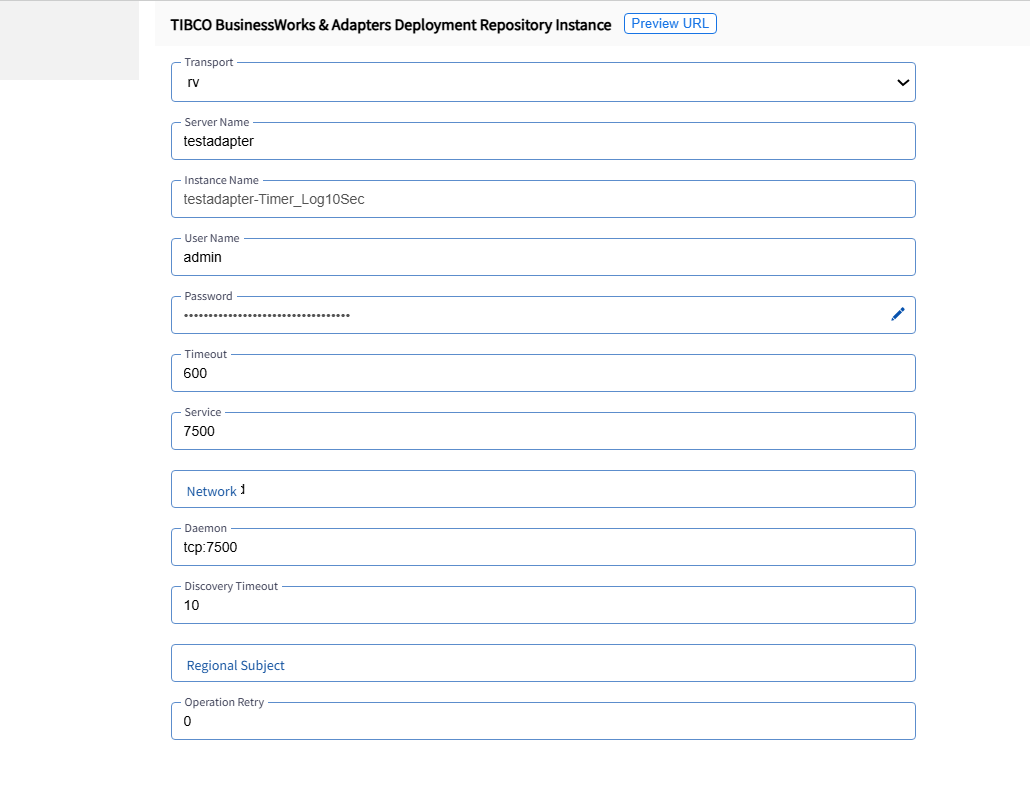
rv: If selected, the client application will use TIBCO Rendezvous to communicate with the administration server. The following fields become available:
| Fields | Description |
|---|---|
| Server Name | Administration server name. |
| Instance Name | Service instance name, that is, the instance of the service running on a particular machine. |
| User Name | User authorized for this application repository. Defaults to the user currently logged into TIBCO Administrator. |
| Password |
User’s password. |
| Timeout | Amount of time in seconds allowed for completing a task, such as retrieving information from the server. Defaults to 600 seconds. |
| Service, Network, Daemon | TIBCO Rendezvous connection parameters used. |
| Discovery Timeout |
Amount of time in seconds allowed for the initial connection to the administration server. |
| Regional Subject |
TIBCO Rendezvous subject prefix used for regional read operation in the load balancing mode. |
| Operation Retry |
Number of times to retry after a communication timeout occurs. |
http: If selected, the client application will use HTTP to communicate with the administration server. If your administration domain is not initially enabled for HTTPS, and there are deployed applications in the domain that use HTTP to connect to the application repository, the service instances will not restart after they are shut down. In this case, you must redeploy each service instance after changing the transport to HTTPS.
| Fields | Description |
|---|---|
| Server Name | Administration server name. |
| Instance Name | Service instance name, that is, the instance of the service running on a particular machine. |
| User Name | User authorized for this application repository. Defaults to the user currently logged into TIBCO Administrator. |
| Password |
User’s password |
| Timeout | Amount of time in seconds allowed for completing a task, such as retrieving information from the server. Defaults to 600 seconds. |
| HTTP URL, HTTPS URL | The URL on which the client attempts to connect to the server. What displays depends on whether you configured the server for HTTPS. |