Provisioning Subscription through Editor
In provisioning subscription through editor, you need to modify the details in the provided JSON template.
Before you begin
- You must have Admin permission.
- Procedure
- On the Subscription page, click Provision via Editor.
-
Update the fields in the JSON editor template.
Note: If the email server is not configured, specify temporary password for the first TIBCO Control Plane user. If the email server is not configured, no email is sent to the subscription owner. Therefore, the login credentials including password and URL must be noted down and shared with the owner in an offline way for signing into their Control Plane subscription.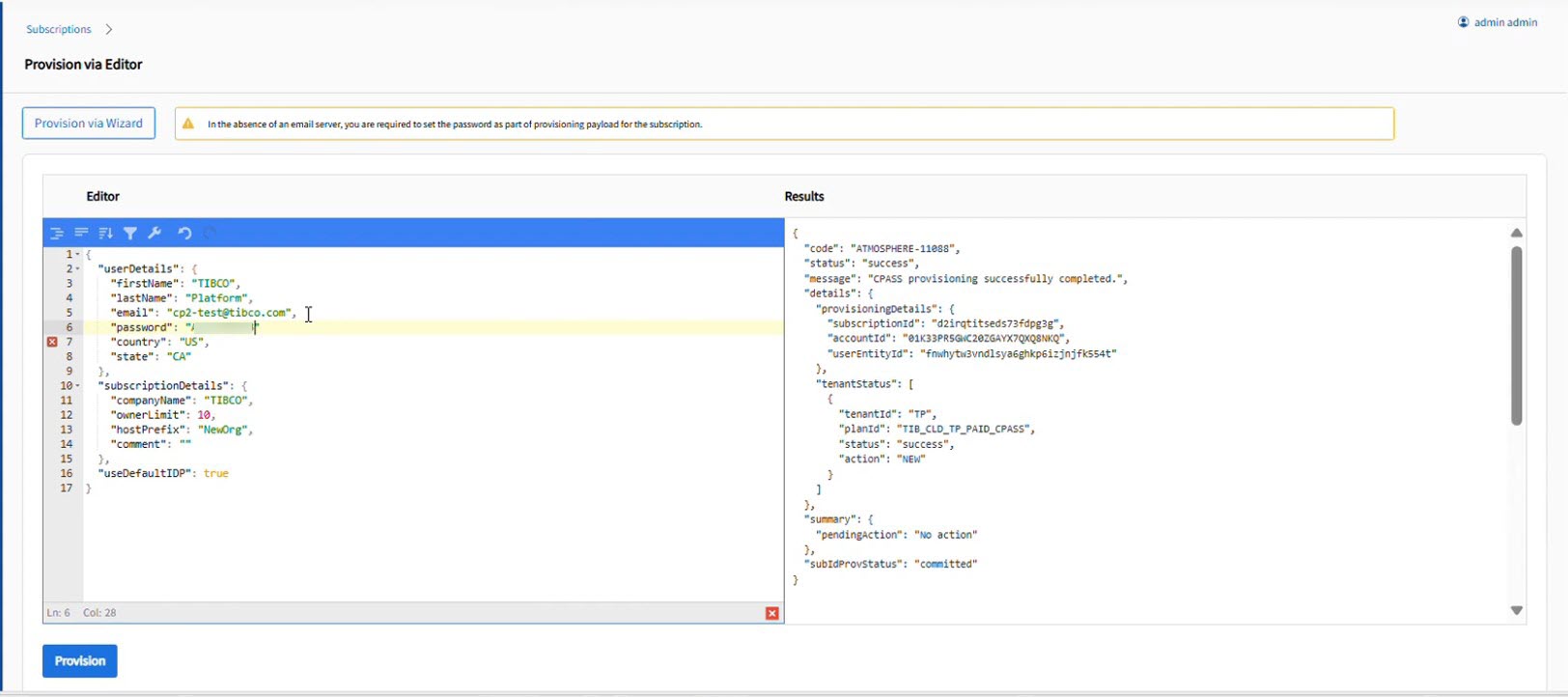
Field Description Email Address Email address of the Control Plane subscription owner First Name First name of the Control Plane subscription owner Last Name Last name of the Control Plane subscription owner Password If the email server is not configured, specify temporary password for the owner. Country Country of the subscription owner Organization Name The name of the organization Owners allowed The number of owners allowed in a subscription. You can have a maximum of 10 owners. Host prefix The unqualified hostname of the TIBCO Control Plane. All TIBCO Control Plane subscriptions are part of the same domain. For example: <myhostprefix.company.com>.
Use default Idp If you choose the default IdP, when TIBCO Control Plane gets installed, it uses the Default IdP for configuring or adding users. Default Idp is included by default in TIBCO Control Plane. To configure corporate IdP, see Configure IdP. - Click Provision.
ResultThe subscription result is displayed on the Result pane.