TIBCO ActiveMatrix BusinessWorks™ 5 and TIBCO ActiveMatrix® Adapters
The machines on which the TIBCO ActiveMatrix BusinessWorks™ 5 and TIBCO ActiveMatrix® Adapters is going to be deployed needs to have the below prerequisites.
Software Requirements
| Release Number | Minimum Software Requirements |
|---|---|
| 1.1.0 |
|
| 1.2.0 |
|
View Applications
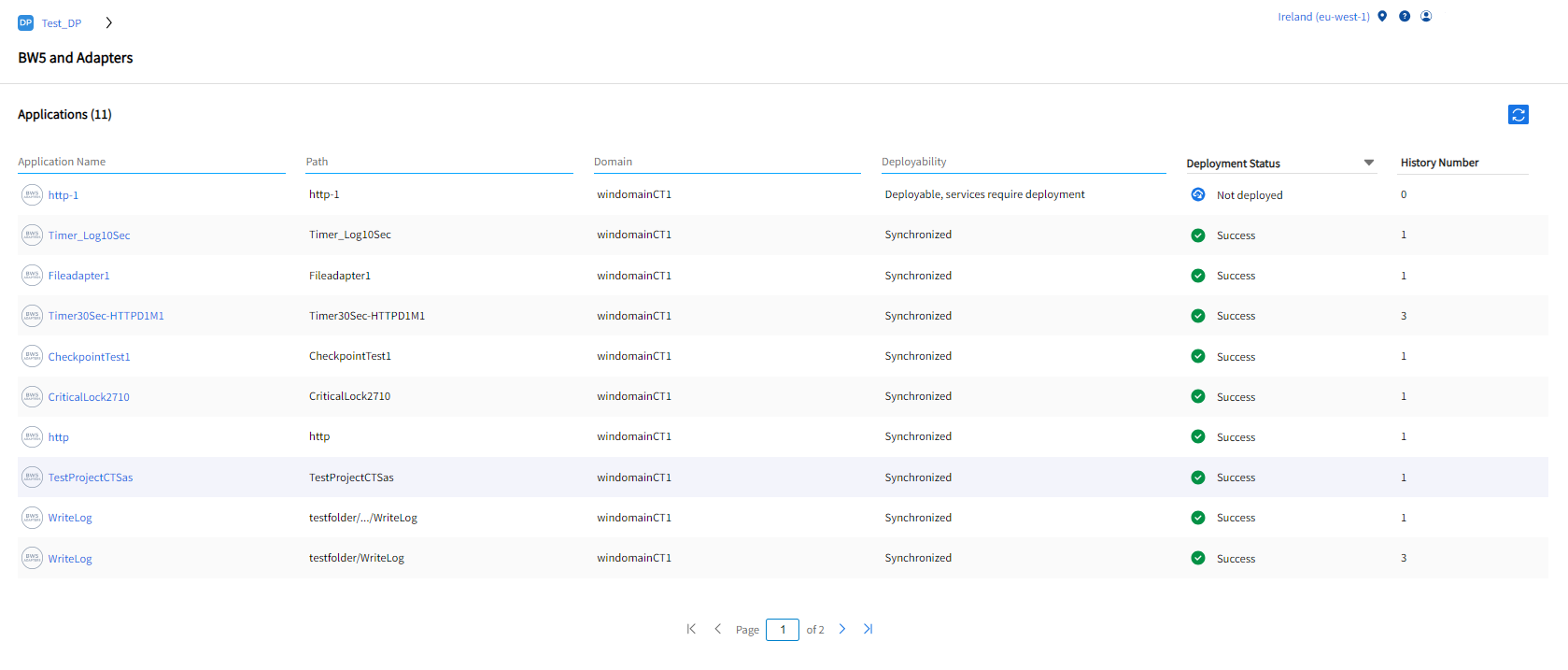
To navigate to the applications home page, click View Apps. The TIBCO ActiveMatrix BusinessWorks™ 5 and TIBCO ActiveMatrix® Adapters applications across all the domains that are registered in a particular data plane are listed as the following:
| Fields | Description |
|---|---|
| Application Name | The Application Name is the default name of the enterprise archive file. To view all the services in that particular application along with its details, click the Application Name. To search for any application, click the Application Name tab. |
| Path | The folder location of the deployed application. |
| Domain | The name of the Domain where the application is deployed. To search for the registered Domain, click the Domain tab. |
| Deployability | It shows whether the application is deployable and whether it’s been deployed before. |
| Deployment Status | The deployment status provides the information about the success or failure of each deployed process in the application. You can filter the deployment status according to the dropdown options. |
| History Number |
The number of times an application is deployed. |
The search filter is applicable only for application name, path, domain, deployability.