Deleting Non-Kubernetes Data Plane
Delete Data Plane:
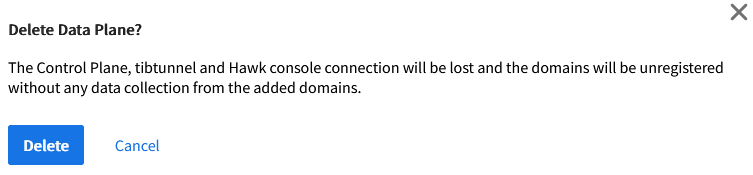
To delete non-kubernetes data plane, the Control Plane, tibtunnel and the Hawk console will be lost and the domains will be unregistered without any data collection from the added domains.
-
If the tibtunnel connection is lost.
When the connection is lost between Control Tower and non-kubernetes data plane, then install the tibtunnel by running control tower installation command and re-establish the connection. Now you can delete the data plane.
Note: The Control Tower installation command should be the same that was used to establish the connection between the Control Tower and the non-kubernetes data plane.
-
If the tibtunnel is never connected.
The non-kubernetes data plane is never connected to the Control Tower. Click the vertical ellipsis on the Data Plane card and click Delete Data Plane.
Note: You can view only the Delete Data plane option if the tibtunel was never connected. -
If the tibtunnel is connected.
The non-kubernetes data plane is deleted and domains gets unregistered from the Hawk console.
Follow the below steps to delete non-kubernetes data plane:
- Procedure
-
In TIBCO Control Plane, click the Data Planes menu from the sidebar.
-
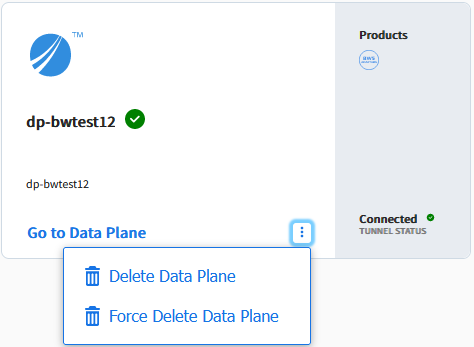
Click the vertical ellipsis icon on the Data Plane card.
-
To delete a data plane, click Delete Data Plane.
-
Click Delete. The data plane gets deleted from UI.
Force Delete Data Plane:
For non-kubernetes data plane, if the user is unable to delete data plane because of lost tibtunnel connectivity- user can use force delete.
Follow the below steps to force delete non-kubernetes data plane.
- Procedure
-
In TIBCO Control Plane, click Data Planes menu from the sidebar.
-
Click the vertical ellipsis icon on the Data Plane card.
-
To force delete a data plane, click Force Delete Data Plane. The confirmation dialog opens.

-
Click Delete Data Plane.