Using Profiles
Profile is a set of configurations grouped together. A profile connects to one Control Plane and has zero or more data planes. There is always default profile and there can be default data plane within profile. You can configure one or more profiles and switch between profiles as per needs.
Initializing Profiles
You must initialize profile to authenticate and connect with TIBCO Control Plane. Use the following command to initialize profile:
tibcop initialize
You will be prompted to specify Control Plane URL. After Control Plane URL is specified, you will be redirected to Control Plane UI in the browser. You must sign in to TIBCO Control Plane and authorize TIBCO Platform CLI. After you have authorized CLI, you can close browser and return to CLI. After the profile is initialized, you can run the Platform CLI commands. You don't need to authenticate each time you run a command.
Adding Profiles
You can add multiple profiles for different Control Plane instances using the following command.
tibcop add-profile
Using Profile in Interactive Mode
After running the following command, all subsequent commands in interactive mode will run with profile as specified profile.
tibcop --profile <profilename>
Switching Profiles
You can change the default profile by using the following command:
tibcop switch-profile
Removing Profiles
You can remove the existing profile by using the following command:
tibcop remove-profile
Authentication by Using OAuth Token
Instead of using profiles, you can run commands and authenticate by using OAuth token. You need to specify --token parameter when running commands. You must generate the OAuth token from TIBCO Control Plane UI.
tibcop tplatform:list-capabilities --cpurl "https://tibcohub.us-west.cp-platform-my.tcie.pro/" --token=<OAuth token>
Troubleshooting
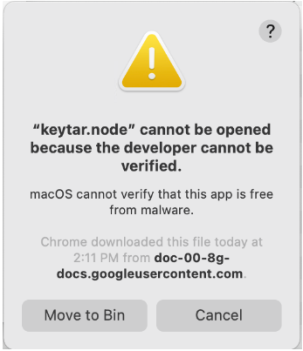
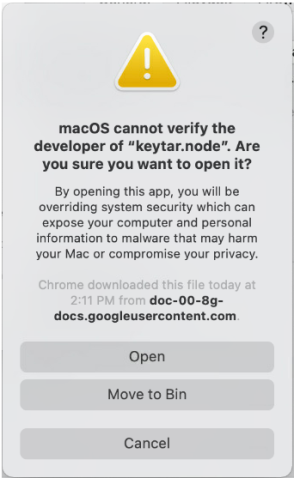
In case you get any of the following errors while running command tibcop initialize:
Solution
-
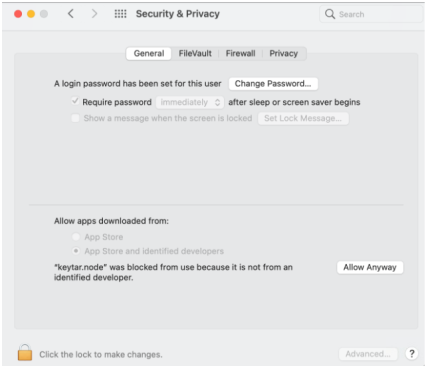
Navigate to the path Apple menu > System Preferences > Security & Privacy > General.
-
Click the Allow anyway button.