Installing Platform CLI
You can download the Platform CLI installer file from the Downloads page in TIBCO Control Plane.
You can install the Platform CLI on the following Operating Systems:
-
MacOS (ARM64 and AMD64)
-
Windows (AMD64)
-
Linux (AMD64)
Prerequisites
-
You must have libsecret installed for Linux based machines. If not, use below commands:
-
Debian or Ubuntu:
sudo apt-get install libsecret-1-dev -
Red Hat-based:
sudo yum install libsecret-devel -
Arch Linux:
sudo pacman -S libsecret{}Note: You do not need above if you are not using profiles feature and just going to set the token as a environment variable or pass it by using flag.
-
Procedure
-
Sign in to TIBCO Control Plane.
-
On the Downloads page, click Get for the Platform CLI.
-
Click Go to Download.
-
Select version.
-
Select the operating system.
-
Agree to the terms and conditions.
-
Click Individual file Download.
-
Download the binary file for your operating system, for example:
tibco-platform-cli_1.5.0-win-amd64.zip.Extract the zip file. -
Add the path to binary to environment variable Path.
Verify installation
Run the following command in your terminal.
tibcop --version
Proxy
In case your machine is behind proxy. Set proxy in environment variables.
export https_proxy="https://PROXY_SERVER:PORT"
export http_proxy="http://PROXY_SERVER:PORT"
Known Issue
-
If you see the following warning, click Run anyway.
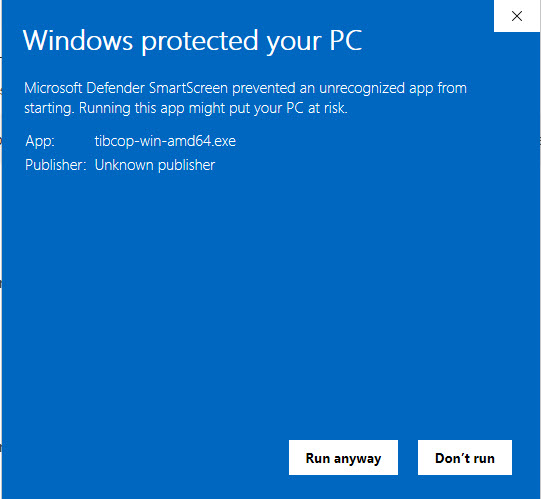
-
If TIBCO Control Plane is configured with self-signed certificate. TIBCO Platform CLI fails to connect to TIBCO Control Plane.
As a workaround, set the environment variable NODE_TLS_REJECT_UNAUTHORIZED='0'.
export NODE_TLS_REJECT_UNAUTHORIZED='0'