Capability Rollback
In case of any failures during upgrade, you can rollback to the previous capability version you have upgraded from.
Before you begin
- You must have Capability Manager permission. For more information, see Permissions.
- Procedure
- From the sidebar, click the Data Planes menu.
- To navigate to the data plane details page, click Go to Data Plane.
-
Click Data Plane configuration. Navigate to Upgrade/Rollback page.
-
On the Capabilities tab, click Rollback next to the version that you want to roll back to. You can only roll back to the previous version that you have upgraded from.
Note: For TIBCO Enterprise Message Service capability, rollback is not supported.Note: For TIBCO Developer Hub capability, rollback to a previous version is supported only if backstage version of the previous capability is same as the latest capability backstage version. For example, rollback from TIBCO Developer Hub 1.11.0 to TIBCO Developer Hub 1.10.0 is supported but not to 1.9.0 and earlier. Because backstage version is upgraded in the 1.10.0 release.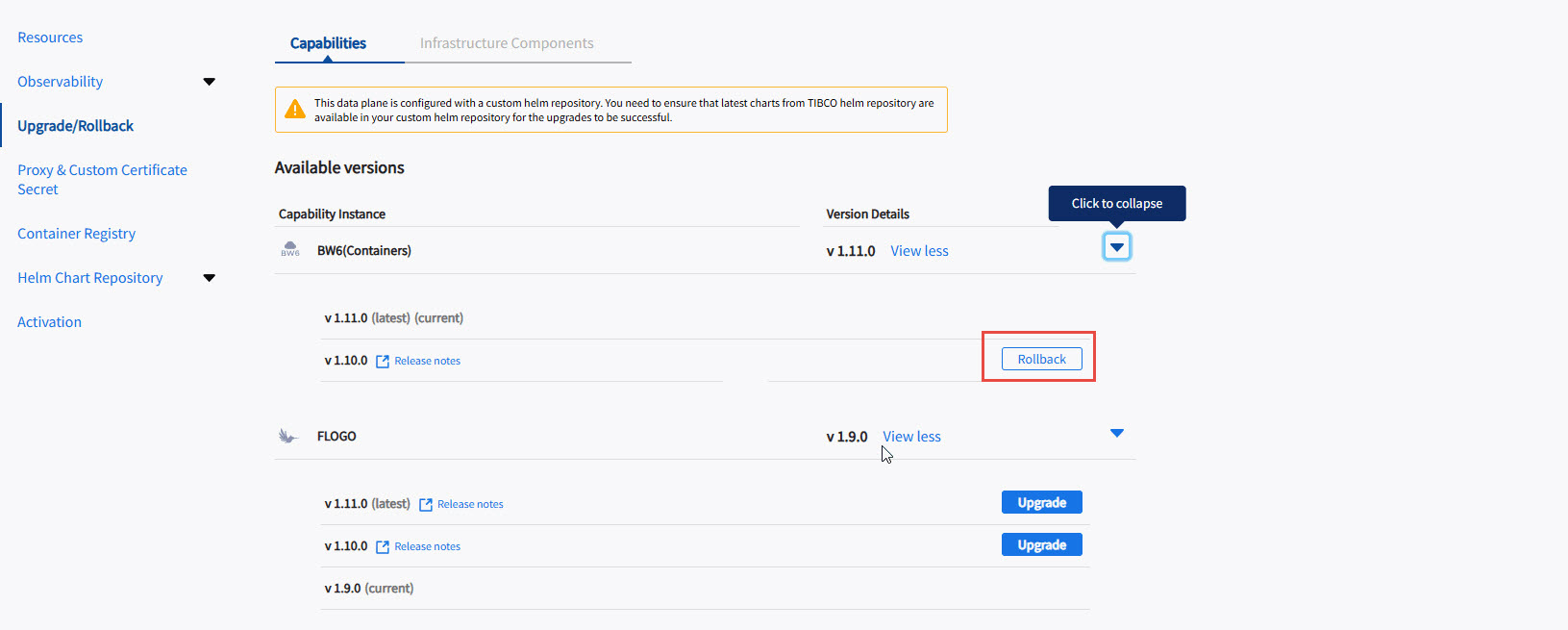
-
Click Yes, Rollback to confirm.
Note: The linked resources will remain same as those of the current capability version and may need to be manually updated post rollback from Data plane configuration in case of any issues.Note: Post rollback, in case the linked resources are updated, the capability is required to be refreshed.
Result
After the rollback is completed, you can verify the capability version on the capability card.