Configuring Single Sign-On
With Enterprise SSO, users can sign in to TIBCO Control Plane by using a Single Sign-on with a corporate account. You must not set up new login credentials specific to TIBCO Control Plane. Instead, users in your organization can easily log in to TIBCO Control Plane with their organization credentials through custom IdP (identity provider). User authentication follows your organization security policies.
The two supported protocols are SAML and LDAP. Only one is supported at a given time and switching between the two is not yet supported.
Configuring SAML IdP
- Your organization must have an IdP that is compliant with the SAML 2.0 web browser SSO profile.
- You must have IdP Manager permission in the TIBCO Control Plane. For more information, see Permissions.
- Procedure
-
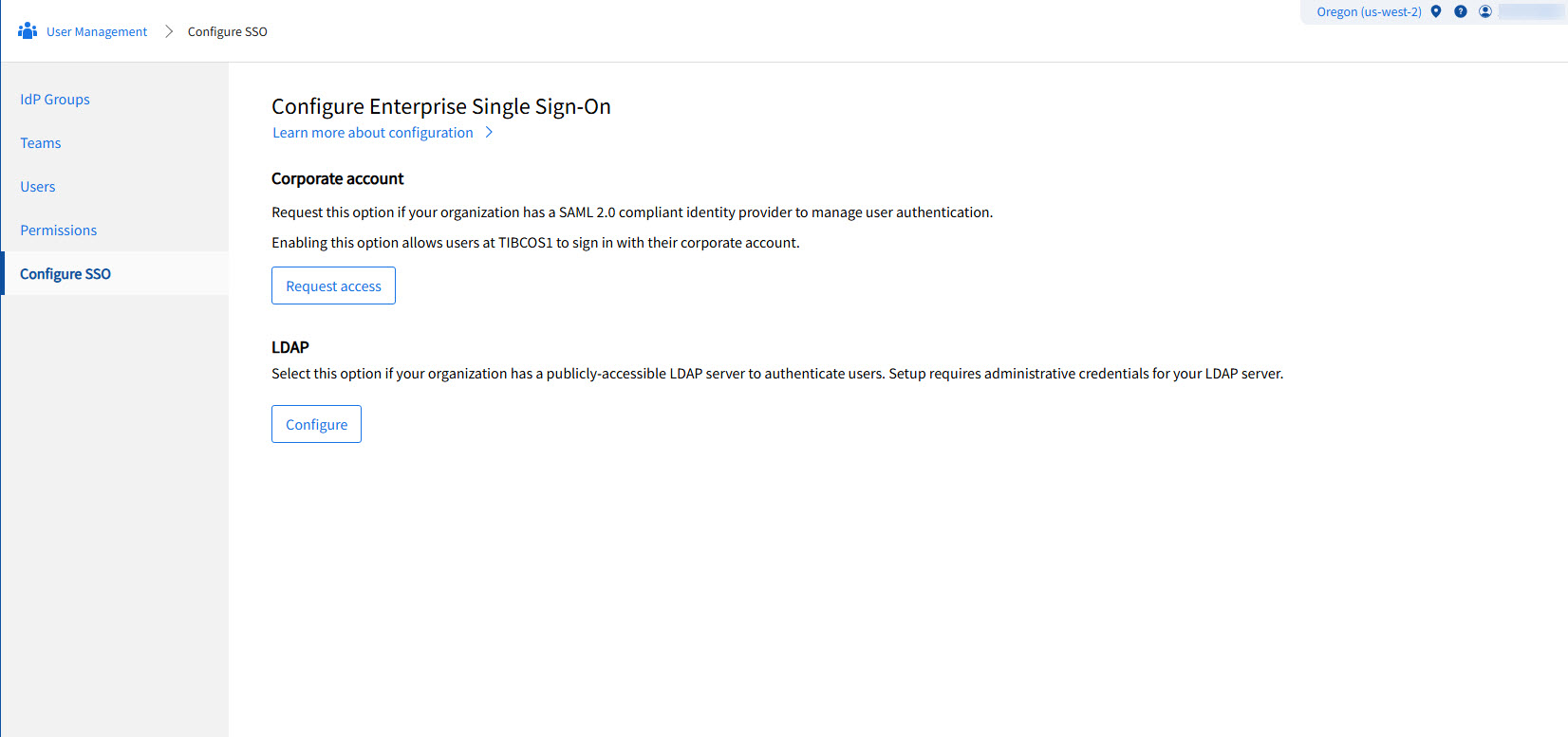
In TIBCO Control Plane UI, go to User Management > Configure SSO and click Request access.
-
In the Request permission to enable Sign in with Corporate account dialog, enter all the necessary information and click Send.
An email is sent to the TIBCO Support team. The TIBCO Support team then contacts you with further questions and instructions to set up your IdP. After TIBCO and your IT department have configured and enabled services on both sides to authenticate users, all newly added users in the organization are authenticated by your IdP instead of setting up passwords at TIBCO Accounts.
Additional Information
-
As part of the IdP configuration questionnaire, the IdP manager must provide a fixed number of IdP Groups from their IdP.
-
If the IdP manager has to delete any of these IdP Groups after they are configured in TIBCO Control Plane, they must send a request to TIBCO Support.
-
If such a group has attached permissions, deleting the group deletes the attached permissions automatically. TIBCO Support lets the IdP manager know about the attached permissions and get confirmation from IdP manager.
-
The permissions for users who are part of the deleted group are automatically revoked.
Configuring External LDAP Server
- Your organization must have an LDAP directory. This directory must be accessible from TIBCO's Control Plane IP addresses.
- Whitelist TIBCO's Control Plane IP addresses. See Whitelisting Requirements for TIBCO Control Plane for more information.
- TIBCO's Control Plane validates users who sign in with LDAP credentials. User provides the realm name, user ID, and password. The realm's name acts as a shared secret among legitimate users. This filters invalid requests before TIBCO Control Plane passes credentials to the LDAP server. Realm name input field is applicable to TIBCO Operated Control Plane only. For self-hosted Control Plane, user will see User ID and Password fields.
- Provide administrative user credentials. These credentials query the LDAP directory and validate user credentials.
- Group membership is captured only when a group has users. You can assign permissions to LDAP groups or users.
- You must have IdP Manager permission in TIBCO Control Plane. See Permissions for details.
LDAP Configuration Process
On the Configure SSO page, click Configure in the LDAP section. The IdP Manager configures the LDAP connection. This process does not require TIBCO Support interaction. A successful connection and authentication test must pass before you save the configuration.
Configuration Parameters
The following table describes the LDAP configuration parameters:
| Parameter | Description |
|---|---|
| Realm name | This parameter acts as a shared secret. Users must provide this secret for authentication within TIBCO Control Plane. |
| Server URL | This is the LDAP server URL. Acceptable schemes are ldap and ldaps. For example:ldaps://server.example.com:3289. |
| Bind User DN | This is the Distinguished Name of a user. The system binds this user to the LDAP directory. It searches for users and groups and verifies credentials. |
| Bind User Password | This password is saved in the encrypted format in the database. You must provide it every time you modify the LDAP configuration. |
| Group Id Attribute | This attribute holds the group's name. The system passes this name to TIBCO Platform. A typical value is CN. |
| Group User Attribute | This attribute denotes member users. A typical value is member. |
| Sub Group Attribute | This attribute denotes other subgroups. Often, the value is member. |
| Groups Search Base DN | This is the starting point for searching groups. For example: dc=groups,dc=company,dc=com. |
| Group Search Expression | This LDAP search expression searches for groups that contain a given user. For example: (&(member={0})(objectClass=group)). |
| User Id Attribute | This is the user's ID attribute. For example: sAMAccountName. |
| User Search Base | This is the starting point for searching users. For example: dc=users,dc=company,dc=com. |
| User Search Expression | This LDAP search expression searches for the user with the given user ID. For example: (&(sAMAccountName={0})(objectClass=person)). |
| User Password Attribute | This is an optional attribute that contains the user's password. |
| Trusted Custom Certificates | This option is enabled only for the ldaps URL scheme. It applies only if the server presents a self-signed X.509 certificate or a certificate issued by a private Certificate Authority. You can add at most three certificates. |
| Test configuration | You use a username and password to test whether user credentials validate. These are not part of the configuration and are not persisted. The response shows the groups to which this user belongs. The response may truncate to fit the display. |