Wiring Using the Graphical View

You can use the services (rendered in green) and references (rendered in pink) in the logical view to wire together applications or environments.

Procedure
  1. Drill down into an application until the services and references are visible.
  2. Click the reference.
  3. Access the FreeWire option.
    • If wiring a reference to a service, click the FreeWire option and hold down the mouse button for a few seconds till the wire is visible.
    • If wiring a service to a reference, double click the FreeWire option.
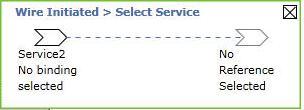
    The wiring aid tool box appears. The following figure shows an example of a tool box displayed when wiring a service to a reference.

  4. Wire the components.
    Option Description
    Wiring a reference to a service When wiring a reference to a service, guide the wire across the screen. On reaching a suitable target service, the color of the wire changes to blue and the service is expanded to display its bindings. Choose a binding.
    Wiring a service to a reference
    1. When wiring a service to a reference, the service expands to display its bindings.
    2. Choose a binding.

      The wire is enabled.

    3. Guide the wire across the screen. On reaching a suitable target reference, the color of the wire changes to blue. Release the mouse button when over the desired reference.
    The wire is created. The wiring aid tool box displays the updated information for a few seconds before it disappears.

What to do next

To delete a wiring, select the wire and press the delete button on your keyboard.
