Copyright © Cloud Software Group, Inc. All Rights Reserved


Chapter 1 Product Overview : Rendezvous Components

Rendezvous Components
Rendezvous software adds two parts to your current operating environment:
 
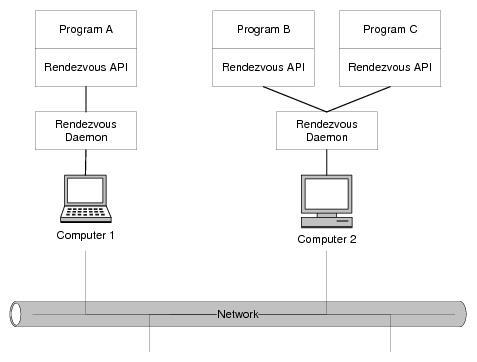
Figure 1 illustrates the interaction of these two parts in the operating environment. Computer 1 runs program A and a daemon process. Computer 2 runs two programs, B and C, which connect to the network using a single Rendezvous daemon process. All three programs can communicate with one another.
Figure 1 Rendezvous Operating Environment
Any computer can run any number of Rendezvous programs. Usually all the programs on one computer share the same Rendezvous daemon.
Rendezvous Daemon
Programs depend on the Rendezvous daemon, a background process (rvd), for reliable and efficient network communication. The Rendezvous daemon completes the information pathway between Rendezvous program processes across the network. (Usually the daemon runs on the same computer as the program; however, it is possible to connect to a remote daemon.)
Programs attempt to connect to a Rendezvous daemon process. If a local daemon process is not yet running, the program starts one automatically and connects to it.
The Rendezvous daemon arranges the details of data transport, packet ordering, receipt acknowledgment, retransmission requests, and dispatching information to the correct program processes. The daemon hides all these details from Rendezvous programs.
The Rendezvous daemon is nearly invisible to the programs that depend upon it. Programs send and receive information using Rendezvous communications calls, and the Rendezvous daemon does the work of getting information to the right place.
For details of the daemon process and its command line, see rvd on page 36 in TIBCO Rendezvous Administration.
Multiple Daemons
In most situations, each computer runs one Rendezvous daemon process, which serves all the programs running on the same computer. In general, adding multiple daemons does not increase performance.

Copyright © Cloud Software Group, Inc. All Rights Reserved