Users
This page lets you configure the set of users that can connect to a secure daemon. (In contrast, to configure administrative users, see Administrator and Password.)
To display this page, click Users in the left margin of any page of the secure daemon browser administration interface.
For background information, see Users.
Figure 128: Secure Daemon Users Page
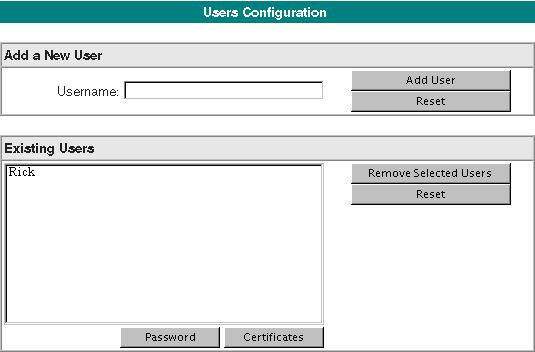
Add a New User
This panel lets you create new users.
|
Item |
Description |
|
User Name |
Required. Every user must have a unique name, distinct from every other user that this secure daemon administers. For syntax rules governing user names, see User Name and Password Identification. To add a user, type the user name, and click the Add User button. |
Existing Users
This list displays the users currently authorized to connect to the secure daemon.
Buttons operate on selected users from the list.
|
Button |
Description |
|
Password |
Displays a page that lets you view and set the password for the selected user. |
|
Certificates |
Displays a series of pages that let you view and set public certificates for the selected user. |
|
Remove Selected Users |
Deletes one or more selected users from the list. |