Copyright © TIBCO Software Inc. All Rights Reserved

Appendix A Menu Reference : Tools Menu

Tools Menu
Resource Tools
Links can also be created holding down Control-Shift and by dragging a resource into a folder or another resource.
File Tools
Offers a variety of ways of changing file extensions and moving files. For example:
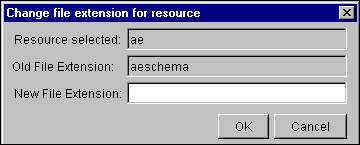
A dialog displays the resource name and extension and allows you to specify the new extension.
Figure 49 Change File EXtension For Resource Dialog
Find Global Variable Usages
Displays a dialog where you can select a global variable and find each resource that uses it. Click a found resource to display it in the configuration panel.
Export As XML Schemas
Converts an AESchema file to an XML Schema file. You are prompted for the name of the AESchema file you want to convert.
Trusted Certificates
Import into PEM Format. Prompts you for the location of a certificate and adds the certificate in PEM format to the project. You need a certificate in PEM format to be part of the project when you want to add the certificate to other resources, for example, to a TIBCO Rendezvous Session you want to make secure.
Create Project EAR
Creates an Enterprise Archive for the current project. The archive includes an adapter archive for each adapter and a process archive for each process that has a process starter.
See Chapter 6, Creating an Archive for Deployment, for information about working with an Enterprise Archive.
Schema Importer
The schema import tool allows you to import resources into a TIBCO ActiveMatrix BusinessWorks project. See TIBCO ActiveMatrix BusinessWorks Process Design Guide for details.
Generate Web Service
Allows you to create web services using a process definition or WSDL file. See TIBCO ActiveMatrix BusinessWorks Process Design Guide for details.
UDDI
Displays the WSIL and UDDI Registry Browser dialog. This dialog allows you to browse web services or publish the details of your web service. See TIBCO ActiveMatrix BusinessWorks Process Design Guide for details.
Java Code
Allows you to compile java code for each Java Code activity individually. See TIBCO ActiveMatrix BusinessWorks Palette Reference for details.
Tester
Displays if TIBCO ActiveMatrix BusinessWorks is installed. Allows you to test a process instance from TIBCO Designer. Only one test session can run at a time in the same process instance.
Show Adapter Tester
Displays the Adapter Tester tool, which allows you to select an installed TIBCO Adapter for which the configuration is currently available and perform testing.
See TIBCO Designer Palette Reference for more information on Adapter Tester.

Copyright © TIBCO Software Inc. All Rights Reserved