ForEach
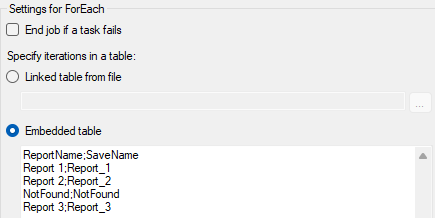
Use the ForEach task to loop over a list of items and run other tasks once for each row.
The task automatically adds a matching ForEach End marker to show the end of the loop.
If a task fails within a loop, you can choose whether the job should continue with the next iteration or end. The Automation Services Job Builder shows a warning if the table or the external file is incorrect.
To insert data from the table into text fields inside the ForEach loop, go to . See Inserting a field in a Spotfire Automation Services job to learn more about how to use Insert field.
ForEach loops can be nested inside one another, and can also be placed
inside
If blocks (or vice
versa) to any depth. Inside nested loops, the
{forEachProperty:<column>} variable can reference
columns from the current loop and from any enclosing loop. For more
information, see
Nested
blocks.
You can use a Break task inside a ForEach loop to stop the loop early. An Exit task inside a loop ends the entire job.
allowedFilePaths setting in the
Spotfire.Dxp.Worker.Automation.config file. For
more information, see the
Spotfire® Server and Environment – Installation and
Administration manual.