Window Functions - Rank
Returns the rank of each row in relation to its windowed partition.

Information at a Glance
|
Parameter |
Description |
|---|---|
| Category | Transform |
| Data source type | HD |
| Send output to other operators | Yes |
| Data processing tool | Spark |
The Rank operator supports the
rank,
dense_rank,
cumulative distribution, and
ntile (n: number of quantiles) functions. The core concept of this operator is to compute the rank/order of each row, relative to a defined grouping or partition. An example use case is ranking transactions for individual customers, within a data set that contains unique customers. In this example, the partitioning, or grouping, is the customer ID, while the data to rank/order is the transaction value amount. Transactions within each partition/customer ID are ranked and ordered starting with 1 for the highest, and counting up.
The window functions operators allow you to compute database-like window functions on top of Hadoop by leveraging Spark SQL. To learn more about how window functions are implemented in Spark SQL, see this tutorial.
A window function calculates a return value for every input row of an input based on a specific group of user-defined rows called the frame. Every input row has a unique frame associated with it.
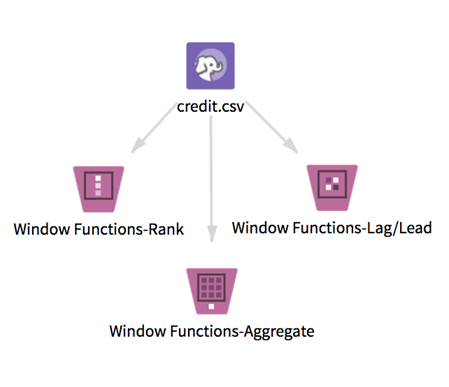
TIBCO Data Science – Team Studio provides two other distinct window functions operators: Window Functions - Aggregate and Window Functions - Lag/Lead.
Input
This operator takes one data set from HDFS. It must have some numeric columns on which to compute numeric aggregations, and might include partition by column(s) and order by columns of any type.
Null values: Before calculating any of the window functions, the operator filters any rows that contain null values in the Order By column selected. The operator then processes these rows with null values according to the value of the Write Rows Removed Due to Null Data To File parameter. The number of rows removed due to null data is reported in the Summary tab of the visual output (if you do not select Yes, but do not count removed rows (faster).
Datetime columns must have a format specified in the input (for example, Datetime 'MM/dd/yy').
Restrictions
Wide data: This operator works quickly on long data, but performance might slow down dramatically if window functions are calculated on thousands of columns. Increasing Spark's executor memory might improve performance.
Datetime columns: Input datetime columns must have a format specified in the input (for example, Datetime 'MM/dd/yy'); otherwise, the operator returns null values for the whole column.
Configuration
| Parameter | Description |
|---|---|
| Notes | Notes or helpful information about this operator's parameter settings. When you enter content in the Notes field, a yellow asterisk appears on the operator. |
| Partition By | Column(s) by which to partition. |
| Order By | Column by which to order each partition (all data types are supported). |
| Order | Order type for the selected Order By column. |
| Calculate Row Number | Specifies whether the row number function returns a sequential (and unique) number starting at 1 within an ordered partition. Default value is No. |
| Calculate Rank | Specifies whether the rank function returns a sequential number starting at 1 within an ordered partition. Default value is No. |
| Calculate Dense Rank | Specifies whether the dense rank function returns a sequential number starting at 1 within an ordered partition. Default value is
No.
Note: Rank vs Dense Rank The difference between rank and dense rank is that dense rank leaves no gaps in ranking sequence when ties occur (for example, if three values tie for the second place, all three have a dense rank of 2, and the next value has a dense rank of 3). |
| Calculate Cumulative Distribution | If
Yes, this function returns the cumulative distribution of values within an ordered window partition; that is, the fraction of rows that are below the current row. Default value is
No.
If N = total number of rows in the partition and V = number of values before (and including) x, the equation would be CUME_DIST(X)=V/N. |
| Calculate Quantiles | If
Yes, returns the n-tile group ID (from 1 to
Number of Quantiles inclusive) in an ordered window partition (equivalent to the NTILE function in SQL). Default value is
No.
For example, if n = 4 (number of quantiles), the first quarter of the rows gets value 1, the second quarter gets 2, the third quarter gets 3, and the last quarter gets 4. Note: If Yes is selected, you must specify an integer value for Number of Quantiles. |
| Number of Quantiles | If Calculate Quantiles is set to Yes, specify the number of quantiles to return for each ordered window partition. The value must be an integer > 0. |
| Columns to Keep | Columns to keep in the output. |
| Write Rows Removed Due to Null Data To File | Rows with null values in the selected
Order By column are removed from the analysis. This parameter allows you to specify whether the data with null values is written to a file.
The file is written to the same directory as the rest of the output. The file name is suffixed with _baddata.
|
| Storage Format | Select the format in which to store the results. The storage format is determined by your type of operator.
Typical formats are Avro, CSV, TSV, or Parquet. |
| Compression | Select the type of compression for the output.
Available Parquet compression options.
Available Avro compression options.
|
| Output Directory | The location to store the output files. |
| Output Name | The name to contain the results. |
| Overwrite Output | Specifies whether to delete existing data at that path.
|
| Advanced Spark Settings Automatic Optimization |
|
Output
- Output - A preview of the data output.
- Summary - A list of the selected parameters, a summary of the number of rows removed due to null data, and a message about where the results were stored.
Example