Normalization (DB)
Performs normalization on the selected columns of the input data set. Normalization means adjusting values measured on different scales to a notionally common scale.

Information at a Glance
Note: You can also use this operator in a workflow that uses TIBCO® Data Virtualization and Apache Spark 3.2 or later.
|
Parameter |
Description |
|---|---|
| Category | Transform |
| Data source type | DB |
| Send output to other operators | Yes |
| Data processing tool | n/a |
Note: The Normalization (DB) operator is for database data only. For Hadoop data, use the
Normalization (HD) operator.
Algorithm
You can accomplish normalization in various ways.
- By specifying a user-defined minimum and maximum value.
- By a z-transformation (for example, on mean 0 and variance 1).
- By a transformation as proportion of the average or sum of the respective attribute.
Your selection translates into four possible types of normalization to select.
- Z-Transformation.
- Proportion Transformation.
- Range Transformation.
- Divide-By-Average Transformation.
See Method under Configuration for a definition of each type.
Input
A data set from the preceding operator.
Configuration
| Parameter | Description |
|---|---|
| Notes | Notes or helpful information about this operator's parameter settings. When you enter content in the Notes field, a yellow asterisk appears on the operator. |
| Method | Normalization method to use.
Options:
|
| Range Minimum | Specify the minimum value in Range transformation. |
| Range Maximum | Specify the maximum value in Range transformation. |
| Columns | Click Column Names to open the dialog for selecting the available numerical columns for the columns to normalize. |
| Output Type |
|
| Output Schema | The schema for the output table or view. |
| Output Table | Specify the table path and name where the output of the results is generated. By default, this is a unique table name based on your user ID, workflow ID, and operator. |
| Storage Parameters | Advanced database settings for the operator output. Available only for
TABLE output.
See Storage Parameters dialog for more information. |
| Drop If Exists | Specifies whether to overwrite an existing table.
|
Output
Visual Output
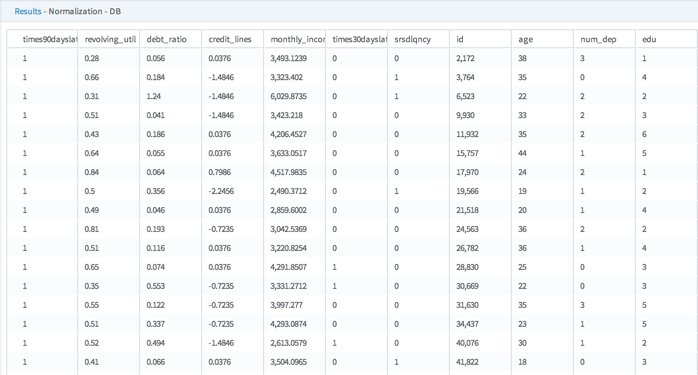
The data rows of the output table or view displayed (up to 200 rows of the data).
Data Output
The data set of the normalized data.