Random Forest Regression
This operator implements the Random Forest Regression algorithm from Spark MLlib.

Information at a Glance
|
Parameter |
Description |
|---|---|
| Category | Model |
| Data source type | TIBCO® Data Virtualization |
| Send output to other operators | Yes |
| Data processing tool | TIBCO® DV, Apache Spark 3.2 or later |
Algorithm
The Random Forest Regression is an ensemble tree algorithm that generates numerical predictions by averaging the numerical regression tree predictions of the ensemble. You can fine-tune the hyper-parameters of interest with the cross-validation training method. The operator uses the specified metric to evaluate the performance. The output of the operator is the model object with the best validation performance. This operator implements the Random Forest Regression algorithm from Spark MLlib.
Input
An input is a single tabular data set.
Bad or Missing Values
- Null values are not allowed and result in an error.
Configuration
The following table provides the configuration details for the Random Forest Regression operator.
| Parameter | Description |
|---|---|
| Notes | Notes or helpful information about this operator's parameter settings. When you enter content in the Notes field, a yellow asterisk appears on the operator. |
| Dependent Variable | Specify the data column as a dependent column. It must be a continuous numerical variable. |
| Use all available columns as Predictors | When set to Yes, the operator uses all the available columns as predictors and ignores the Continuous Predictors and Categorical Predictors parameters. When set to No, the user must select at least one of the Continuous or Categorical Predictors. |
| Continuous Predictors |
Specify the numerical data columns as independent columns. It must be numerical column. Click Select Columns to select the required columns. Note: The columns selected in the Categorical Predictors parameter are not available.
|
| Categorical Predictors |
Specify the categorical data columns as independent columns. Note: The columns selected in the Continuous Predictors parameter are not available.
|
| Evaluation Metric |
Specify the metric for evaluating the regression models. The following values are available:
For more information, see the Apache Spark documentation on Classification and Regression. Default: RMSE |
| Number of Feature Functions | Specify the function to determine the number of features for building each decision tree. The following values are available:
Default: Square Root |
| Feature Sampling Ratio | Specify the fraction of a number of features per node to use when the Number of Feature Functions is set to the User Defined option. The input for this parameter should be a comma-separated sequence of numeric values in (0,1). Default: Note: If User Defined is not selected in the Number of Feature Functions, then this parameter is ignored. |
| Max Depth |
Specify the maximum depth of each tree. The input for this parameter should be a comma-separated sequence of integer values from 0 to 30. Default: |
| Number of Trees |
Specify the total number of trees. The input for this parameter should be a comma-separated sequence of integer values. Default: |
| Row Sampling Ratio |
Specify the fraction of training data for building each decision tree. The input for this parameter should be a comma-separated sequence of double values in Default: |
| Min Leaf Size |
Specify the smallest number of data instances within a decision tree's terminal leaf node. The input for this parameter should be a comma-separated sequence of integer values (for example, Default: |
| Max Bins |
Specify the maximum number of bins used for discretizing and splitting continuous features. The input for this parameter should be a comma-separated sequence of integer values (for example, 256). Note: The value of Max Bins should be larger than the number of unique levels of any selected categorical columns.
Default: |
| Number of Cross Validation Folds |
Specify the number of cross-validation samples. Default: |
| Random Seed | The seed used for the pseudo-random generation. Default: |
Output
- Parameter Summary Info: Displays information about the input parameters and their current settings.
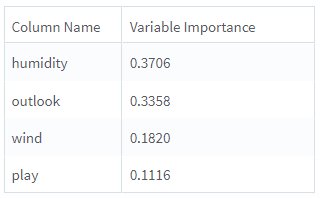
- Variable Importance: Displays the importance of predictors as evaluated in the training process. For each predictor, the variable importance for the model is displayed in the second column. This provides an indication of the importance or impact of a particular parameter on the model's predictions.
- Training Summary: Displays a table with a row for each tested combination of hyper-parameters. For each row, the chosen metric is displayed and the Best Model is marked. The information provides an insight into the parameters which resulted in the best model.
Example
The following example demonstrates a Random Forest Regression operator.
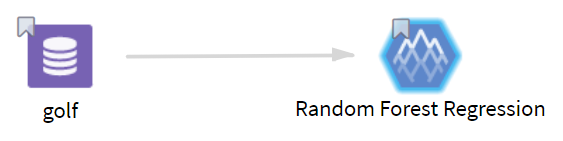
Data
golf: This data set contains the following information:
- Multiple columns namely outlook, temperature, wind, humidity, and play.
- Multiple rows (14 rows).
Parameter Setting
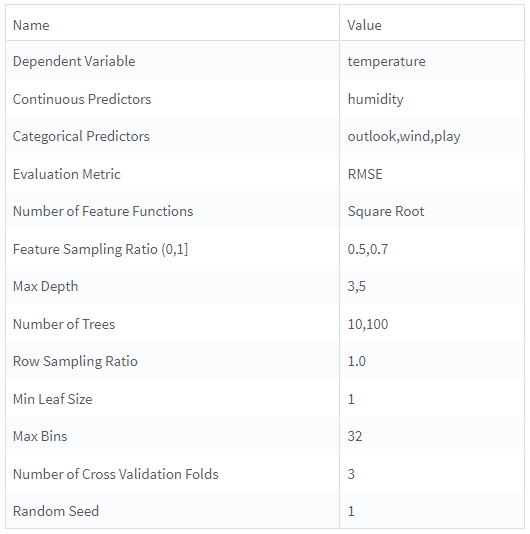
The parameter settings for the golf data set are as follows:
- Dependent Variable: temperature
- Use all available columns as Predictors: No
-
Continuous Predictors: humidity
-
Categorical Predictors: outlook, wind, play
-
Evaluation Metric: RMSE
-
Number of Feature Functions: Square Root
-
Feature Sampling ratio (0,1): 0.5, 0.7
-
Max Depth: 3, 5
-
Number of Trees: 10, 100
-
Row Sampling Ratio: 1
-
Min Leaf Size: 1
-
Max Bins: 32
-
Number of Cross Validation Fold: 3
-
Random Seed: 1
These figures displays the results for the parameter settings for the golf data set.
Parameter Summary Info
Variable Importance
Training Summary
