Replace Outliers (DB)
Reduces the range of values for numeric columns.

Information at a Glance
|
Parameter |
Description |
|---|---|
| Category | Transform |
| Data source type | DB |
| Send output to other operators | Yes |
| Data processing tool | DB |
For more information about how the Replace Outliers operator works, see Outliers in Numerical Data.
Input
This operator works for tabular data sets. The transformation function can be applied only to numeric columns, and the type of the numeric input columns is preserved in the output.
Restrictions
Any data set with numeric columns can be used. This operator slows down as the number of columns selected and the cardinality of the columns increases.
Configuration
| Parameter | Description |
|---|---|
| Notes | Notes or helpful information about this operator's parameter settings. When you enter content in the Notes field, a yellow asterisk appears on the operator. |
| Columns | The numeric columns to transform. |
| Lower Boundary (%) | A double that represents the percentage of values in the left tail of the distribution (on the low end of the range in each column) to replace.
The lower threshold
x is calculated as
|
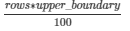
| Upper Boundary (%) | A double that represents the percentage of values in the right tail of the original distribution for each column (the high end of the range in each column) to replace.
The upper threshold
y is calculated as
|
 .
.
 .
.
| Output Type |
|
| Output Schema | The schema for the output table or view. |
| Output Table | Specify the table path and name where the output of the results is generated. By default, this is a unique table name based on your user ID, workflow ID, and operator. |
| Drop If Exists | Specifies whether to overwrite an existing table.
|
Output
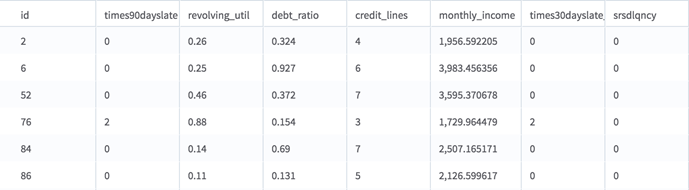
- Output: A table with the outlier values replaced, as detailed above.
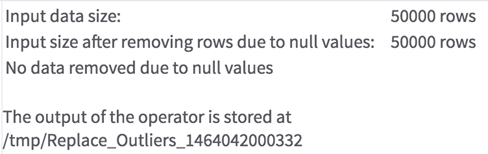
- Summary: A description of the input data and the rows removed due to null data. It also shows where the results are stored.