Text Extractor
Using the Text Extractor, users can select an HDFS input directory that contains a set of documents, and then parse that content to create a new data set that contains the parsed text.

Information at a Glance
|
Parameter |
Description |
|---|---|
| Category | NLP |
| Data source type | HD |
| Send output to other operators | Yes |
| Data processing tool | Spark |
Input
No input needs to be directly connected. Select an input directory from the parameter configuration dialog.
Restrictions
Text Extractor accepts only the following file types.
- .doc
- .docx
- .html
- .log
- .ppt
- .pptx
- .rtf
- .txt
- .xml
Text Extractor does not preserve the structure of the document; it only parses the text data. Thus, the structure of the original document might be lost.
If the fonts in your document use a non-standard encoding and the document structure does not contain a /ToUnicode table associated with these fonts, the text content extracted might be garbled. Many different encodings and fonts exist, and it is not possible to predict all of them. Some files are produced without this important metadata. Even though you can display and print the file properly, the file does not contain information about the meaning of the font/letter shapes. In this case, you must recreate the file or use OCR. (source)
Configuration
| Parameter | Description |
|---|---|
| Notes | Notes or helpful information about this operator's parameter settings. When you enter content in the Notes field, a yellow asterisk appears on the operator. |
| Data Source (HD) | The Hadoop data source. |
| Input Directory | The input directory that contains the files to parse (wildcards and patterns are supported, as well as single file selection).
Tip: The input directory path can be entered manually, and the user can enter a regular expression as path pattern
(for example, /dir/user*/projectA*) The operator parses only files with selected extensions in the chosen directory its tree of subdirectories (other files are skipped). If no files with the selected extensions are found, the output is empty and the following error message is displayed in the addendum: "No files with selected extension were found in the input directory and subdirectories" Caution: Invalid Filenames Filenames with the following characters: {}[],| are not supported and cause the job to fail. |
| File Formats to Parse | Extensions of the files to parse from the available options.
Note: The filenames must explicitly include the extension. For example, a PDF file titled
mydoc is not read, but a PDF file titled
mydoc.pdf is read.
|
| Maximum Number of Characters per File | If a file has more characters than this limit, the file is not parsed. The default limit is 10,000,000 characters. The column
read_parse_error is set to true and an error is displayed in the output column
text_content.
Caution: Parsing Large Files This limit is set to avoid the Spark job hanging because the directory contains huge files that a user could try to parse by mistake. To parse these large files, increase this limit. Doing so may require tuning the Spark memory settings. |
| Storage Format | Select the format in which to store the results. The storage format is determined by your type of operator.
Typical formats are Avro, CSV, TSV, or Parquet. |
| Compression | Select the type of compression for the output.
Available Parquet compression options.
Available Avro compression options.
|
| Output Directory | The location to store the output files. |
| Output Name | The name to contain the results. |
| Overwrite Output | Specifies whether to delete existing data at that path.
|
| Advanced Spark Settings Automatic Optimization |
|
Output
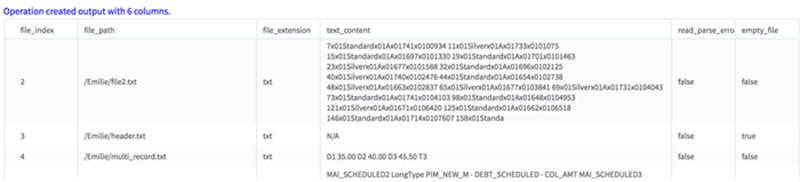
This operator outputs a tabular data set (.TSV) with the following six columns.
- doc_index - a unique index created to identify the document.
- file_path - the original file path.
- file_extension - the extension of the file.
- text_content - the text content parsed from the document.
- read_or_parse_error - a boolean value that determines whether an error occurred while reading/parsing this document.
- true - an error occurred while reading or parsing. If an error occurred, it appears in the text_content column.
- false - no errors occurred while parsing this document.
- is_empty - a boolean value that is set to true if the file to be read is empty (or does not contain any alphanumeric characters).