DateTime Input Values
Pig Execute Operators can process and perform operations on DateTime input values.
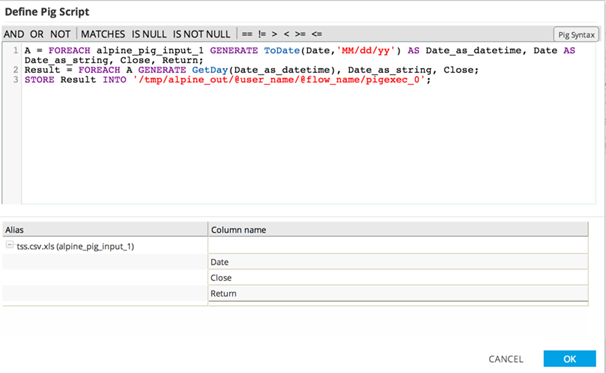
DateTime input fields are passed into the Pig Execute Operator as
chararray strings, specified in an ISO-acceptable format. The Pig Script template reads the input DateTime format and generates two intermediate columns: one that contains the
Date_as_string, and one that contains the
Date_as_datetime object.
The
Date_as_datetime object is created by using the ToDate Pig Function that references the input format.
Any valid DateTime function can be used within the Pig Script, as listed here: Apache Pig DateTime Functions
The
Result portion of the Pig Script specifies the datetime output values that the Pig Script should generate. In this example, the Day of the Date is returned as well as the date as a string.
DaysBetween becomes
DaysBetweenAlpine.
| Pig DateTime Function | Alternative Pig DateTime Function |
|---|---|
AddDuration | AddDurationAlpine |
SubtractDuration | SubtractDurationAlpine |
MilliSecondsBetween | MilliSecondsBetweenAlpine |
SecondsBetween | SecondsBetweenAlpine |
MinutesBetween | MinutesBetweenAlpine |
HoursBetween | HoursBetweenAlpine |
DaysBetween | DaysBetweenAlpine |
WeeksBetween | WeeksBetweenAlpine |
MonthsBetween | MonthsBetweenAlpine |
YearsBetween | YearsBetweenAlpine |