Dynamic Column Filter
This operator selects a subset of the columns from the data source. Only the selected columns remain in the output data set.

Information at a Glance
|
Parameter |
Description |
|---|---|
| Category | Transform |
| Data source type | TIBCO® Data Virtualization |
| Send output to other operators | Yes |
| Data processing tool | TIBCO® DV, Apache Spark 3.2 or later |
Algorithm
This operator is particularly helpful when there are many columns in a data source that are not needed for the data analysis workflow or in case, you need to select columns dynamically. You can also specify a regular expression for selecting a subset of columns by column names.
The Dynamic Column Filter operator is designed to be used in conjunction with Modeling operators. When the Use all available columns as Predictors parameter is set to Yes in these operators, the Dynamic Column Filter operator that is placed before the Modeling operators decides which columns are used as predictors dynamically.
Input
An input is a single tabular data set.
Configuration
The following table provides the configuration details for the Dynamic Column Filter operator.
| Parameter | Description |
|---|---|
| Notes | Notes or helpful information about this operator's parameter settings. When you enter content in the Notes field, a yellow asterisk appears on the operator. |
| Columns to Include | The columns to be made available for analysis. Only static columns can be selected. Click Select Columns to select the columns. It is an optional parameter. |
| Data Types to Include | Specify the data type that you want to include. Click
Select to select the data type. It is an optional parameter. The following values are available:
By default, all data types are selected. Note: You can also select more than one data type or none. By default all data types are selected, so without changing this default choice, you get the whole table as output. |
| Column Names to Include (regex) | Specify the regular expression or wildcards for
selecting a subset of columns by name. It is an optional parameter. Note: For the regular expression, the dollar ( $) symbol is not accepted. You can use \Z instead. |
| Output Schema | Specify the schema for the output table or view. |
| Output Table | Specify the table path and name where the output of the results is generated. By default, this is a unique table name based on your user ID, workflow ID, and operator. |
| Store Results | When set to Yes, it enables the operator to save the results. When set to No, it disables the operator to save the results. |
Output
Example
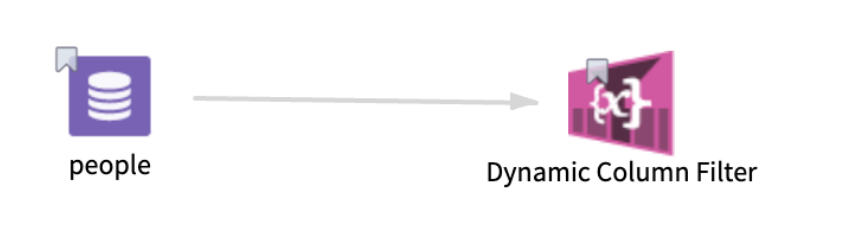
The following example demonstrates the workflow of a Dynamic Column Filter operator.
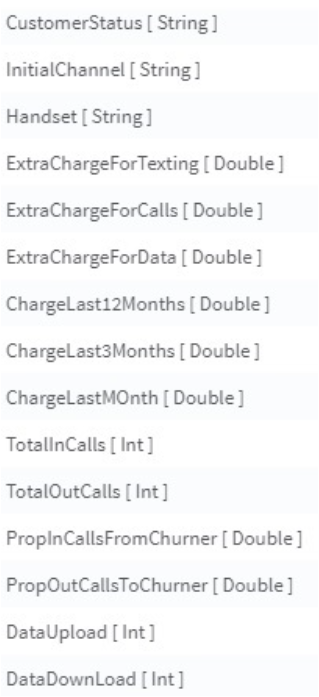
-
Columns to Include: CustomerStatus
-
Data Types to Include: String
-
Column Names to Include (regex): ^Data
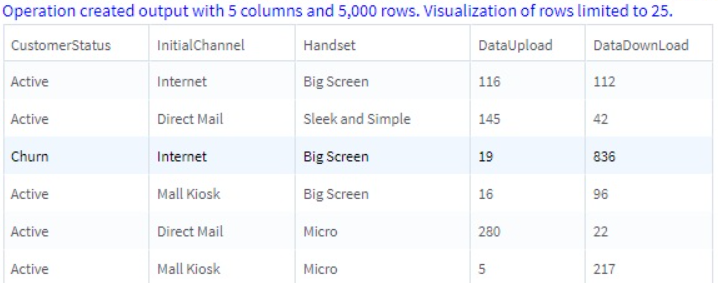
In the above table, the column CustomerStatus is included based on Columns to Include parameter. The columns InitialChannel and Handset are included based on the Data Types to Include parameter. Finally, the columns DataUpload and DataDownLoad are in the results because they satisfy the regular expression asking for all variables starting with Data.
Additional regular expression examples
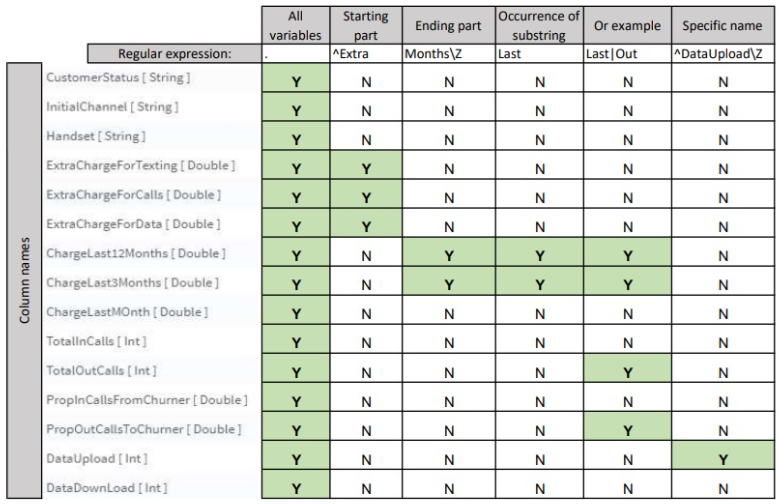
The following table provides an example of regular expressions. The green color is highlighting the columns that are included based on the specified regular expressions.