Join (DB)
Performs a table join on the input data sets by allowing users to define the input data set alias, the output columns, and the join condition.

Information at a Glance
Note: You can also use this operator in a workflow that uses TIBCO® Data Virtualization and Apache Spark 3.2 or later.
|
Parameter |
Description |
|---|---|
| Category | Transform |
| Data source type | DB |
| Send output to other operators | Yes |
| Data processing tool | n/a |
Note: The Join (DB) operator is for database data only. For Hadoop data, use the
Join (HD) operator.
Input
Accepts two or more data sets.
Note: Both tables must be located in the same database. Join does not work on tables located in different databases. See the Join (DB) for any data source exceptions for the Join operator.
Configuration
| Parameter | Description |
|---|---|
| Notes | Notes or helpful information about this operator's parameter settings. When you enter content in the Notes field, a yellow asterisk appears on the operator. |
| Create Sequence ID | Click Yes to create an ID column on the output data set of the Join operator. |
| Join Conditions | Click
Set Table Join Parameters to display the
Join Properties dialog.
For information about the options, see Join Properties - Database dialog. For information about creating the Join condition, see Creating a Join condition for a database join. |
| Output Type |
|
| Output Schema | The schema for the output table or view. |
| Output Table | Specify the table path and name where the output of the results is generated. By default, this is a unique table name based on your user ID, workflow ID, and operator. |
| Storage Parameters | Advanced database settings for the operator output. Available only for
TABLE output.
See Storage Parameters dialog for more information. |
| Drop If Exists | Specifies whether to overwrite an existing table.
|
Output
Visual Output
The resulting joined data rows of the output table or view are displayed in the
Results window (up to 200 rows of the data):
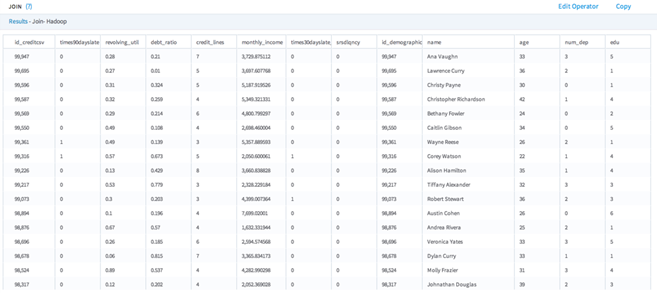
Data Output
A data set of the output table or view of the joined data set.