Regression Evaluator
This operator calculates several metrics for evaluating the regression models.

Information at a Glance
|
Parameter |
Description |
|---|---|
| Category | Model Validation |
| Data source type | TIBCO® Data Virtualization |
| Send output to other operators | No |
| Data processing tool | TIBCO® DV, Apache Spark 3.2 or later |
Algorithm
This operator computes several commonly used statistical tests to determine the accuracy of selected columns that contain predicted values. This operator implements the regression evaluator in Spark MLlib.
For model validation, the operator uses the Spark ML regression evaluator. You can use the model with the following evaluation metric.
|
Metric |
Description | Equation |
|---|---|---|
| Mean Squared Error (MSE) | Sum of the squared differences between the actual and predicted columns, divided by the number of observations in the data set. A value of 0 indicates that the predicted and actual values are exactly the same for each observation. A very high value indicates that the difference between actual and predicted values is very large. |
 |
| Root Mean Squared Error (MSE) | Square root of the Mean Squared Error (MSE) metric. |
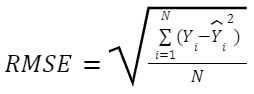
|
| Mean Absolute Error (MAE) | Average of the absolute difference between the predicted and actual columns for each observation. A value of 0 indicates that the predicted and actual values are exactly the same for each observation. A very high value indicates that the difference between actual and predicted values is very large. |
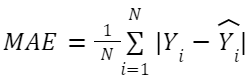 |
| Coefficient of Determination (R2) | The proportion of the variance in the dependent variable that is predictable from the independent variables. A value of 1 indicates that the regression line perfectly fits the data, while a value of 0 indicates that it doesn't fit the data at all. When a value is negative, it indicates that the horizontal line is better than the regression mode and does not capture the trend of the data. |
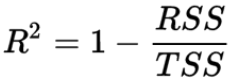
Where |
| Explained Variance | Returns the variance explained by the regression. For more information, see the Spark documentation. |
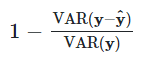
|
Input
An input is a single tabular data set and one or more TIBCO Data Virtualization model operators.
- The operator accepts only the classification model.
- The operator does not accept more than one data set.
- Null values are not allowed and result in an error.
- Two types of input (tabular data and at least one model object) must be connected to this operator to prevent errors.
-
The dependent variable should be in the input data set, or else the operator produces an error.
Configuration
The following table provides the configuration details for the Regression Evaluator operator.
| Parameter | Description |
|---|---|
| Notes | Notes or helpful information about this operator's parameter settings. When you enter content in the Notes field, a yellow asterisk appears on the operator. |
| Actual Value | Specify a numerical column that holds the dependent variable on which the models were used to train or a column of known values for the dependent variable. The column must be a numerical type column. |
| Output Schema | Specify the schema for the output table or view. |
| Output Table | Specify the table path and name where the output of the results is generated. By default, this is a unique table name based on your user ID, workflow ID, and operator. |
| Store Results | When set to Yes, the operator saves the results. If set to No, the operator does not save the results. |
Output
Example
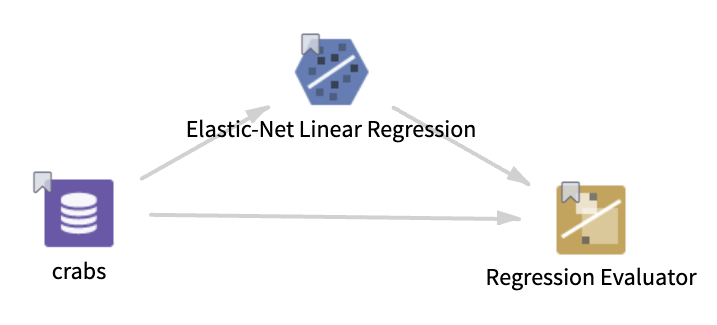
The following example uses the crabs data set to build the Elastic-Net Linear Regression model and then evaluates the model and crabs data set with the Regression Evaluator operator.
- Multiple columns such as color, spine, width, satellts, weight, and catwidth.
- Multiple rows (173 rows)
- Actual Value: satellts
-
Store Results: Yes
