Variable Selection (DB)
Identifies and prioritizes the variables of interest to a prediction task or model. This is especially helpful when there are a large number of potential variables for a model, enabling the modeler to focus on only a subset of those that show the strongest relevance.
Information at a Glance
|
Parameter |
Description |
|---|---|
| Category | Explore |
| Data source type | DB |
| Send output to other operators | No |
| Data processing tool | n/a |
Algorithm
For database, there are three information gain-based scoring metrics for variable selection: Information Gain, Information Gain Ratio, and Transformed Information Gain. For numerical columns, we discretize them. We recommend a preliminary threshold of the variables by comparing their scores to a random benchmark.
Information Gain is a measure of the change in the entropy (or uncertainty) of a random variable Y when it is conditioned on another (categorical) variable X. In our case, Y is the class to be predicted (the dependent variable), and X is a candidate driver.
The entropy of a categorical random variable Y with n possible values (classes) is given by
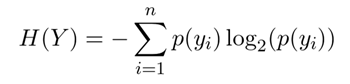
The conditional entropy of Y given the values of a discrete variable X that takes on the m values is given by
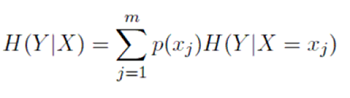
The information gain about Y, given that we know X measures how much more we know about Y because we know X:

The standard way to adjust for the biases of information gain is to normalize by the entropy of X. This is called the Information Gain Ratio.

Another way to adjust for bias is to map all candidate features into the same number of classes.
For binary output variables, we can create a simple predictor from each candidate feature, and then measure the information gain in Y, given the simple predictions from X.
One way to build a simple predictor is as follows:
- Calculate the prior probabilities of the true output class, P
- Calculate the probability of the true output class for each of the input classes: pI = p(Y = TRUE|X = xI)
- If pI >P , predict TRUE for all the members of the class xI, otherwise predict FALSE.
This transforms the variable X to the simple predictor, which takes on the same number of classes as Y. The score for X is now given by IG(Y, "simple predictor").
Score threshold by chance is a score we can get just by chance, even if X is not truly predictive of Y. We generate X that are designed to be independent of Y according to the distribution of Y and then calculate the score. We can generate a lower-bound threshold T. Any candidate feature that scores lower than T is almost certainly not predictive of the output variable, and can be eliminated. In practice, T is quite small, and probably does not eliminate too many variables. However, it still gives a useful sense of scores that correspond to meaningful and less-meaningful variables.
In a database, we approximate the probability density of continuous/numerical X by histograms. To do this, we bin X into a fairly large number of discrete classes, and then use the equation up, or the transform technique to calculate the scores.
Input
A data set from the preceding operator.
Configuration
| Parameter | Description |
|---|---|
| Notes | Notes or helpful information about this operator's parameter settings. When you enter content in the Notes field, a yellow asterisk appears on the operator. |
| Dependent Column |
Define the column to use as the class variable. For R2 scoring, the dependent column must be numeric. |
| Score Type | Database options:
|
| Columns | Use Select Columns to open the dialog to select the available columns from the input data set for analysis. |
| Score Threshold | Indicates what a good value is for your score type. Variables above the score threshold are stored and passed to subsequent operators.
Default value: 0.1. |
| Always included columns | Columns in this list are automatically passed to subsequent operators, whether or not their score is above the threshold. |
| Output Schema | The schema for the output table or view. |
| Output Table | Specify the table path and name where the output of the results is generated. By default, this is a unique table name based on your user ID, workflow ID, and operator. |
| Drop If Exists | Specifies whether to overwrite an existing table.
|