
Allocation Rule Settings
Add rules to specify and set component behavior.
Add rules to do the following:
- Specify Resource Preferences,
- Set Thresholds for Activation,
- Set Enablement Conditions,
- Specify component dependency, or
- Set Engine Group Minimums or Maximums
Each rule selection will bring up a slightly different dialog window that allows property selection of a tracked Engine or Component Archive statistic to be evaluated according to a logical operator and a value you specify to define an action. In some cases the Component Archive Statistics may be selected as is shown in the Figure.
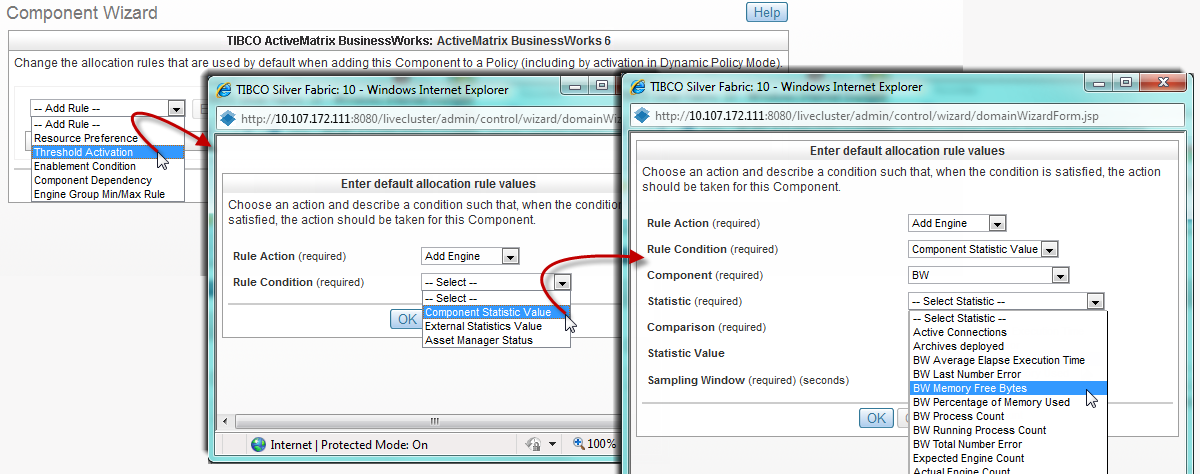
More information on using statistics for micro-scaling or archive scaling is available in the TIBCO Silver® Fabric Cloud Administration Guide and more about Component Archive scaling within a stack is covered in this guide.
Copyright © Cloud Software Group, Inc. All rights reserved.