Using Database/EMS as a Transport (Option 2 )
Using the Database/EMS option, you can use an external database for data persistence and TIBCO Enterprise Message Service™ (EMS) for the communication transport layer.
Procedure
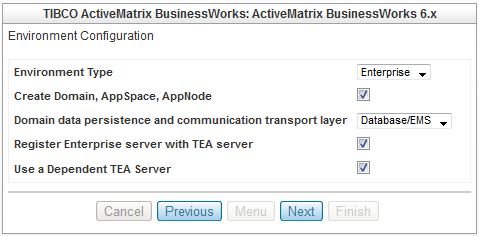
- In Environment Type, ensure that Enterprise is selected.
- See that the Create Domain, AppSpace, AppNode option is selected.
- In Domain data persistence and communication transport layer, select Database/EMS as the messaging transport.
-
Make sure that the
Register Enterprise server with TEA server option is selected.
TIBCO Enterprise Administrator (TEA) server provides an Administrator UI which can be used to create, view, and monitor runtime entities. The bwagent interacts with the TIBCO Enterprise Administrator server through a TEA agent. Only one TEA agent can be registered with a bwagent at a time. When the TEA agent is registered with bwagent, the bwagent is displayed in the Administrator UI. Using Administrator UI, you can manage and monitor runtime entities and perform almost all bwadmin administrative tasks.
-
Ensure that the
Use a Dependent TEA Server option is selected.
Selecting this option creates a TEA component for TIBCO Silver Fabric Enabler for TIBCO Enterprise Administrator and also sets the dependency of BusinessWorks component on the TEA component. TIBCO BusinessWorks component then acquires the URL of TEA server and automatically registers to the TEA server.
If the option is not selected, you need to first setup and start a TEA server manually and then provide the URL of the running TEA server in the TIBCO TEA Server Configuration page in the BusinessWorks component creation wizard.
Tip: Make sure that you take advantage of the automatic registration and administrative features provided by TIBCO Silver® Fabric Enabler for TIBCO® Enterprise Administrator.When the component bwagent is set to run in the server agent role, select the check boxes Register Enterprise Server with TEA Server and Use a Dependent TEA Server to leverage the features provided by TIBCO® Enterprise Administrator (TEA). Add a TEA component to your BusinessWorks stack and add a TEA server dependency to your BW server component. Refer to the TIBCO Silver Fabric Enabler for TIBCO Enterprise Administrator documentation for more information.

- Click Next.
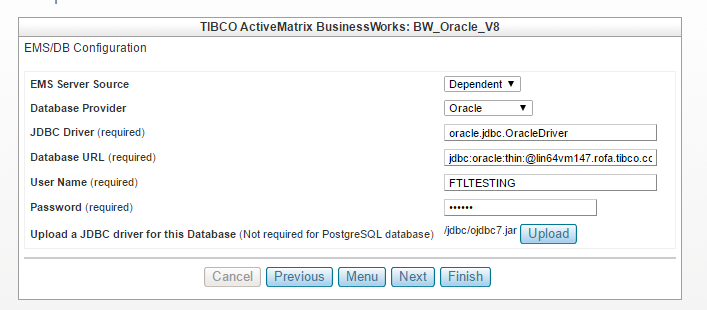
- In EMS Server Source, select Dependent or Specified.
- For the Database Provider option, select PostgreSQL, MySQL, Oracle, Microsoft SQL Server or DB2.
- In the Database URL field, enter the URL path of an external database.
- In the User Name field, enter the username for the database.
- In the Password field, enter the password for the database.
- Unless the database provider is PostgreSQL, click Upload to upload a JDBC driver for the database.
- Click Next.