To reach the Panel Visibility Settings dialog:
Right-click in a text area and select Edit Text Area from the pop-up menu.
Click on the Insert Action
Control button,
.
In the Action Control dialog, click on Actions in the left-hand panel.
On the Actions page, add one or more Functions from the View folder to the Selected actions list.
Select one of the newly added functions in the Selected actions list and then click on Settings....
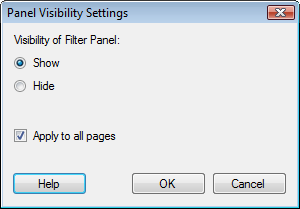
Option |
Description |
Visibility
of [Panel Name] |
|
Show |
The selected panel is shown when clicking on the action link or button. |
Hide |
The selected panel is hidden when clicking on the action link or button. |
Apply
to all pages |
Select the check box to apply the change to all pages. Clear the check box to only change the visibility on the active page. |
See also:
Details on Insert/Edit Action Control