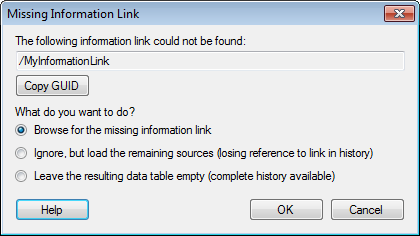
This dialog is shown if an analysis with data linked to an information link is opened and the information link is missing.
Option |
Description |
Copy
GUID |
Copies the GUID of the information link to the clipboard. The GUID is a unique identifier for the information link that remain the same if the name of the information link is changed. This can be useful for support or an administrator if the information link cannot be found. |
Browse
for the missing information link |
Opens a dialog that lets you browse or search for the missing information link. |
Ignore,
but load the remaining sources |
Opens the analysis, but the data tables based on the missing information link will contain no data; all column information is lost together with the history in the Data Table Properties, Source Information tab. |
Leave
the resulting data table empty |
Opens the analysis, but the data tables based on the missing information link will become empty. However, the column names will be kept so you can see what was intended to be shown in the visualizations. This option will also keep the history in the Data Table Properties, Source Information tab. It allows you to see the name and original location of the missing data This option may be preferred if you intend to repair the analysis by replacing the missing data at a later stage. |