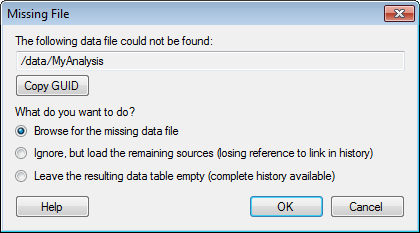
This dialog is shown when you open a linked analysis file in which the path to one or more of the source files in the library is no longer correct.
Option |
Description |
The
following data file could not be found |
Shows the name and path to the file that the linked analysis file is trying to open. |
Copy
GUID |
Copies the GUID of the data source in the library to the clipboard. The GUID is a unique identifier for the data source that remain the same if the name of the data source is changed. This can be useful for support or an administrator if the source cannot be found. |
What
do you want to do? |
|
Browse
for the missing data file |
Select this option to manually browse for the missing file. Use this option if the source file used by the linked analysis file has been renamed. |
Ignore,
but load the remaining sources (losing reference to link in history) |
Select this option to open the analysis but ignore the data tables based on the missing source. Data tables for which the source file is missing will contain no data; all column information is lost together with the history in the Data Table Properties, Source Information tab. |
Leave
the resulting data table empty (complete history available) |
Select this option to open the analysis and leave all data tables based on the missing source empty. However, the information about which columns were included in the data table is kept, which may help fixing the analysis if the data table is replaced at a later stage. |