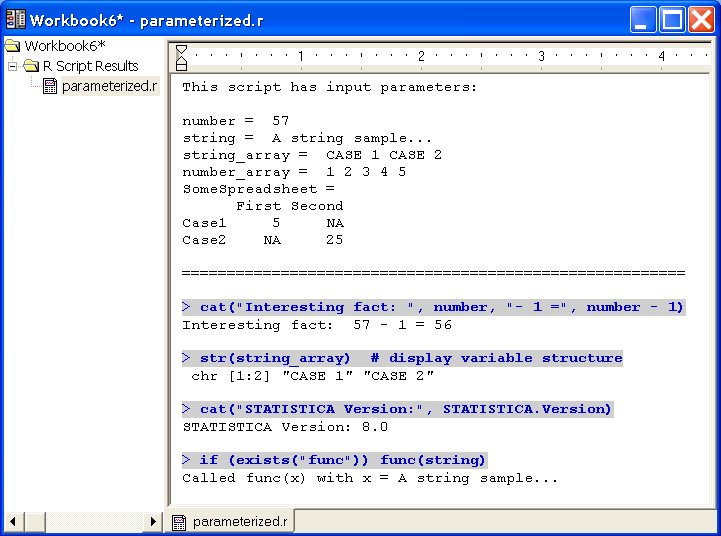
Passing Parameters to R Scripts: Collection Object
Collection is a COM library introduced with Statistica Version 8 MR3 that implements generic Collection objects.
Such objects enable users to store keyword-tagged Variant values. Variants are COM structures that can store one of many supported data types, including arrays and references to other COM objects, example, spreadsheets.
What this means for R Integration is that you can now store {parameter name = parameter value} pairs in such a Collection, then pass this parameter set to Statistica prior to R script execution, thus achieving script parameterization. The R Integration Support macro will transfer all the parameters from the Collection to the R environment as R variables named using the respective parameter keyword tags, making it possible for the script that is executed in this environment to reference all these variables (script parameters) directly by name.
R Integration supports the following types of named parameters: strings, numbers, arrays, and spreadsheets. Support for Statistica Spreadsheets is particularly useful: for example, such a parameter can override the ActiveDataSet keyword, allowing a single script to serve as an R engine for an interactive module, Enterprise analysis configuration, and Workspace node implementations.
Also note that string parameters without a keyword tag are treated as R code that should be executed prior to execution of the script itself. This is analogous to SVB (hidden code) and can be used to, for example, define a common set of new functions or global variables or constants.
In order to use Collection objects, SVB scripts must include a reference to the TIBCO Statistica Collection Library (add it using the Tools > References menu while editing the macro):
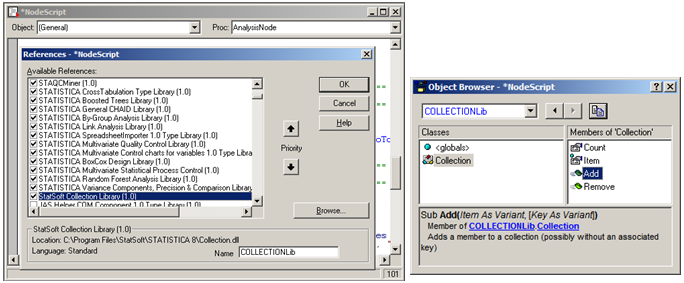
The Collection object has several generic properties and methods that are needed to manipulate the contents of a collection: Count, Add(Item, [Key]), Remove(KeyOrIndex), and Item(KeyOrIndex) that returns an Item object with Key and Value properties. However, due to the use of so-called default object properties (Item is the default property of a Collection and it returns its Value property by default) interaction with a Collection object is reduced to intuitively clear assignment operations:
Dim param As New Collection
param("number") = 57
param("string") = "A string sample..."
After you have assembled the parameter collection, execute the parameterized R script by calling Macro.ExecuteWithArgument(Parameters as Collection).
Example:
Dim s1 As New Spreadsheet, s2 As New Spreadsheet ' ... populate s1, s2 with data var1 = Array("CASE 1", "CASE 2") var2 = Array(1, 2, 3, 4, 5) ' * don't use spaces in parameter names ' * some names are "locked" and can't be used [e.g. 'text', 'str', 'sample'] Dim param As New Collection param("number") = 57 param("string") = "A STRING sample..." param("string_array") = var1 ' add items with an assignment operator param.Add(var2, "number_array") ' OR using explicit Add() method param("SomeSpreadsheet") = s1 param("ActiveDataSet") = s2 'override the value of 'ActiveDataSet' keyword ' string parameters without associated keys will be treated as R code and ' will be executed before the script - an analog of SVB 'hidden code' ' * define a function that will be available to the R script param.Add("func <- function(x) { cat('Called func(x) with x =', x) }") ' * another way to define a global constant or variable param.Add("Statistica.Version = '" & Version & "'") _____________________________________________________________________________________________________ ' now run the R script with this collection of parameters ' (parameters become R variables – the script can reference them by name) Dim m As Macro Set m = Macros.Open(MacroDir & "\parameterized.r") m.ExecuteWithArgument(param) |