How can I suppress the printing of gridlines in spreadsheets?
To suppress the print of the gridlines in an active spreadsheet, you must make changes in two dialogs. (
- Procedure
- Select Gridlines from the View menu by selecting Gridlines from the spreadsheet. (You can access the spreadsheet View menu from within a report window or workbook by double-clicking on the spreadsheet. This gives you access to all spreadsheet editing tools.)
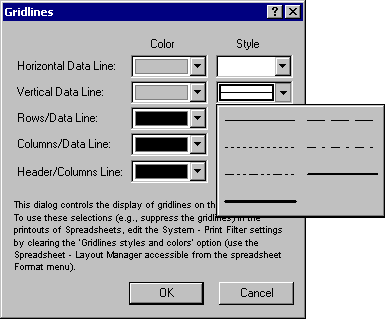
- Change the
Style of both the
Horizontal and
Vertical Data Lines to blank in the Gridlines dialog.
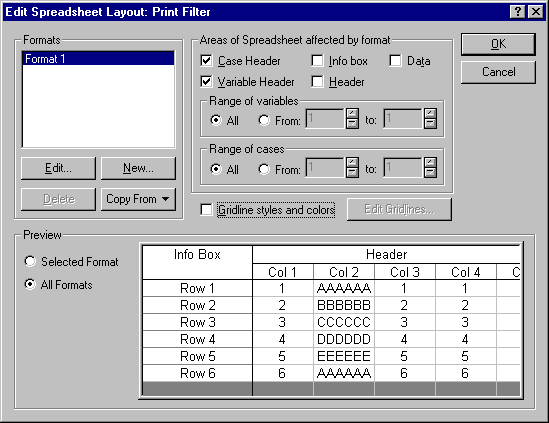
- Clear the
Gridlinestyles and colors check box on the Edit Spreadsheet Layout: Print Filter dialog. Clearing this check box causes Statistica to print the gridlines using the styles and colors specified in the
Gridlines dialog rather than using a default black.
You can also display this dialog, from the spreadsheet Format - Spreadsheet submenu:
- Select - Layout Manager to display the Spreadsheet Layouts dialog.
- On the System tab, select Print Filte
- Click the
Edit button.