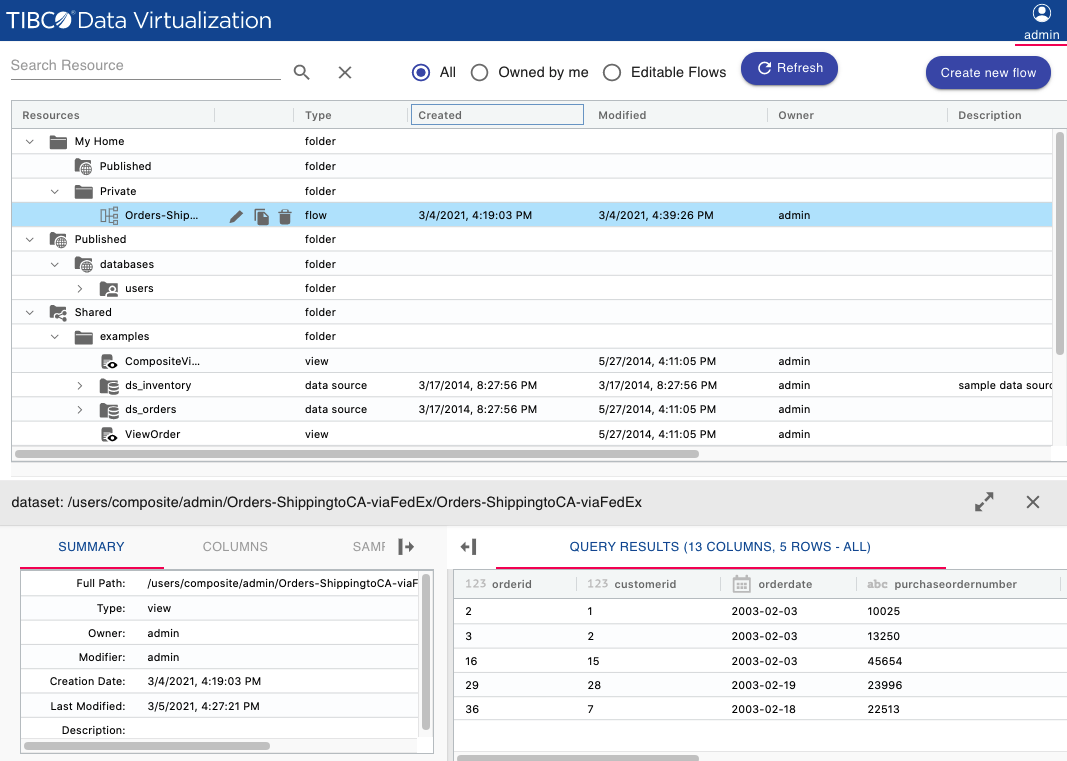
Folder name | Description |
My Home\Published | The user’s published resources. |
My Home\Private | The user’s non-published resources. |
Published\databases | All TDV published resources. |
Shared\ | All shared resources of TDV. |
Users\ | Resources of the user listed by domain name. |
Label | Description |
Resources | This field displays the following: • An Expand/Collapse icon - click on the “>”icon to expand or collapse a resource (such as Folder, Schema). • A Resource type icon - Indicates the type of resource. • Name of the Resource. • Resource Edit icons - Lets you open the resource in Flow editor, copy the resource into a new flow or delete it. Notes: • Any resource created within the TDV Web UI can be edited, deleted as well as copied into a blank flow. Resources created in TDV Studio can only be viewed in the Data Catalog of the Web UI and cannot be edited. • If you wish to copy/delete the flow using TDV Studio, you must do so at the Flow Folder level. |
Type | Type of the Resource (Folder, Schema, Catalog, Database, Table, View or a Flow) |
Created Date | Timestamp of when the resource was created. |
Modified Date | Timestamp of when the resource was modified. |
Owner | The user who created the resource. |
Description | Any description of the resource given at the time of creating the resource. |
Tooltip | The full path of the resource is displayed in a tooltip as the mouse hovers over the resource name. |