Changing What Is Displayed
The toolbar buttons let you change what information is displayed on the lineage graph as described in these sections:
Expanding and Collapsing the Lineage Graph
| • | Use the Expand All button display column details. |
| • | Use the Collapse All button hide column details. |
The default is expanded.
Hiding and Showing Dependencies
| • | Use the Hide/Show Dependencies button to hide or show dependencies. |
The default is to show dependencies.
Hiding and Showing References
| • | Use the Hide/Show References button to hide or show references. |
The default is to show references.
Hiding and Showing Cached Tables and Views
| • | Use the Hide/Show Cached Tables/Views button to hide or show cached tables and views. |
The default is to show cached tables and views within the direct path of lineage.
Hiding and Showing Indirect Links
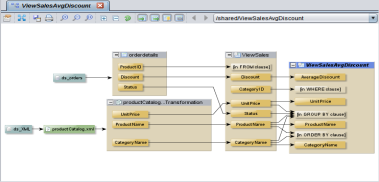
| • | Use the Hide/Show Where/Group By/From and other Indirect Links button to hide or show indirect links which are references in a view to a column by a WHERE, GROUP BY, ORDER BY, FROM, HAVING, or other non-SELECT clause. |
The default is to hide indirect links. The following example shows four indirect links that reference specific columns.