Using the History Feature
When you change the resource focus, Studio adds the previous focus to the history list so that you can easily return to a previous view. This history list is saved with the resource and can be used again if you reopen the resource’s lineage graph.
To display a previously viewed lineage graph
| 1. | Open the lineage graph for a resource. |
| 2. | At the top right corner of the resource graph, click the drop-down arrow next to the path for the current resource. |
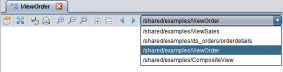
| 3. | Select the path for the resource you want to be the central focus. |
Studio displays the resource graph that was previously viewed.
Note: You can also use the Navigate Backward and Navigate Forward arrow buttons to step through the lineage graphs.