TIBCO® Graph Database Configuration Guide
Version 3.1
November 2021
Table of Contents
TIBCO Graph Database Configuration
Identifiers and Rules for Identifiers
Configuration for Importing Large Files
TIBCO Documentation and Support Services
How to Access TIBCO Documentation
Product-Specific Documentation
TIBCO Graph Database (TGDB) consists of simple operating system level processes that store graph data, query graph data, and execute complex graph algorithms in a secured and efficient environment. These processes consume resources, and the administrator can determine and configure the parameters for these resources through simple configuration files.
Configurable resources are storage, CPU, threads, queues, network, security, user codes, initial schema, data, and so on.
A configuration file is a simple text file that typically ends with a ‘.conf’’ suffix. The configuration file is defined in sections (configuration class) and each section has a name specified in a square bracket [] and has a set of properties. Each property is of name-value pair. Single line comments start with a # symbol. A configuration class or section defines a named configuration instance with properties. This named configuration instance can be referred to in other sections as property values. The value type is inferred and converted according to the engine's need and its execution semantics.
A sample section is shown below.
# Single line comments starts with # symbol | |||
[database] name = demodb dbpath = ../data locale = en_US.UTF-8 timezone = UTC | # A section defines a named configuration instance with properties # The value type is inferred and used according to the engine’s need and its execution semantics. Type Conversions are automatically done. | ||
The table below shows the list of TGDB binaries providing graph database services and the configuration files they use. The configuration file is specified through the ‘-c’ option
Note: The windows binaries end with ‘.exe’ suffix.
Binary Name | Purpose | Configuration Section/Files |
tgdb | Standalone Graph Database Server. Provides the complete TGDB functionality as a standalone process. | Server configuration Database configuration |
tgdb-admin | Graph Database Administration Console. Administration console for Graph Database Standalone and Cluster Manager | None |
tgdb-clstrmgr | Graph Database Cluster Manager Server. Manager for a clustered Graph Database Service. Proxy for Clients | Cluster configuration Database configuration |
tgdb-agent | Graph Database Cluster Agent. Provides a specific TGDB functionality such as Storage Agent, Query Agent, Transaction Agent etc… | Cluster configuration Database configuration |
tgdb-rest | Graph Database REST Services Server. Exposes Graph Database Services as REST Interfaces and Resources for easy, secured and scalable consumption | REST configuration |
tgdb-obfuscate | Password Obfuscation Facilities. | None |
A typical usage of the above binaries with configuration file is shown below:
# Initializing a Database. $> tgdb -i -f -c tgdb.conf # Starting the database $> tgdb -s -c tgdb.conf | Here tgdb.conf is a server configuration file. The server config refers to the database configs. | |
# Initializing a Cluster. $> tgdb-clstrmgr -i -f -c tgdb-cluster.conf # Starting the Cluster Manager $> tgdb-clstrmgr -s -c tgdb-cluster.conf # Starting the Cluster Agent $> tgdb-agent -c tgdb-cluster.conf -n <agent name> | Here tgdb-cluster.conf is a templated cluster configuration file. The cluster config refers to the database configs and other server related parameters. The agent uses the same cluster configuration files in different sections as they most pertain to information typically contained in a standalone server. | |
# Starting a REST Service $> tgdb-rest -c tgdb-rest.conf | The REST server supports config files to parameterize the database options, network listener, and log files. |
The subsequent section describes Database configuration, Server configuration, Cluster and REST configuration files and properties.
The database configuration is specified in its own configuration file and contains sections describing the initialization and runtime configuration parameters for database settings, the segments. The sections in the database configuration files are as follows:
A mandatory section with keyword ‘database’ as the section name and is common for both the Initialization and the Runtime configuration. This section specifies the key properties for the database such as the name, the path where the database resides, locale to be used and the default timezone for the database.
database | |||
Property Name | Type | Default Value | Description |
name | String | <Empty> | Name of the database. Mandatory property. Name must be a minimum 5 characters long. |
dbpath | String | <Empty> | The path where the database resides. The following rules apply:
|
locale | String | <en_US.UTF-8> | The character locale for the database. The default is UTF-8. This is for future use. |
timezone | String | <UTC> | The default database timezone to be used for conversion of "ZonedLocalDatetime" data type. UTC is default and preferred. |
[database] name = demodb dbpath = ../data locale = en_US.UTF-8 timezone = UTC | |||
The initialization configuration provides information for the server to initialize and configure a database with name as specified in the database section. The configuration is used when you run the graph database server with “-i” parameter.
$> tgdb -i -f -c tgdb.conf
The initialization configuration provides the server information about the following parameters to initialize the database.
Initialization process pre-allocates the database segments, sets up the system user and security certificates to be used at runtime. It can optionally set up the schema for the database and import the data if provided.
These parameters are read only during the initialization of the database and stored in the database. Any changes to the configuration later are not read nor affect the database setting.
The subsequent chapter discusses in detail the properties required to define the Segments, Security and Catalog.
The database segment configuration is part of initialization configuration that provides information for the server to initialize and configure a database with name as specified in the database section. The configuration is used when you run the graph database server with “-i” parameter.
$> tgdb -i -f -c tgdb.conf
The initialization configuration provides the server information about the Segments, Security, Catalog, and Import parameters to initialize the database. Initialization process pre-allocates the database segments, sets up the system user and security certificates to be used for runtime. These parameters are read only during the initialization of the database and stored in the database. Any changes to the configuration later are not read nor affect the database setting.
A database is a collection of segments. The database size is the sum of all the segments. A segment is a physical file allocated on disk. It is specified in Units (M or m for MegaByte, G or g for GigaByte, and T or t for TeraByte). The default Unit if unspecified is Gigabyte. For example, 10M or 10m means 10 Megabyte.
There are four types of segments:
A Page is a unit of commit in the database. The storage writer or agent reads/writes data in terms of pages. A segment consists of multiple pages. Each page is of fixed size and is a multiple of 512 bytes. The enumerated values of valid page size and their interpretation is as follows.
Size Enum | Page Size (bytes) | Description |
0 | 512 | System Default Page size |
1 | 1024(1KB) | Use this when the node instance has a lot of attribute instances. Note for every attribute, the overhead is 8byte, and 8byte to hold the value or the address of the page that has the data value. |
2 | 2048(2K) | Use this when the node instance has a lot of attribute instances. Note for every attribute, the overhead is 8byte, and 8byte to hold the value or the address of the page that has the data value. |
4 | 4096(4K) | Typically used for Text Page - attributes of Clob, Blobs will use. |
8 | 8192(8K) | Typically used for Index Page and Shared Page size |
16 | 16384(16K) | Index Page and Shared Page - when you have large index fields |
32 | 32768(32K) | Index Page and Shared Page - when you have large index fields |
Pages are of different types and their purpose is to hold specific data efficiently.
Page Type | Purpose |
DataPage | Holds node, catalog data such as Node Properties |
IndexPage | Holds index data, such as index keys in a ascending order for that page |
TextPage | Holds Clobs, Blobs for a node or edge attribute. |
SharedPage | Typically holds String data |
ControlPage | Control Information |
BlobPage | Holds Clobs, Blobs for a node or edge attribute. |
The segment configuration section starts with the keyword ‘segments'. The table below defines and describes the section properties with an example.
segments | |||
Property Name | Type | Default Value | Description |
segSize | Int [Unit] | <1G> | Size of each segment. The default unit (if not specified) is GigaByte. |
dataSegCnt | Int | <2> | Number of segments for data. Maximum number of Data + Index Segments is 511. |
dataPageSize | Int | <0> | Specifies the data page size. A valid enumeration from the page size. |
textPageSize | Int | <4> | Specifies the text page size. A valid enumeration from the page size. |
blobPageSize | Int | <4> | Specifies the text page size. A valid enumeration from the page size. |
sharedPageSize | Int | <8> | Specifies the shared page size. A valid enumeration from the page size. |
indexSegCnt | Int | <1> | Number of segments for index. Maximum number of Data + Index Segments is 511. |
idxPageSize | Int | <8> | Specifies the index page size. A valid enumeration from the page sizes. |
txnSegCnt | Int | <1> | Number of segments for transaction. |
txnPageSize | Int | <4> | Specifies the txn page size. A valid enumeration from the page sizes. |
sharedPageSize | Int | <8> | Specifies the shared page size. A valid enumeration from the page sizes. |
growSegCnt | Int | <0> | When Index or Data Segments are full, specify the number of segments you want to grow. <= 0 means no Growing. 511 > x > 0 - number of segments to growby. The maximum number of segments is 511 (Data + Index Segments). |
[segments] segSize = 1 dataSegCnt = 2 dataPageSize = 0 textPageSize = 4 indexSegCnt = 1 idxPageSize = 8 growSegCnt = 0 | |||
The security section provides:
The cipher name is a TLS 1.2 Cipher Name obtained from IANA Registry.
It can be also be obtained by running the OpenSSL command
$> openssl -V ciphers
The security configuration starts with the keyword ‘security’ and defines the properties as below:
security | |||
Property Name | Type | Default Value | Description |
sysuser | String | <admin> | The system user name for the database. |
syspasswd | String | <admin> | The system user password for the database. |
sysciphersuite | String | <AES256-SHA256> | System wide Cipher to be used for field level encryption, and message digests for password. |
syscipherbits | Int | <256> | For DH type the bit strength to use. Minimum is 256. |
sysciphercurve | String | <secp521r1> | EC curve name if it is EC based Cipher Suite. |
[security] sysuser = admin syspasswd = admin sysciphersuite = AES256-SHA256 syscipherbits = 1024 sysciphercurve = secp521r1 | |||
The catalog section is part of the initialization section and allows the database to have a schema defined and created during initialization. This is useful as it acts as a template for the lifecycle such as Dev->QA->Integ->Stress->Prod. This is easier to build and makes it very consistent. It is also used as a backup recovery mechanism as the export-import follows the same catalog scheme. The catalog section is completely optional. The alternative to the catalog configuration in the database config is to use administrator scripts and build the catalog.
Unlike most of the TIBCO Graph Database configuration sections, the following sections do not have predefined properties. Instead each entry under the configurations is a system type of the section name. Each one has separate parameters that are allowed. The parameters are what are described in the tables below.
Many section properties have identifiers and they can be the names of properties. An identifier name is unique in the catalog. It must start with a letter and can contain underscores and numbers. Names starting with “@”, “__”, “$” all belong to the reserved word categories and used are used by various TGDB components. There is no section for identifier name but rules for identifier name need to be declared before it can be used.
TGDB supports most of SQL-92 data types with the exception of Arrays. The table below list the types supported by TGDB.
Data Type | Description |
boolean | A true-false value |
byte | 8-bit signed value |
char | 8-bit unsigned value |
short | 16-bit signed value |
int | 32-bit signed value |
long | 64-bit signed value |
float | 32-bit single precision real number |
double | 64-bit double precision real number |
number | A real value with precision and scale. |
string | A stream of UTF-8 encoded chars |
date | An integer representing the date part of date time |
time | An integer representing the time part of date time |
timestamp | A long value |
zonedtimestamp | A timestamp with source zone recorded. |
zonedlocaltimestamp | A timestamp data type where the value is converted to the database defined timestamp, and the queries return the local time zone value of the client. |
clob | Character large object |
blob | Binary large object |
The attribute descriptors defines a list of attribute descriptors and the keyword used is ‘attrtypes’. The attribute descriptor has name, type, and meta properties for the type. TGDB requires database users to describe all the attributes that must be used with entities.
attrtypes | |||
Property Name | Type | Default Value | Description |
name | String | A valid attribute descriptor name adhering to the rules of Identifier Name | |
@type | String | <None> | Required. The value must be of one of the data type specified above |
@encrypted | None | N/A | If specified, states that this attribute is encrypted. |
[attrtypes] name = @type:string desc = @type:string address = @type:string ssn = @type:string @encrypted age = @type:int multiple = @type:int rate = @type:double factor = @type:double extra = @type:boolean createtm = @type:timestamp networth = @type:number(20,5) @encrypted image = @type:blob doc = @type:clob stperiod = @type:zonedtimestamp endperiod= @type:zonedtimestamp | |||
The nodetypes defines a list of nodetypes and the keyword used is ‘nodetypes’. A nodetype is a container for nodes of similar type. For example, ‘Person’ nodetype contains data of all the person instances. This is similar to a sql table. A node type has a valid identifier name, the subset of attributes from the attribute descriptor list and a primary key specification.
nodetypes | |||
Property Name | Type | Default Value | Description |
name | String | A valid nodetype name | |
attrs | String | <None> | The value is a comma separated list of attribute descriptors defined above. This indicates generally present attributes on nodes of this type. |
pkeys | String | <None> | The value is a comma separated list of attribute descriptors defined above. This indicates attributes |
[nodetypes] basicnode = @attrs:name,desc,address,age,multiple,networth,createtm,image,doc @pkey:name ratenode = @attrs:name,rate,factor,extra,level,createtm,ratedate @pkey:name testnode = @attrs:name,multiple,rate,nickname historynode = @attrs:stperiod,endperiod,desc | |||
The edgetypes defines a type of relation between any two nodes. Each relation has a name and optionally a set of properties. The direction parameter must be specified and be one of DIRECTED, UNDIRECTED, BIDIRECTED, or BIDIRECTION. This section collects a list of edgetypes and is defined by the keyword ‘edgetypes’.
edgetypes | |||
Property Name | Type | Default Value | Description |
name | String | A valid edge type name | |
attrs | String | <None> | The value is a comma separated list of attribute descriptors defined above. This indicates generally present attributes on edges of this type. |
direction | Direction | <None> | Required. Specifies the edge’s direction. Must be either DIRECTED, UNDIRECTED, BIDIRECTED, or BIDIRECTION. |
fromnode | String | <None> | Optional. Determine the outbound nodes’ type of all edge’s of this type. |
tonode | String | <None> | Optional. Determine the inbound nodes’ type of all edge’s of this type. |
[edgetypes] basicedge = @direction:UNDIRECTED @fromnode:basicnode @tonode:basicnode @attrs:name,age otheredge = @direction:DIRECTED @attrs:name,age | |||
The indexes define a list of indexes for node types and the keyword used is ‘indices’. Indexes allow you to search entities quickly. TGDB supports b-tree indexes. An Index has a name and is for a node type only. It can have unique or non-unique constraints. Furthermore, the index can be composed of single or multiple keys. Multiple keys indexes are referred to as a composite index.
indices | |||
Property Name | Type | Default Value | Description |
name | String | A valid index name | |
attrs | String | <None> | Required. The value is a comma separated list of attribute descriptors defined above. This indicates what attributes comprise the index. |
unique | Boolean | <False> | Specifies whether the index is unique (which is a particular combination of attributes can only occur once in the given node type). |
ontype | String | <None> | Specifies the nodetype the index is on. |
[indices] nameidx = @attrs:name @unique:true @ontype:basicnode historyidx = @attrs:stperiod @unique:false @ontype:historynode | |||
The authorization configuration section provides the set of credentials and the roles granted to these credentials. It consists of two sections:
Roles: Roles are provided with permissions string and a privilege string on catalog objects.
Users: Users are given a name with password and the Roles it can have.
Permissions is consent or authorization granted to an user or role on a particular resource. The table describes different kinds of permission, their mnemonic and meaning.
Mnemonic | Name | Description |
c | create | Allows creation of the attributes, nodes, or edges specified. |
r | read | Allows querying of the attributes, nodes, or edges specified. |
u | update | Allows updating of the attributes, nodes, or edges specified. |
d | delete | Allows deletion of the attributes, nodes, or edges specified. |
e | encrypt | Allows operation on encrypted types of the attributes, nodes, or edges specified. |
x | execute | Allows execution of the attributes, nodes, or edges specified. |
A privilege is a special type of right on the server operations. There are different kinds of privileges and the table lists these privileges with their mnemonic and meaning.
Mnemonic | Name | Description |
g | grant | Allows granting of privileges or permissions to roles and users. |
r | revoke | Allows revoking of privileges or permissions to roles and users. |
o | operate | Allows performing operations on the server, like stopping the server or killing a connection. |
d | diagnostic | Allows performing diagnostics on the server, like showing the server’s stack trace. |
i | import | Allows importing data to the database. |
e | export | Allows exporting data from the database. |
p | proxy | Allows acting as a proxy for a connection. |
Define a list of roles identified by the keyword ‘roles’. A role has privilege and permissions defined on catalog objects.
Permission is a comma separated identifier, each of which is a ''|'' delimited sequence with the first element of the sequence being a string of concatenated permission mnemonics or the keyword ''all'' and every element following the ''|'' delimiter is the catalog object type. For System Catalog use $SYSCATALOG.
Privilege is a string of concatenated privilege mnemonics or the keyword ‘all’ granted to this role
roles | |||
Property Name | Type | Default Value | Description |
perms | String | <None> | See the description for Permission. |
privs | String | <None> | See the description for Privilege |
[roles] basicrole = @privs:g @perms:crudx|basicedge|basicnode,crx|all userplus = @perms:crudx|all | |||
Defines a list of users and is identified by the keyword ‘users’.
users | |||
Property Name | Type | Default Value | Description |
roles | String | <None> | The value is a comma separated list of attribute descriptors defined above. This indicates what roles this user has access to use. |
passwd | String | <None> | The value specifies what the password for this user should be. |
obfuscate | boolean | false | Whether the password is obfuscate |
[users] scott = @passwd:scott @roles:user,userplus,operator john = @passwd:john @obfuscate:false @roles:operator | |||
As with the Catalog sections, import sections accept any valid node or edge type as a property which will be interpreted as how to import that type. Unlike with the Catalog sections, there are a few reserved properties that specify how the import process should be handled by the server. The keyword for this section is ‘import’.
import | |||
properties | |||
Property Name | Type | Default Value | Description |
dir | Path | <None> | Required. Specifies where the import directory is located. |
lobdir | Path | <None> | The large object binary directory which stores blob and clob data. |
loadopts | String | <insert> | Specifies whether to only insert or update and insert. Valid options are insert and upsert. |
erroropts | String | <stop> | Specifies whether to ignore or stop on errors. Valid options are stop and ignore. |
dtformat | String | <YMD> | Specifies what order dates are in YMD for year month day, MDY for month day year, or DMY for day month year. |
entity types | |||
Property Name | Type | Default Value | Description |
attrs | String | <None> | The value is a comma separated list of attribute descriptors defined above. This indicates what order the columns of the CSV files will be. |
files | String | <None> | Required. Specifies for this type and this configuration of attributes. |
from | String | <None> | Required when the imported type is an edgetype and does not have a specified `from` nodetype. Specifies what the `from` nodetype for all of the edges in the files specified. |
to | String | <None> | Required when the imported type is an edgetype and does not have a specified `to` nodetype. Specifies what the `to` nodetype for all of the edges in the files specified. |
[import] dir=./import basicnode = @files:basicnode.csv @attrs:name,desc,address,age,multiple basicedge = @files:basedge.csv @attrs:name,age @from:basicnode @to:basicnode | |||
For importing large files, see the Configuration for Imports.
The runtime configuration is used by the TGDB server on runtime, when it is servicing requests from clients. The configuration specifies the cache settings specifications for the databases, settings for Transaction WriteAhead Log, settings for Processors and the information about the Stored Procedures.
This section is identified by the keyword ‘cache’ that determines the cache breakdown for this database at runtime. Database holds data (nodes, indexes) as pages. There will always be more data stored on disk than the available system memory. The server's job is to predict the need for a data or index page and efficiently load it and keep it available in memory so queries or transactions can operate at the optimum performance and not wait to reload from the disk. To keep reloading the page, ensure that the memory is available, and it can do so by evicting or freeing pages that have not been used recently. As there are different types of pages, and each page type has a different size configured, there are different caches to manage these pages.
The section allows you to specify cache sizes depending on your application needs. If the application is read centric or query heavy, it can specify a larger number for Query and Index cache setting, and if it is more write centric, then reduce the query cache and index cache settings. The total cache for the database is a percentage of the total cache allocated by the server. Since the server supports multi-tenancy i.e multiple databases hosted on the same server, the sum of all the database caches should be equal to the total cache allocated for the server. For more information, see the server settings for memory.
The system memory model is shown below:
System Memory Model
Working Memory | ||
Server Cache | ||
Database 1 Cache [X = x % of total server cache] | Database 2 Cache [Y = y % of total server cache] | Database 3 Cache [Z = z % of total server cache] |
Data cache % of X | Data cache % of Y | Data cache % of Z |
Index cache % of X | Index cache % of Y | Index cache % of Z |
Shared cache % of X | Shared cache % of Y | Shared cache % of Z |
Query cache % of X | Query cache % of Y | Query cache % of Z |
Edge References | Edge References | Edge References |
x, y and z are referred to as the input cache percentage of the total server cache (cachepct)
The cache settings, their property names, the value type for a database is described below and followed with an example. The cache section is identified by the keyword ‘cache’.
cache | |||
Property Name | Type | Default Value | Description |
cachepct | Integer | <25> | Represents a percentage of the total cache to be used for this database |
index.cachepct | Integer | <25> | Represents a percentage of the cachepct to be used for the index cache. |
index.threshold | pair<int,int> | <75, 85> | Represents the high and low mark for the index cache. |
data.cachepct | Integer | <25> | Represents a percentage of the cachepct to be used for the data cache. |
data.threshold | pair<int,ints | <70, 80> | Represents the high and low mark for the data cache. |
shared.cachepct | Integer | <0> | Represents a percentage of the cachepct to be used for the shared cache. |
shared.threshold | pair<int,int | <0, 0> | Represents the high and low mark for the shared cache. |
query.cachepct | Integer | <40> | Represents a percentage of the cachepct to be used for the query’s cache. |
query.threshold | pair<int,int | <80, 90> | Represents the high and low mark for the query cache. |
[cache] cachepct = 25 strategy = lru index.cachepct = 25 index.threshold = 75, 85 data.cachepct = 25 data.threshold = 70, 80 shared.cachepct = 10 shared.threshold = 80, 90 query.cachepct = 40 query.threshold = 80, 90 | |||
Write Ahead Log is a circular queue of transaction log entries. Each transaction log entry consists of transaction changeList, before commit pages (index, control, and data) and other vital information. The log entry is written to a shared memory as of the current release of the product. For more information, see Shared memory configuration of the server section.
wal | |||
Property Name | Type | Default Value | Description |
useSharedMemory | Boolean | <True> | Whether to use shared memory for the write ahead log. This is always True |
redoQDepth | Integer | <1000> | Defines the maximum number of redo transactions in the Write Ahead Log. Configure it according to your OLTP needs where system depends
|
numRetries | Integer | <16> | The number of retries for a transaction before canceling it. |
timeout | Integer | <1> | The timeout before canceling a transaction. |
[wal] useSharedMemory = true redoQDepth = 1000 numRetries = 16 timeout = 1 | |||
This section is identified by the keyword ‘processors’. The number of Transaction and Query processors to use for this database from the pool of processors the server has allocated. A processor is a thread and a queue of pending tasks or instructions to execute. The processor follows the Actor model. For more information, see the Server Processor.
processors | |||
Property Name | Type | Default Value | Description |
numTxnProcessors | Integer | <0> | Required. Specifies the number of processors for handling transactions. |
numQryProcessors | Integer | <0> | Required. Specifies the number of processors for handling queries. |
queueDepth | Integer | <0> | Required. Specifies the depth of the queue for queries. |
[processors] numTxnProcessors = 2 numQryProcessors = 4 queueDepth = 16 | |||
Stored procedures have their own configuration section ‘storedproc’ in the database configuration file. The stored procedures are scanned from the directory and compiled and loaded into the server's memory. See the table below for the properties, the default value and description associated with them. It also provides a sample:
storedproc | |||
Property Name | Type | Default Value | Description |
pythonpath | String | <Empty> | Additional Python library path for any third party packages. The path must be accessible by the server process. |
dir | String | <Empty> | The root directory where the stored procedures are located. It can contain subfolders where the python package is available. This directory will be scanned, compiled and loaded as python objects. |
autorefresh | Boolean | <false> | Boolean which indicates if the stored procedure directory should be automatically refreshed. This flag is typically set to ‘true’ during the development, integration & qa process. For production, it gives fine grain control to Admin as to when to load the new procedures. Admins can use reload procedures command to refresh the SP directory and recompile the objects |
refreshinterval | Integer | <60> | The auto refresh rate in seconds |
[storedproc] pythonpath = . dir = /Users/john/Projects/GQT/3.1/storedproc autorefresh = false refreshinterval = 60 | |||
The server configuration is a configuration file provided as a command line option to the TGDB server. This file refers to the other configuration files such as the Database configuration files. The server configuration file is used in both the Initialization and Runtime of TGDB servers. During Initialization, it reads the necessary information from the configuration and initializes the database. At runtime, it loads databases and starts the network listener to service client requests. The subsequent sections discuss server configuration in detail. The server configuration file consists of the following section
The main server section for general properties. It is identified by the keyword ‘tgdb’. The main server section has the name of the server, the locale and timezone information for the log and database defaults, and expiration duration for the ACL tokens.
[tgdb] | |||
Property Name | Type | Default Value | Description |
name | String | <Empty> | The name of the server. It follows the Identifier Rules for the name |
locale | String | <en_US.UTF-8> | The server locale. This locale is used for all the databases managed by this server as of this current release. |
timezone | String | <America/Los_Angeles> | The server timezone. |
timezone.jump.error | String | <FAIL> | Whether the server should fail or adjust when an invalid is specified during a timezone conversion. Valid options are FAIL and ADJUST. |
timezone.zoneinfo.path | Path | <None> | The path to the IANA zoneinfo directory with the Olson TZif files. On UNIX and UNIX-like systems, the default is /usr/share/zoneinfo if not specified. For Windows, TGDB uses Windows built-in timezone management system. Specify path in case the SA wishes to use different Olson TZif files than what OS provides. |
acl.token.expire | String | <1h> | The server-wide expiration interval for access control list tokens. Valid post-fixes are 's' for seconds, 'm' for minutes, 'h' for hours, and 'd' for days. Default is 1 hour. To ignore ACL token expiration (NOT recommended), set this field equal to "none". |
[tgdb] name = demoprimary locale = en_US.UTF-8 timezone = America/Los_Angeles timezone.jump.error = FAIL timezone.zoneinfo.path = /usr/share/zoneinfo acl.token.expire = 1h | |||
This section is identified by the keyword ‘memory’ and specifies settings for the server's memory manager. The server has two kinds of memory manager.
Heap Memory Manager properties are:
Shared Memory Manager properties are
Note : In either case, once the server starts, the memory cannot be decreased or increased dynamically.
The server needs to be restarted.
[memory] | |||
Property Name | Type | Default Value | Description |
memory | pair<int> | <1,8> | The memory allocated for the engine in GB. Memory is specified as a pair of maximum values for Initialization and Runtime. |
cacheSize | Integer | <65> | The percentage of the memory to be used as Total Cache memory. The cache section in the database config specifies how much cache should be allocated from this cache, and its breakdown per cache type. |
sharedmemory | Integer | <1> | Size of the Shared Memory Area. Minimum is 1G. |
shmpath | Path | <None> | The path to the shared memory file. The file name is <servername>.shm |
enableHugePages | Boolean | <False> | This flag is Linux only. See the kernel documentation for huge pages |
[memory] memory = 4,4 sharedmemory = 1 shmpath = ../data/shm cacheSize = 65 enableHugePages = false | |||
This section is identified by the keyword ‘io’ and controls how the server reads and writes data. The section provides settings for System Administrator to configure for an optimum performance. There are three settings and capture the core ‘io’ needs for an efficient storage access.
[io] | |||
Property Name | Type | Default Value | Description |
useOsCache | Boolean | <False> | Enables/Disables the read/writes call to use OS cache for file io. |
writethrough | Boolean | <True> | Enables/Disable flushing to physical storage media |
synctype | String | <Data> | Specify how to sync the data to the driver/disk cache. Flags help specify options to commit metadata and preserve data integrity. |
[io] useOsCache = false writethrough = true synctype = Data | |||
This section is identified by the keyword ‘processors’ and specifies the number of processors available with their queue depth. A processor is a thread and a queue of pending tasks or instructions to execute. The processor follows the Actor model. Server creates a Processor Pool and uses this pool to configure the database processor requests.
[processors] | |||
Property Name | Type | Default Value | Description |
numprocessors | Integer | <8> | The physical number of cores in the system or that the system is allowed to take. The database config processors section will specify a quantity from the number specified. |
queueDepth | Integer | <16> | Specifies the depth of the queue for the processors. |
[processors] numprocessors = 8 queueDepth = 16 | |||
This section is identified by the keyword ‘databases’ and specifies a list of databases that will be hosted on the server. Each database is listed as the database name, followed by an equal character (=), followed by the path to the database configuration file.
databases | |||
Property Name | Type | Default Value | Description |
name | Path | <Empty> | Required. Specifies the path to the database configuration as specified above. |
[databases] demodb = ./demodb.conf #routesdb = ../examples/routes/routesdb.conf #tracedb = ../examples/trace/tracedb.conf #housedb = ../examples/hierarchy/housedb.conf | |||
This section is identified by the keyword ‘logger’ and specifies logging information for the server. The logger has the following key properties:
logger | |||
Property Name | Type | Default Value | Description |
level | String | <Empty> | Required. A sequence of level:component pair Examples : info:*;debug:core.all,server.main;warn:admin.all |
path | Path | <Empty> | The path of the logfile. |
size | Integer | <10> | Maximum size of each log file(MB). Must be between 1 and 100. |
count | Integer | <10> | Number of rolling log files. Must be between 1 and 100. |
console | Boolean | <True> | Log to console. |
[logger] level = info:* path = ./log size = 10 count = 10 console = true | |||
Note: For troubleshooting, TIBCO support will request to enable the appropriate component and level. This can be done via the admin console dynamically without restarting the server.
This section is identified by the keyword ‘netlistener’. It provides the TGDB server a set of configuration parameters to start a network listener. The standard configuration properties are as below:
netlistener | |||
Property Name | Type | Default Value | Description |
name | String | <None> | Required. A name for this net listener. |
host | String | <localhost> | The host name, ip number, or interface name to which netlistener is bound to. |
port | Integer | <8222> | Listening port for TCP. |
maxconnections | Integer | 10 | Maximum number client connections. |
ssl | Boolean | <False> | Whether this netlistener is encrypted via SSL. |
certificate | Path | <None> | For future use, currently only supports a self signed certificate. |
sslTimeout | Integer | <10> | Specifies the timeout(in secs) for handshake or operation to complete. |
sslciphersuite | String | <AES256-SHA256> | Ciphersuite used to build the dynamic certificate for TLS purposes. |
sslcipherbits | Integer | <1024> | The bit strength to use For Diffie-Hellman key exchange. Minimum is 256. |
sslciphercurve | String | <secp521r1> | The elliptical curve name for an elliptical curve cipher suite. |
sslcipherexpiry | Integer | <1> | Specifies the expiry time for the certificate. Minimum is 1. |
[netlistener] name = analytics host = :: port = 8223 maxconnections = 10 ssl = true certificate = sslTimeout = 10 sslciphersuite = AES256-SHA256 sslcipherbits = 1024 sslciphercurve = secp521r1 sslcipherexpiry = 1 [netlistener] name = oltp host = 0.0.0.0 port = 8222 maxconnections = 10 ssl = false | |||
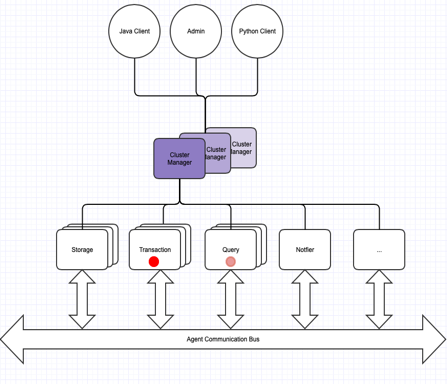
TGDB provides built-in clustering for high availability and scalability. A Cluster is a system of interconnected homogenous machines within a data center. All machines have the same operating system and have access to the shared storage space.
A high level block diagram for TGDB clustering is shown below.
The components of the TGDB cluster are as follows.
TGDB configures and starts the cluster using the cluster configuration file. The cluster configuration file provides the cluster definition parameters, the parameters for the managers and agents. Since a cluster is a set of nodes running on a group of interconnected homogeneous machines, the ability to deploy a cluster on any environment using a simple and easy configuration is a key aspect of the deployment.
Cluster configuration file extends the traditional server configuration file by introducing named instances. Consider the following section in a config file:
[netlistener:queryagent] host = en11 port = 0 prot = tcp | ||||
Cluster processes such as tgdb-agent can configure themselves by specifying a name command line argument.
$bin> ./tgdb-agent -c tgdb-cluster.conf --name queryagent
This section is identified by the config class “tgdb-cluster” and defines the cluster setting. It is used to initialize the cluster, and at runtime uses the path parameter to load the cluster definition.
Before TGDB built-in clustering can be used, a cluster needs to be created and initialized. The cluster is created and initialized by running the following command:
$bin> ./tgdb-clstrmgr -i -f -c tgdb-cluster.conf
The initialization command reads the cluster definition from the cluster config class “tgdb-cluster”. It creates a cluster control database in the path specified that is then used by the cluster manager and cluster agent for:
The next section describes all properties for the cluster config class and an example “democluster”
tgdb-cluster | |||
Property Name | Type | Default Value | Description |
path | Path | <None> | Required. The path to the cluster control database. This path must be accessible to all cluster members and managers.The database must be on shared storage. |
admin-user | String | <None> | Required. The user that will manage the cluster. This user does not manage the database. |
admin-passwd | String | <None> | Required. The password for the cluster admin. The format is @obfuscate=<boolean> @value = <password>
|
agent-user | String | <None> | Required. The cluster agent that will be used for inter agent and cluster communication. |
agent-passwd | String | <None> | Required. The password for the cluster agent. The format is the same |
databases | Databases Section | <None> | Required. Points to the database section to use. |
maxagents | Integer | <None> | Required. The maximum number of active agents in a cluster. |
quorum | Integer | <None> | Required. The minimum number of agents that should be active before the cluster is deemed active to take any user requests. This number must be an odd number and should represent more than 51% of the total agents in order to avoid any split brain scenarios. |
storeagents | Integer | <None> | Required. The number of storage agents that will be active within a quorum at any point. Any more storage agents, they are considered backup storage agents, in the event the primary fails, they will take over. They can perform other tasks. |
txnagents | Integer | <None> | Required. The number of storage agents that will be active within a quorum. One can specify 1 per database managed by the cluster. The number is always less than equal to the database configured. The remaining are all query agents. |
locale | String | <en_US.UTF-8> | This locale is used for the cluster, when database locale is absent |
timezone | String | <America/Los_Angeles> | This timezone is used for the cluster, when the database timezone is absent |
[tgdb-cluster:democluster] path = ../data/cluster admin-user = clusteradmin admin-passwd = @obfuscate=false @value=clusteradmin agent-user = clusteragent agent-passwd = @obfuscate=false @value=clusteragent databases = databases:exampledbs maxagents = 8 quorum = 5 storeagents = 2 txnagents = 1 locale = en_US.UTF-8 timezone = UTC |
| ||
This section is named instance of database config class. This section is identified as [database:<name>] where the name is the instance name, and can be referred to in any other section. The properties of this section are the same as the Server’s Database config.
This section is named instance of a logger config class. This section is identified as [logger:<name>] where the name is the instance name, and can be referred to in any other section. The properties of this section are the same as the Server’s Logger config. The name of the logger file is format as specified below: <clustername>-<agentname>-<hostname>-<pid>.log[n]
This section is named instance of a netlistener config class. This section is identified as [netlistener:<name>] where the name is the instance name, and can be referred to in any other section. The properties of this section are the same as the Server’s Network Listener config.
The name property is used as the instance name in [<config class>:<instance name>] scheme. In the below example the config class is netlistener and the name is oltp
Tip : Use the interface name such as “en01” for the hostname. A system administrator is likely to provision the cluster nodes identically i.e using the same script. This helps the cluster configuration to be used by the cluster manager and agents thereby reducing the configuration management, and confusion caused by multiple configuration files
[netlistener:analytics] host = :: port = 8223 maxconnections = 10 ssl = true certificate = sslTimeout = 10 sslciphersuite = AES256-SHA256 sslcipherbits = 1024 sslciphercurve = secp521r1 sslcipherexpiry = 1 [netlistener:oltp] host = 0.0.0.0 port = 8222 maxconnections = 10 ssl = false [netlistener:clustermgr] host = en11 port = 8225 prot = tcp [netlistener:demoagent] host = en11 port = 0 prot = tcp |
The Environment config class serves as a combination of the memory, input/output, and processors section of the server configuration into one section. The meaning and rules for the property are the same.
Note: TGDB Clustering does not use a shared memory setting.
environment | |||
Property Name | Type | Default Value | Description |
memory | pair<int,int> | <2,8> | Same as the Server Memory |
cacheSize | Integer | <65> | Same as the Server Memory |
useOsCache | Boolean | <True> | Same as the Server IO. |
writethrough | Boolean | <False> | Same as the Server IO.s. |
synctype | String | <None> | Same as the Server IO. |
numprocessors | Integer | <8> | Same as the Server Processors |
queueDepth | Integer | <16> | Same as the Server Processors |
[environment:clustermgr] memory = 1, 1 cachesize = 65 useOsCache = false writethrough = true synctype = Data numprocessors = 4 queueDepth = 16 [environment:queryagent] memory = 1, 2 cachesize = 70 useOsCache = true writethrough = false synctype = Data numprocessors = 8 queueDepth = 16 [environment:default] memory = 1, 2 cachesize = 50 useOsCache = false writethrough = true synctype = Data numprocessors = 8 queueDepth = 16 |
| ||
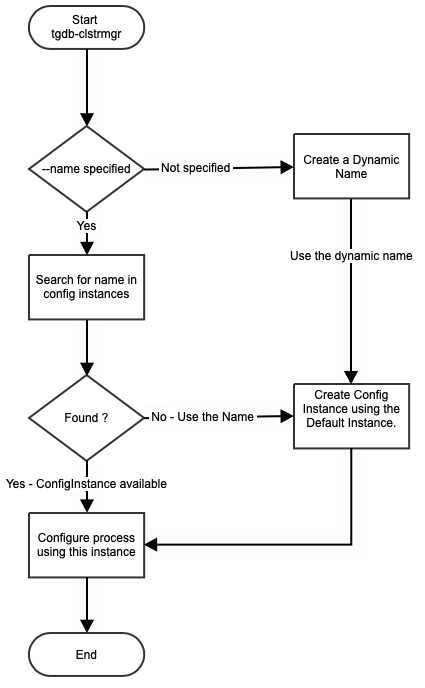
The Cluster Manager config class is identified by “tgdb-clustermgr”. There can be multiple named config instances of this class, but at least one of them must be a “default” instance.
TGDB cluster manager process “tgdb-clstrmgr” reads the configuration file, and tries to configure the process using the name argument passed as shown below:
$bin> ./tgdb-clstrmgr -s -c tgdb-cluster.conf --name inventory_clstrmgr
The rules to pickup the cluster manager configuration is show in the flowchart:
tgdb-clustermgr | |||
Property Name | Type | Default Value | Description |
cluster | Cluster Section | <None> | Required. Named cluster instance to use |
user | String | <None> | Required. The cluster admin user |
password | String | <None> | Required. The cluster admin password to use |
logger | Logger | <None> | Required. The named logger instance to use |
environment | Environment | <None> | Required. The named environment section |
listeners | list<Net Listener> | <None> | Required. Sequence of comma separated named netlistener. Enables the Client to communicate with the cluster manager. Can have SSL. |
member-lsnr | Net Listener | <None> | Required. A named net listener for internal agents and managers to communicate. Must be a non-SSL IPV4 net listener name. |
[tgdb-clustermgr:default] cluster = tgdb-cluster:democluster user = clusteradmin password = @obfuscate=false @value=clusteradmin logger = logger:default environment = environment:clustermgr listeners = netlistener:analytics, netlistener:oltp member-lsnr = netlistener:clustermgr |
| ||
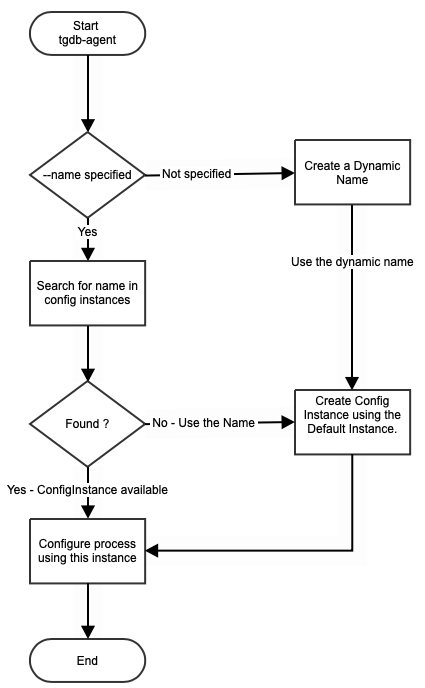
The Cluster Agent config class is identified by “tgdb-agent”. There can be multiple named config instances of this class, but at least one of them must be a “default” instance.
TGDB cluster agent process “tgdb-agent” reads the configuration file, and tries to configure the process using the name argument passed as shown below:
$bin> ./tgdb-agent -s -c tgdb-cluster.conf --name storageagent
The rules to pickup the cluster agent configuration is show in the flowchart:
tgdb-agent | |||
Property Name | Type | Default Value | Description |
cluster | Cluster | <None> | Required. Named cluster instance to use |
user | String | <None> | Required. The cluster agent user to use for inter-agent communication. This user has a proxy role in each database hosted. |
password | String | <None> | Required. The password for the agent’s user. |
agentrole | String | <None> | Required. Specifies which role this agent will take on the cluster. Valid roles are txn, storage, query, analytics, notifier, and any. |
logger | Logger | <None> | Required. The named logger instance to use. |
environment | Environment | <None> | Required. The named environment instance to use. |
member-lsnr | Net Listeners Section | <None> | Required. Specifies which net listener is for internal agents and managers to communicate. Must be a non-SSL IPV4 net listener name. |
[tgdb-agent:default] cluster = tgdb-cluster:democluster user = clusteragent password = @obfuscate=false @value=clusteragent agentrole = any logger = logger:default environment = environment:default member-lsnr = netlistener:demoagent |
| ||
The REST configuration contains sections describing the configuration parameters for tuning the TIBCO Graph Database REST server. The sections in the REST configuration files are as follows:
An optional section with keyword ‘tgdb-rest’ as the section name. This section specifies a property to configure the name of the REST server instance.
tgdb-rest | |||
Property Name | Type | Default Value | Description |
name | String | tgdb-rest-<pid> | Name of the REST Server instance |
[tgdb-rest] name = REST-Server-For-RoutesDB | |||
A mandatory section with keyword ‘database’ as the section name. This section specifies the key properties for the database such as the name, the path where the database resides, connection-pooling parameters, authentication information needed for the database.
database | |||
Property Name | Type | Default Value | Description |
url | String | <Empty> | URL to connect to TIBCO Graph Database server instance |
name | String | <Empty> | Name of the database. |
poolsize | Integer | 25 | Connection-Pool size for the connection to database server instance |
user | String | <Empty> | Valid User-name to connect to the database server |
password | String | <Empty> | Valid password to connect to the database server |
[database] url = tcp://127.0.0.1:8222/ name = routesdb poolsize = 20 user = api password = @obfuscate=false @value=api | |||
An optional section with keyword “netlistener’ as the section name. This section specifies the key properties for HTTP host and port on which the REST server instance listens to.
netlistener | |||
Property Name | Type | Default Value | Description |
host | String | localhost | Host-name or IP for the HTTP Server listener |
port | Integer | 9500 | Port number for the HTTP Server listener |
[netlistener] host = example.domain.com port = 9500 | |||
An optional section with keyword ‘logger’ as the section name. This section specifies the key properties for logging purposes such as the logging level, path to store the log messages, enable console logging.
logger | |||
Property Name | Type | Default Value | Description |
level | String | Warning | loglevel to set (Error|Warning|Info|Debug) |
path | String | Current Working Directory | directory to store the log messages |
console | Boolean | true | allows users to log messages on console |
[logger] level = info path = C:\users\user1\logs console = true | |||
TGDB provides client API in Java, GO, Python and REST. The client API connects to the TGDB server through a ConnectionFactory class. The ConnectionFactory creates, configures the connection based on the properties the client specifies as its arguments and connects to the server. The configuration properties are categorized as:
The following table shows the list properties that a Client can configure while creating a connection. A property can be specified as a fully qualified name which is <category name>,<property name> or just the property name which is also the alias for the property. In some cases the property name and alias name are different, and they are clearly specified in the table. For example, a client can specify the property in either way, and it means the same.
Properties props = new Properties(); props.putInt(“tgdb.channel.sendSize”, 2048); //2MB props.putInt(“sendSize”, 2048); TGConnection connection = TGConnectionFactory.createConnection(“tcp://localhost:8222”, “jdoe”, “jdoe123”, props); |
Property Name [Alias] | Default Value | Description |
tgdb.channel | Channel specific properties | |
defaultHost | localhost | The default host specifier |
defaultPort | 8222 | The default port specifier |
defaultProtocol | tcp | The default protocol |
sendSize | 122 | TCP send packet size in KBs |
recvSize | 128 | TCP recv packet size in KB |
pingInterval | 30 | Keep alive ping intervals |
connectTimeout | 1000 | Timeout for connection to establish, before it gives up and tries the ftUrls if specified |
ftHosts | - | Alternate fault tolerant list of <host:port> pair separated by comma. |
ftRetryIntervalSeconds | 10 | The connect retry interval to ftHosts |
ftRetryCount | 3 | The number of times to retry |
defaultUserID | - | The default user Id for the connection |
userID | - | The user id for the connection if it is not specified in the API. See the rules for picking the user name |
password | - | The password for the username |
clientId | tgdb.java-api.client | The client id to be used for the connection |
tgdb.connectionpool | Connection pool specific properties | |
useDedicatedChannelPerConnection | false | A boolean value indicating either to multiplex multiple connections on a single tcp socket or use a dedicated socket per connection. A true value consumes resources but provides good performance. Also check the max number of connections |
defaultPoolSize | 10 | The default connection pool size to use when creating a ConnectionPool |
connectionReserveTimeoutSeconds | 10 | A timeout parameter indicating how long to wait before getting a connection from the pool |
tgdb.connection | Connection specific properties | |
dbName | - | The database name the client is connecting to. It is used as part of verification for ssl channels |
specifiedRoles | - | The role name(s) that the user wants to log in as. |
operationTimeoutSeconds | 10 | A timeout parameter indicating how long to wait for an operation before giving up. Some queries are long running, and may override this behavior. |
idleTimeoutSeconds | 3600 | An idle timeout parameter requested to the server, before the server disconnects. This may/may not be honored by the server |
dateFormat | YYYY-MM-DD | Date format for this connection |
timeFormat | HH:mm:ss | Date format for this connection |
timeStampFormat | YYYY-MM-DD HH:mm:ss.zzz | Timestamp format for this connection |
zonedTimeStampFormat | ISO_ZONED_DATE_TIME | Zoned Date Timestamp format for this connection. @see DateTimeFormatter.ISO_ZONED_DATE_TIME |
locale | en_US | Locale for this connection |
timezone | UTC | Timezone to use for this connection |
queryLanguage | gremlin | Default query language format for this connection |
enableTrace | false | The flag for debugging purpose, to enable the commit trace |
enableTraceDir | . | The base directory to hold commit trace log |
tgdb.tls | Transport Layer Security (TLS) related properties | |
provider.name [tlsProviderName] | SunJSSE | Transport level Security provider. Work with your InfoSec team to change this value |
provider.className [tlsProviderClassName] | com.sun.net.ssl.internal.ssl.Provider | The underlying Provider implementation. Work with your InfoSec team to change this value. |
provider.configFile [tlsProviderConfigFile] | - | Some providers require extra configuration parameters, and it can be passed as a file |
protocol [tlsProtocol] | TLSv1.2 | tlsProtocol version. The system only supports 1.2+ |
cipherSuites | - | A list cipher suites that the InfoSec team has cleared. The default list is a common list of JSSE's cipher list and Openssl list that supports 1.2 protocol |
verifyDBName | false | Verify the Database name in the certificate. TGDB provides a self signed certificate for easy-to-use SSL. |
expectedHostName | - | The expected hostName for the certificate. This is for future use |
trustedCertificates | - | The list of trusted Certificates |
keyStorePassword | - | The Keystore for the password |
In certain cases, while importing large files, the Initialization process can have requirements that require different configuration files and be managed separately. To increase the performance of Import, tuning it differently than what it is for runtime, can achieve significant gains. Here’s a list that you can adjust:
Server configuration | Database Configuration | Remarks | ||
[tgdb] ⠇ [memory] memory = 16,4 sharedmemory = 1 shmpath = ../data/shm cacheSize = 85 enableHugePages = false [io] useOsCache = true writethrough = false synctype = None | [database] name = demodb dbpath = ../data locale = en_US.UTF-8 timezone = UTC ⠇ [cache] cachepct = 80 strategy = lru index.cachepct = 25 index.threshold = 90, 95 data.cachepct = 55 data.threshold = 90, 95 shared.cachepct = 10 shared.threshold = 90, 95 query.cachepct = 10 query.threshold = 90, 90 |
| ||
Documentation for TIBCO products is available on the TIBCO Product Documentation website, mainly in HTML and PDF formats.
The TIBCO Product Documentation website is updated frequently and is more current than any other documentation included with the product. To access the latest documentation, visit https://docs.tibco.com.
Documentation for TIBCO Graph Database is available on https://docs.tibco.com/products/tibco-graph- database-enterprise-edition-3-1-0 page.
This feature is available to both Enterprise edition and Community. The guidelines specified for Clustering are applicable only to Enterprise edition.
The following documents form the documentation set:
You can contact TIBCO Support in the following ways:
TIBCO Community is the official channel for TIBCO customers, partners, and employee subject matter experts to share and access their collective experience. TIBCO Community offers access to Q&A forums, product wikis, and best practices. It also offers access to extensions, adapters, solution accelerators, and tools that extend and enable customers to gain full value from TIBCO products. In addition, users can submit and vote on feature requests from within the TIBCO Ideas Portal. For a free registration, go to https://community.tibco.com.