TIBCO® Graph Database Query Guide
Version 3.1
November 2021
Document Updated: March 2022
Table of Contents
TIBCO Graph Database Query Language
Functional & Declarative Languages
Installing the Example Database
Aggregates, Filters and Predicates
Working with Date, Time, DateTime and Timezones
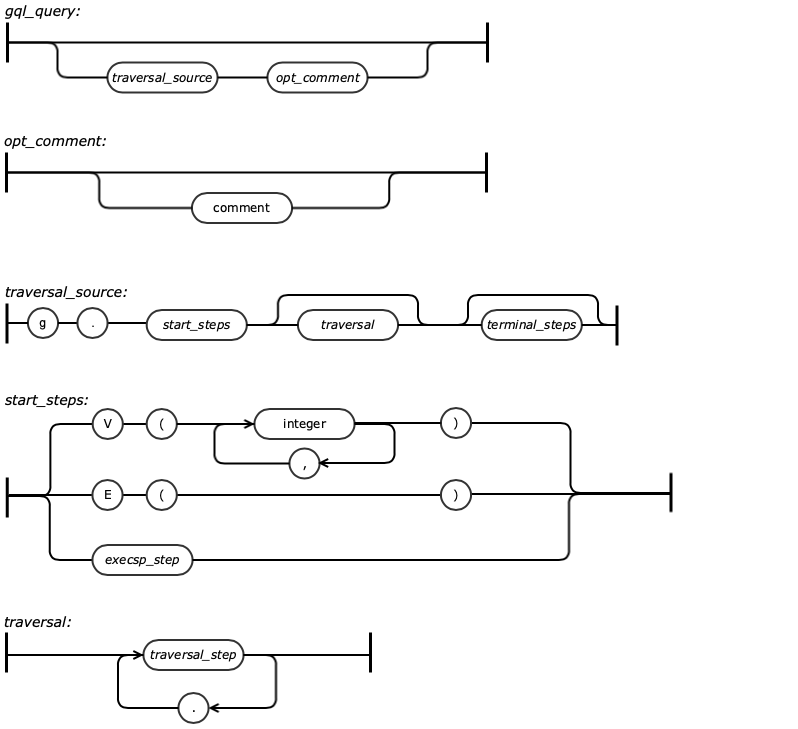
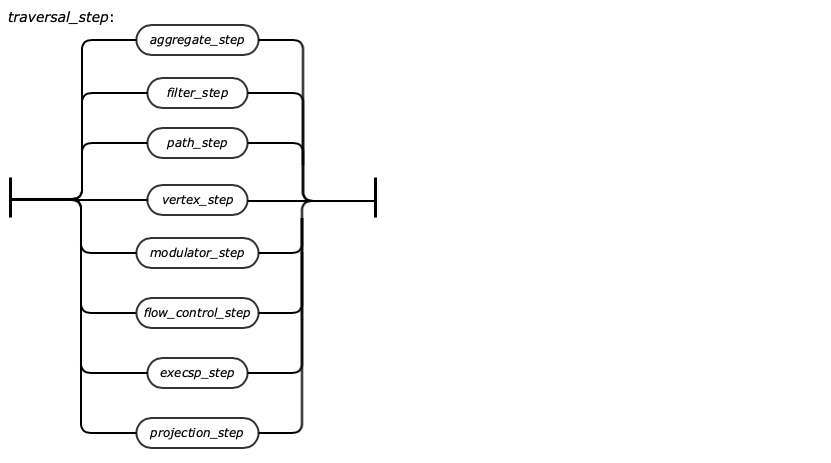
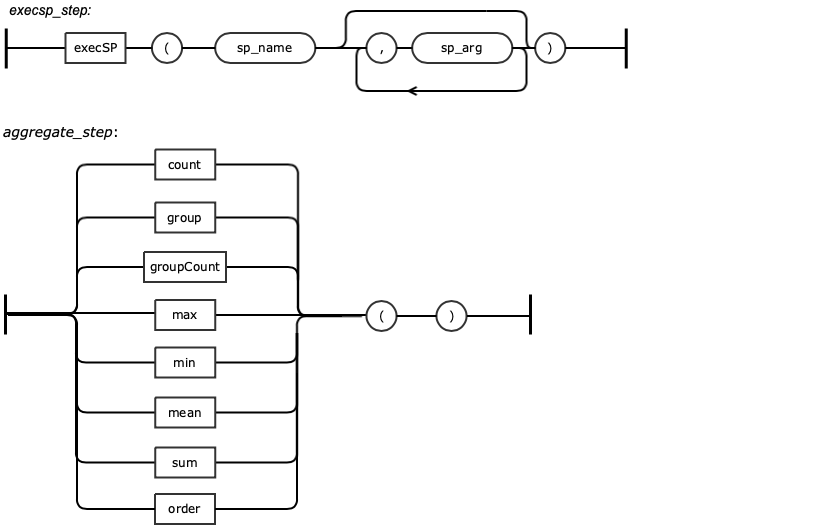
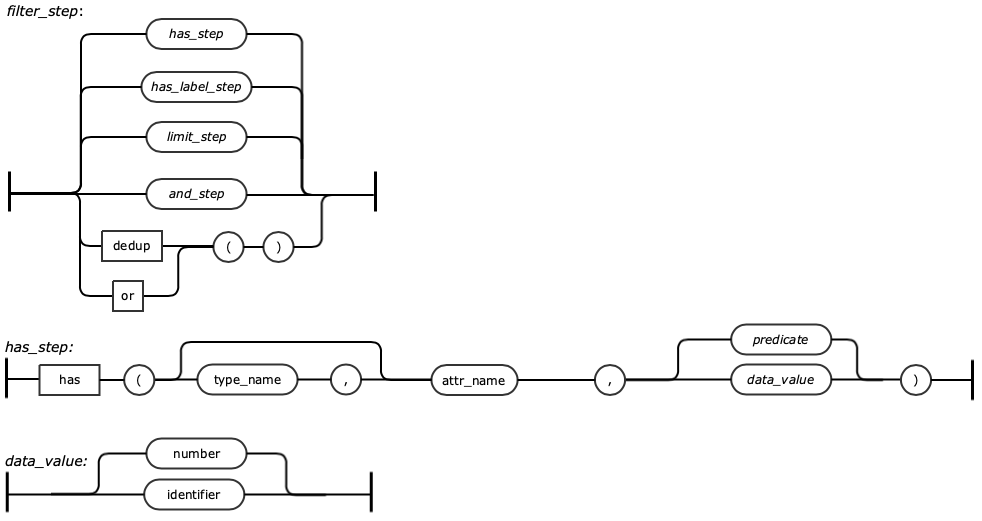
Gremlin Query Language Syntax Diagram
Differences between Apache Gremlin and TGDB GQL
TIBCO Documentation and Support Services
How to Access TIBCO Documentation
Product-Specific Documentation
TIBCO Graph Database (TGDB) query language is a functional, data-flow language that enables users to succinctly express complex traversals on (or queries of) their application's property graph. The query language is derived from Apache Tinkerpop’s graph traversal language “Gremlin”. TGDB’s query language is also referred to as the Gremlin Query Language (GQL).
Every Gremlin traversal is composed of a sequence of potentially nested steps. A step performs an atomic operation on the data stream.
Every step can be categorized into one of the following steps:
The Gremlin step library extends on these 3-fundamental operations to provide you a rich collection of steps that you can compose in order to ask any conceivable question you may have of their data for Gremlin is Turing-complete.
TGDB also supports/implements the functional API form of Gremlin Query in Java. In Programming languages like Java, Go, Python, typically the Connection object has executeQuery or createQuery methods that take a string representation of the Gremlin Query. The string is of the URI form “gremlin://…”. This tells the query engine to interpret the string sequence as a Gremlin Query.
The current industry of Graph is evolving and query standards are being developed and refined. Providing a URI form helps end-user investment and quickly adapt to the new standards to avail the efficiency and benefits and changing the code as per the demands.
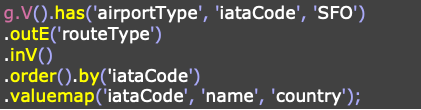
A GQL is a functional language, that is, an imperative language instructing the engine how to proceed in each step of the traversal. For instance, the imperative traversal on the right first places a traverser at the airport denoting “SFO”. That traverser then splits itself across all of Gremlin's collaborators that are not Gremlin himself. Next, the traversers walk to the managers of those collaborators to ultimately be grouped into a manager name count distribution. This traversal is imperative in that it tells the traversers to "go here and then go there" in an explicit, procedural manner.
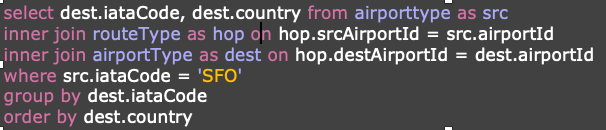
Declarative language is a non-imperative style of language in which programs describe their desired results without explicitly listing commands or steps that must be performed. For instance, the SQL statement on the right window declares what to project, and the conditions to be met for the projection. It does not tell or spit out the instruction order as in the functional or imperative style. The query engine decides the best possible algorithm and execution model to execute the query.
Each style has its own advantages and disadvantages. SQL style is well suited for traditional relational databases, is matured, and is good at expressing relational joins across 2 to 3 tables. But, when it comes to expressing a Graph traversal “cyclic” and “hierarchical”, it becomes very difficult to define and execute. GQL is built for Graph Traversal and Transformation. TIBCO Graph Database adopted GQL for its expressive prowess and simplicity in understanding.
The book provides various examples of GQL and attempts how a SQL variant could potentially solve the same problem. You can notice that as the complexity increases, GQL provides an easier way to express compared to the SQL variant.
TIBCO Graph Database also supports the Gremlin Functional Interface in Java, so code written for other Gremlin providers can easily be ported to the TIBCO provider by configuration settings.
GQL helps you navigate the vertices and edges of a graph. It is the query language to graph databases, as SQL is the query language to relational databases. To tell Gremlin how it should "traverse" the graph (i.e., what you want your query to do) you need a way to provide commands in the language TGDB understands — and, of course, that language is called "Gremlin Query Language".
You installed TIBCO Graph Database 3.1.0, and followed the basic instructions as set in the Getting Started guide.
Download the database from Github [https://github.com/TIBCOSoftware/tgdb-client/tree/master/examples/database/gqt]
Follow the instructions:
This book provides many examples of GQL queries. They require data, and model so that the queries are reasonable and have an application sense to today’s work environment. The book comes with an Example database that can be downloaded from Github
Example database consists of two independent schemas
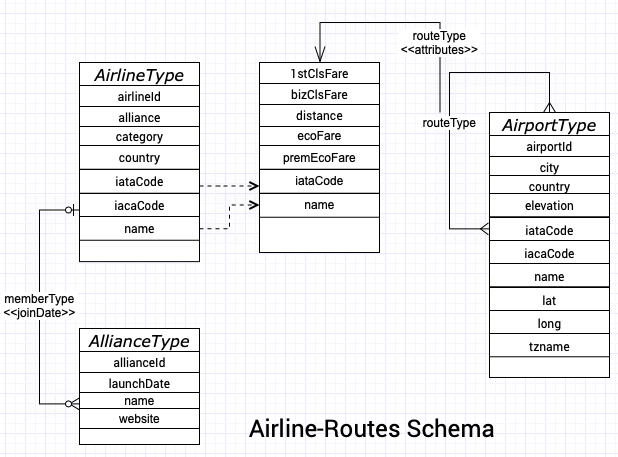
In the following E-R diagram, the entities are specified with both name and its attributes. The relationship between entities captures the name of the relationship and also the attributes for the relationships.
Airline-Routes schema provides an exhaustive set of Routes serviced by different airlines between any 2 airports.It also provides a class Fare for airline servicing the route.
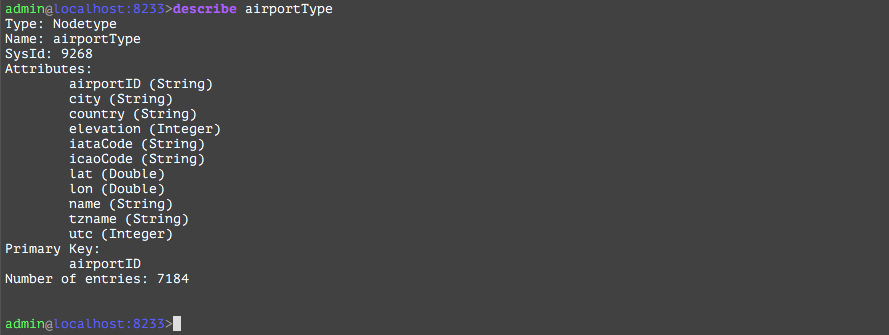
It is important to note that the RouteType relationship is a self join of AirportType Entity and has attributes in which the iataCode is the key into the AirlineType
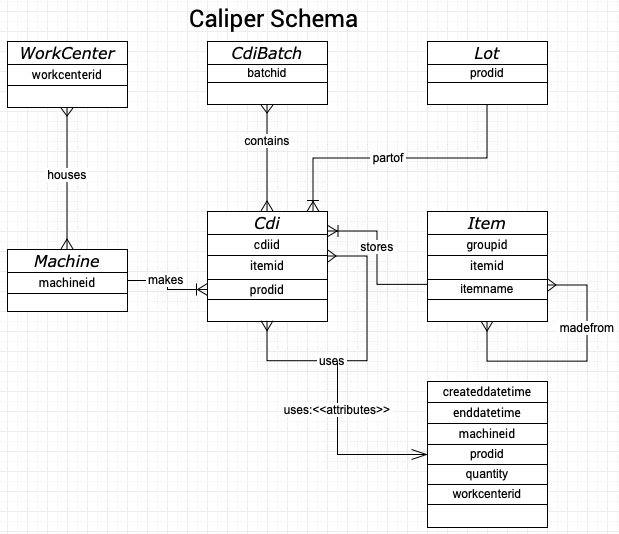
Caliper model captures entities and relationship between foundry, manufactured parts and source materials. Data captured by this model provides traceability of each manufactured part in its manufacturing process
The schema element consists of
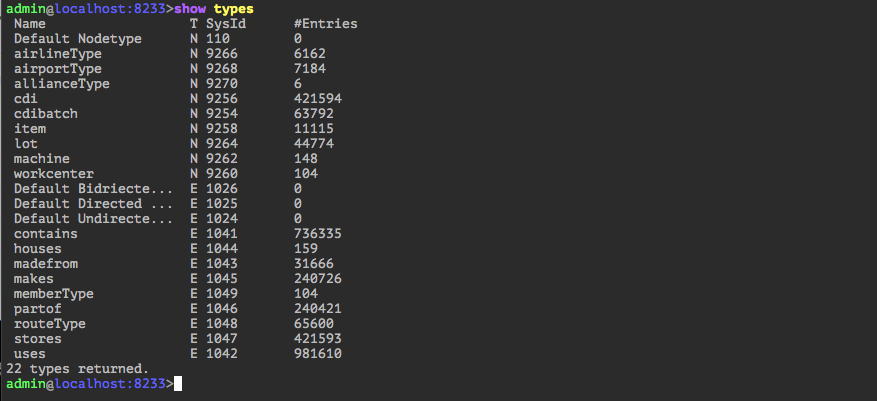
This chapter describes the key schema elements that are used throughout the book. One can run the show types command in Administrator and get all the information.
Node Types
CDI | A container or box contains a specific ‘Item’ A CDI can use other CDIs to make its ‘Item’ |
CDIBatch | Each batch contains multiple CDIs Each CDI can belong to multiple batches |
Item | The actual part/item contained in a CDI An item can be made from one or more items |
Lot | Each CDI is part of a lot Lot id is the ‘prodid’ in the data file A lot can contain more than one CDI |
Workcenter | The place when the corresponding CDI is manufactured It contains one or more machines |
Machine | The machine used to manufacture the item in the CDI |
Edge Types
contains | A CDIBatch has a one to many ‘contains’ relationship to CDI |
uses | A CDI can use other CDI during the manufacturing process It’s a many to many relationship |
madefrom | Similar to the ‘uses’ relationship but it’s between ‘Item’ to ‘Item’ |
houses | A workcenter ‘houses’ one or more machines |
partof | A CDI is ‘part of’ a lot It’s a many to one relationship |
stores | A CDI has one and only one particular ‘item’ in it |
This section introduces the GQL basics which helps you start working on GQL quickly.
Use the tgdb-admin console to help navigate the vertices and edge of a graph. The tgdb-admin is the tool equivalent to pl/sql of Oracle and GQL is the query language to graph database as SQL is the query language to the relational database.
At this point, it is assumed that the Example database has been loaded and is running. If you have not done that, please refer to Installing the Example Database section and complete that.
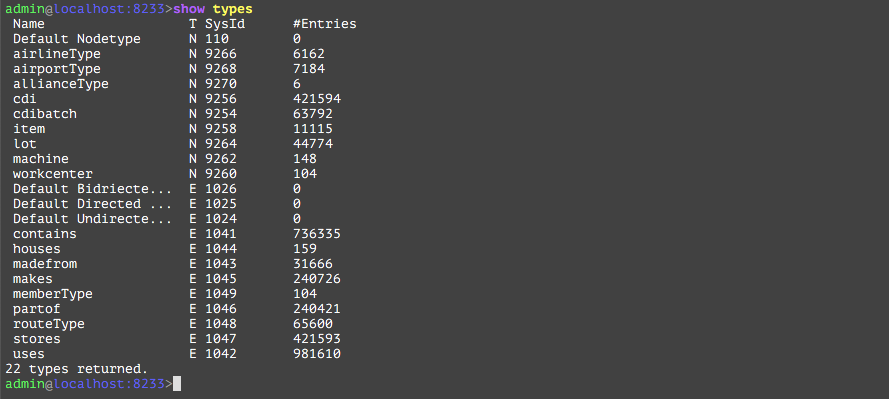
The first command to run is “show types”. See the following command output. It shows all the NodeTypes and EdgeTypes, their system id, along with the number of instances of that particular type. It is equivalent to executing a “show tables” on mysql.
The database has a collection of nodes and edges which forms a graph. However just having a graph isn’t enough to traverse the graph, we need a TraversalSource. The TraversalSource provides additional information to Gremlin (such as the traversal strategies to apply and the traversal engine to use) which provides guidance on how to execute the trip around the graph.
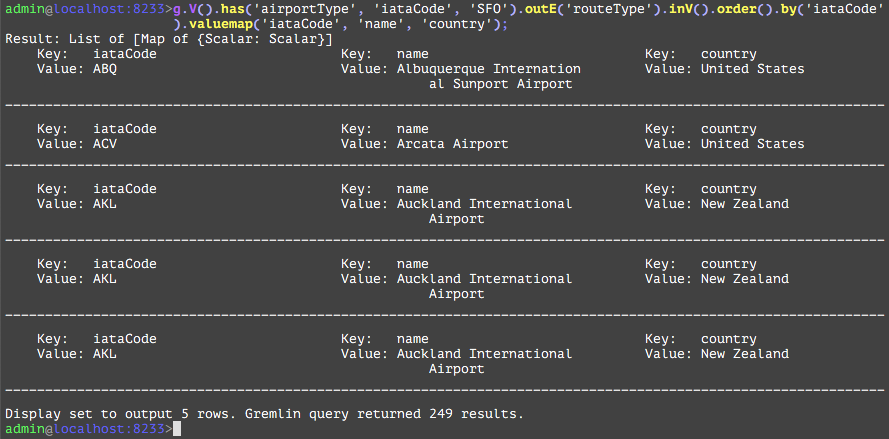
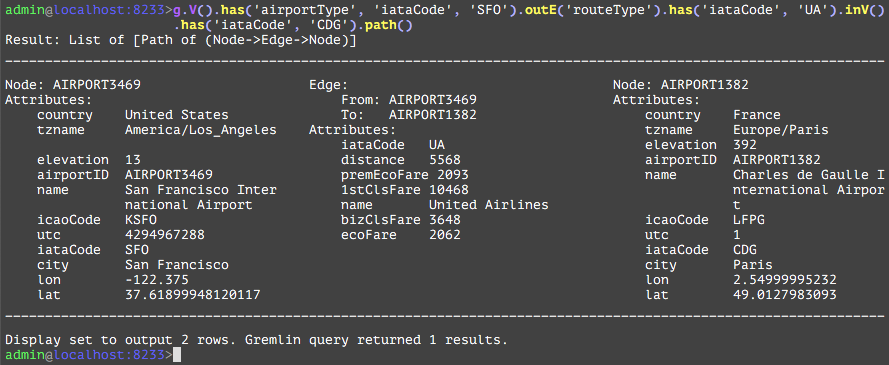
In this short primer, see how to explore and search available flights from San Francisco airport to Paris airport in one or more hops. Then narrow the search by using United Airlines to reach the destination.
The admin console “tgdb-admin” comes with a built-in TraversalSource “g”. Use that to traverse the graph.
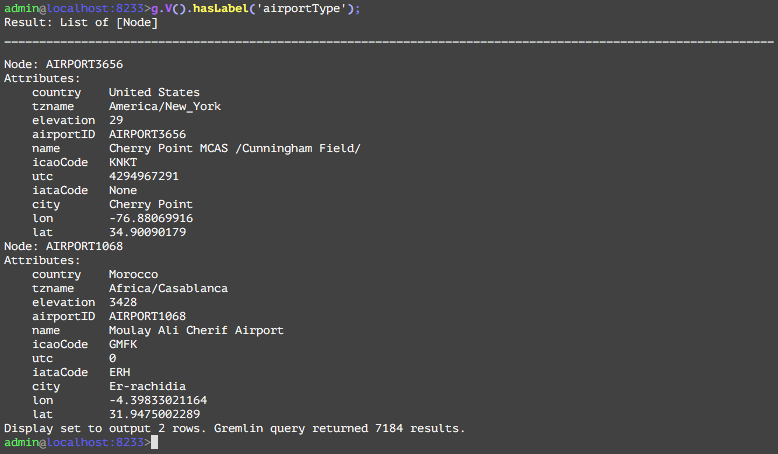
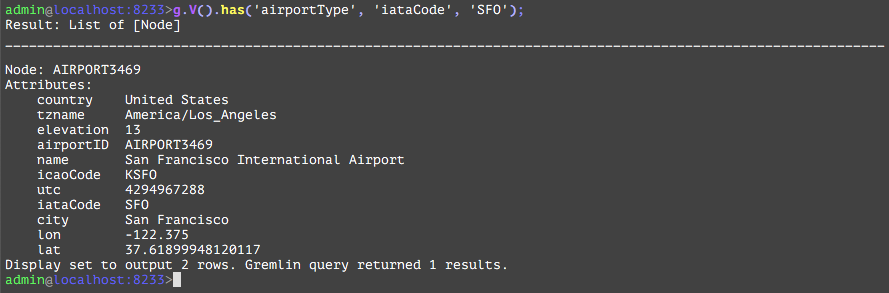
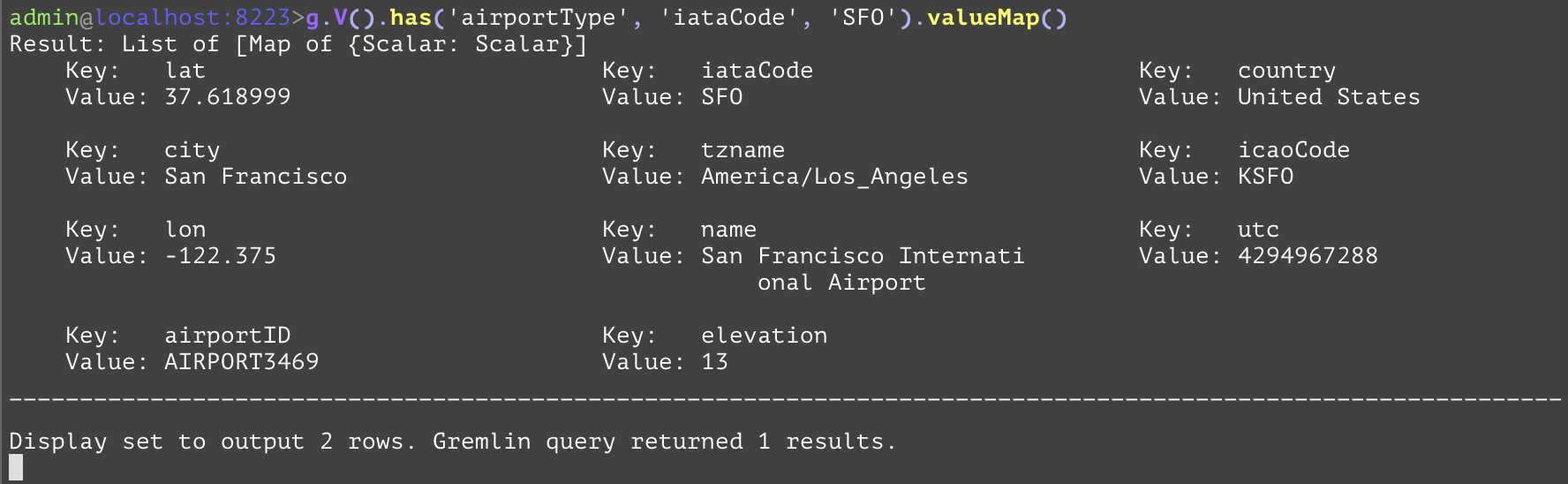
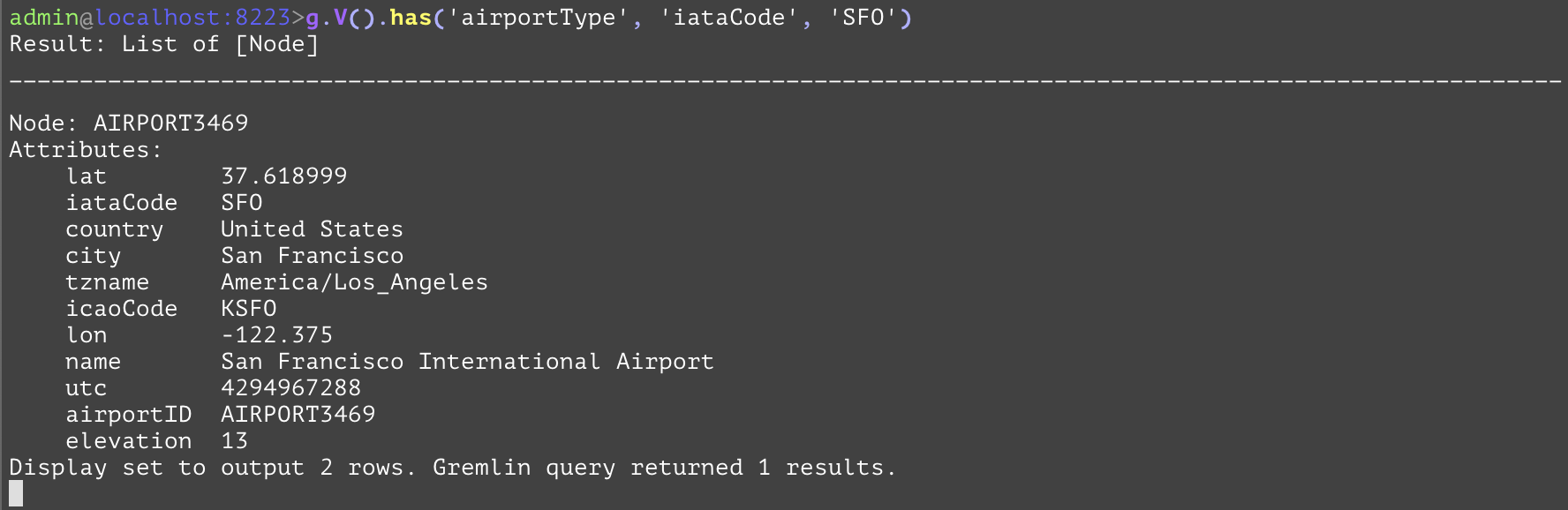
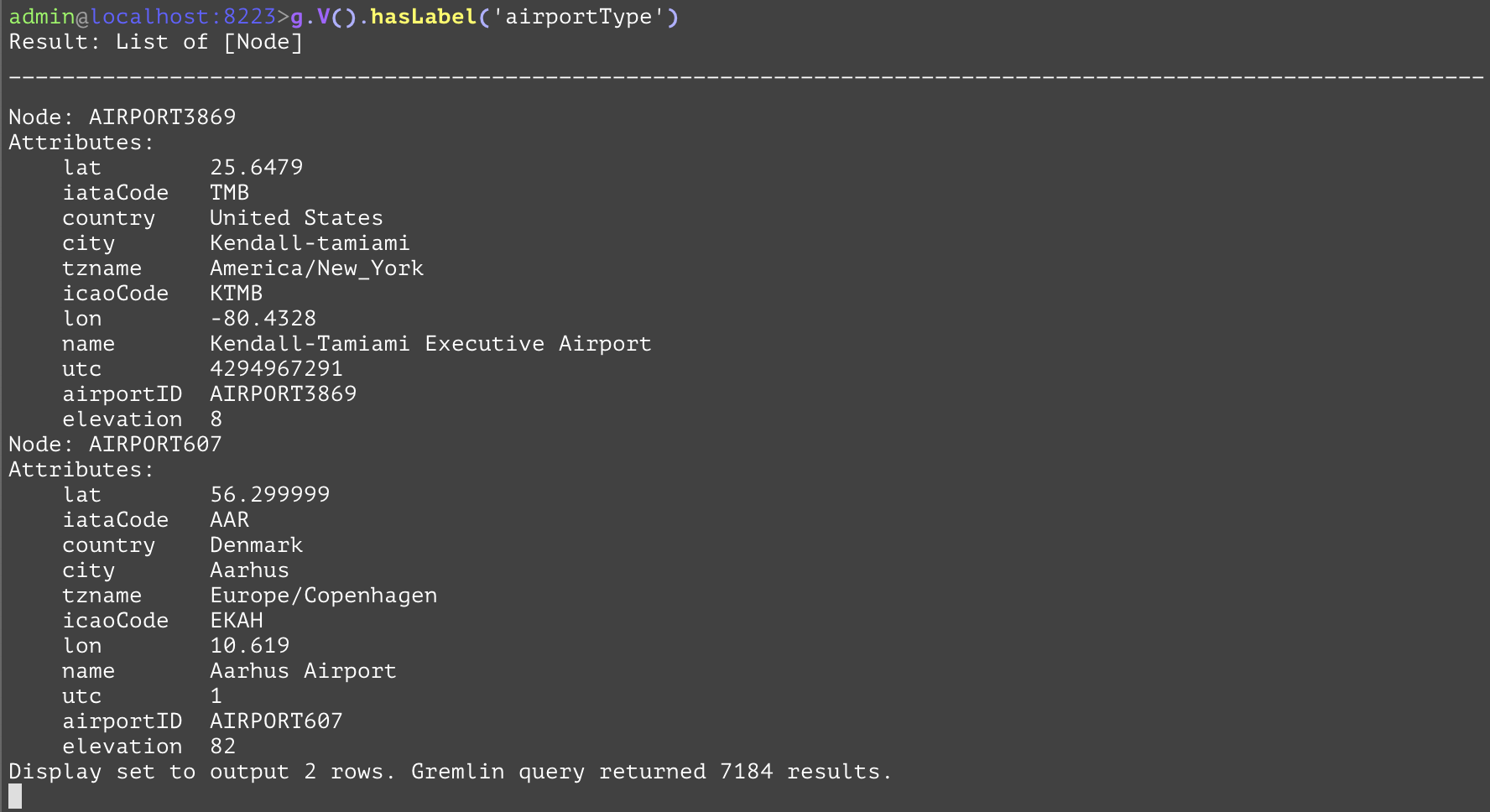
You can see that there are 7184 node instances of airportType in the database, and the result displayed 2 rows with all its attributes. The sql equivalent is select * from airportType.
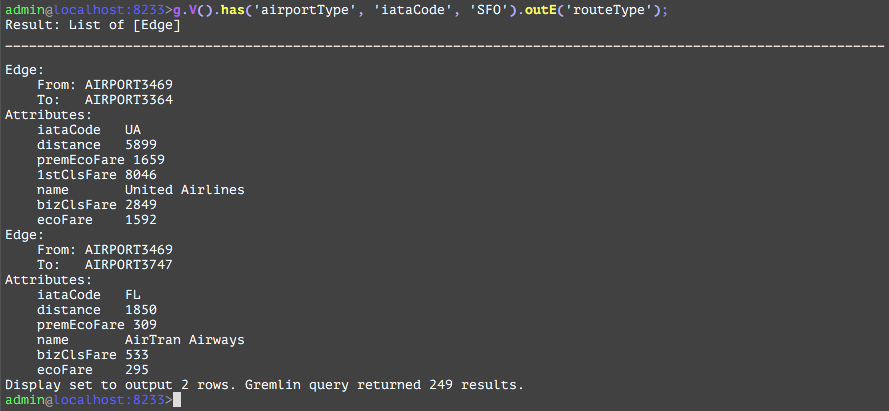
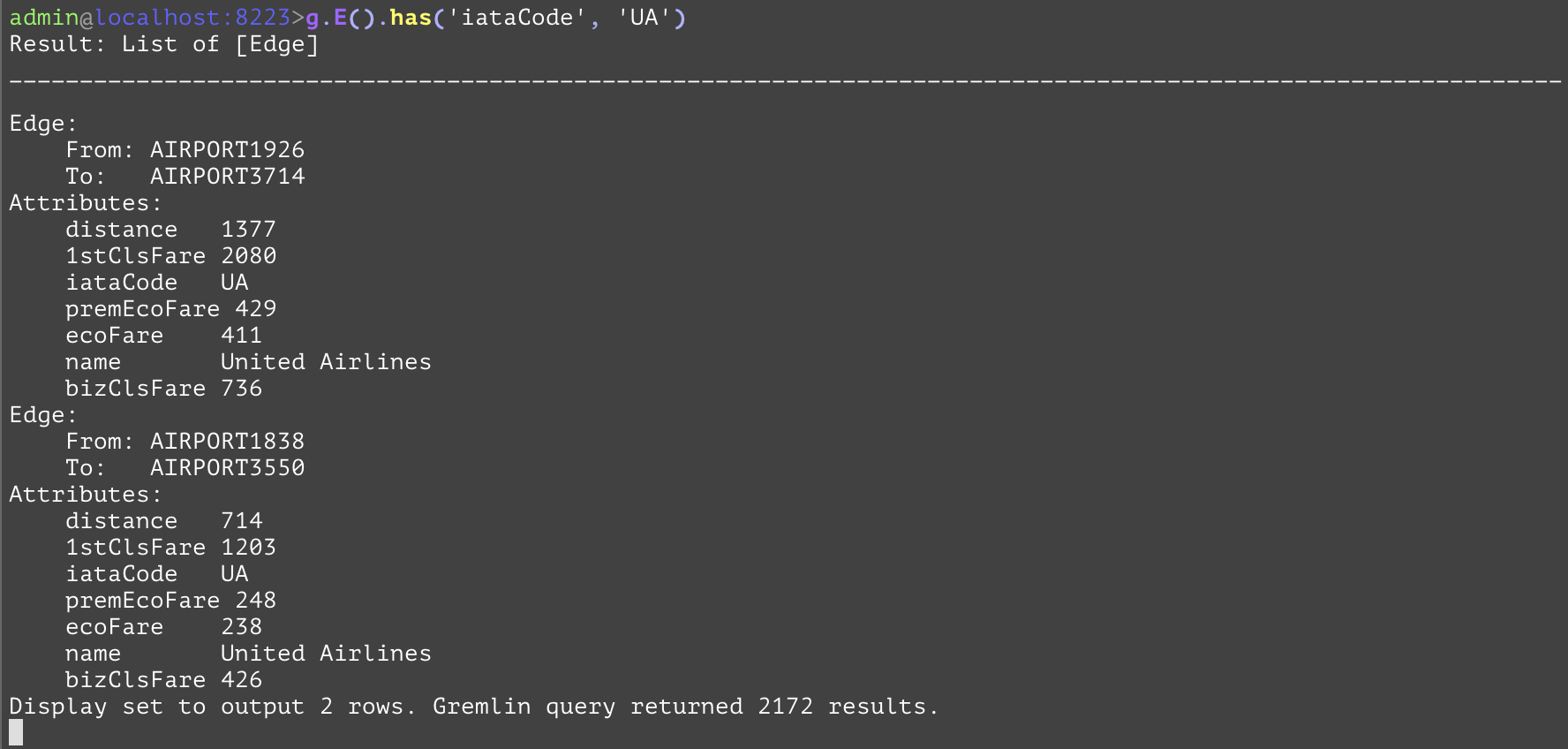
The routeType Edge is a cyclical edge and has various attributes. The iataCode whose value is ‘UA’ is the airline code servicing between these 2 airports.
In 7 easy steps, you explored, searched, and traversed the Airline database.
TGDB query is a functional language composed of individual steps that make up the language. This section describes the component parts of the query that make a traversal work. It provides a foundational framework for:
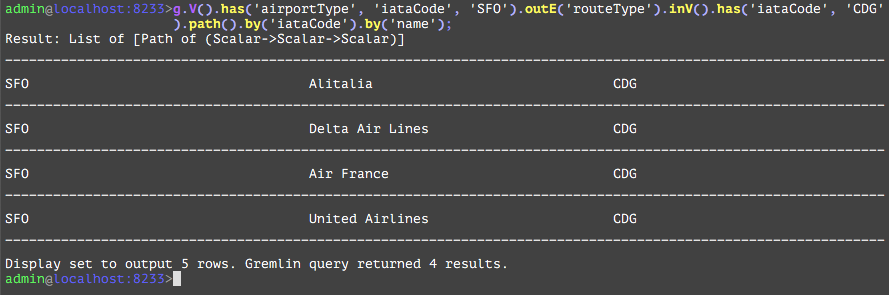
The component parts of a Gremlin traversal can be all be identified from the following code (as in step 7 of the previous section:
In plain English, we are listing all direct flights with their fares run by United Airlines (‘UA’) from SanFrancisco(‘SFO’) to Paris(‘CDG’). In the following sections, we will dissect the query into its individual components, and discuss in detail the functionality and any subtle differences between the TGDB GQL and Apache Gremlin
‘g.’ - It is in virtually every traversal you read in documentation, blog posts, or examples and is likely the start of most every traversal you will write in your own applications.
‘g’ is a predefined GraphTraversalSource variable available in the tgdb-admin console, TGDB GQL query language in any of the API support. In Gremlin API support for Java, one can create an arbitrary GraphTraversalSource object and label it anything, but convention is to use g. The state of ‘g’ in TGDB is only for that query, and any subsequent query submission reinitializes the variable. This is a subtle deviation from the Apache Gremlin where the state management of ‘g’ is upto the provider, and is not clearly defined.
In TGDB, ‘g’ does not have any state, and is purely a functional decorator as of this release.
The subtle deviation between Apache and TGDB are as below
Following ‘g’ are the Start Steps discussed in the next section.
g is a GraphTraversalSource and it spawns GraphTraversal instances with start steps. V() is one such start step, but there are others like E() for getting all the edges in the graph.
The start steps in Gremlin are tabled as below
V() | Reads vertices from the graph to start the traversal. Apache Gremlin defines this step to result in a list of vertices. However TGDB requires this step to be filtered by a Vertex Type or by a set of ids. It is similar to a relational query to say “select * from table <t>” unlike Apache Gremlin which mean “select * from table”. TGDB will search for indices applicable for this vertex type and use the best possible index that narrows the result set. If no index is specified, and no primary key is defined, then it will use the internal index based on a internal “@id” |
E() | Reads edges from the graph to start the traversal. TGDB reads edges from an Edge reference index. An Edge reference is a 40-byte object that maintains references of from and to vertex identifier, an 8-byte edge uniqueid, and edge page identifier if the edge has any properties. Note the edge index itself is a compressed index. Just like the V(), TGDB requires this step to be filtered by a Edge Type or by a set of ids As of this release, there is no support for user defined edge indices. This means a filtered set of edges is full scan on the edge reference index. |
addV() addE() inject() | These steps are not supported by TGDB in the current release. These steps are supported through the Transactional CRUD API available Java, Python, Go, REST in a different form. TGDB supports only the read-only query form of the Gremlin language. |
Terminal steps are steps that instruct the engine to execute the query and return results. These are not GraphTraversal steps. The examples of terminal steps include: hasNext(), toList(), and iterate().
TGDB supports only toList() and is the default terminal step when not specified. In the example used, toList is appended to the query and executed. TGDB query compiler raises syntax error for hasNext and iterate terminal steps.
Since the default terminal is always a List, the result set will always be enclosed in a List container. See ResultSet
The start steps spawns the GraphTraversal. The GraphTraversal contains the steps that make up the Gremlin language. Each step returns a GraphTraversal so that the steps can be chained together in a fluent fashion. Revisiting the example again ‘has’, ‘outE’, ‘inV’, and ‘path’ are components of the GraphTraversal. The key to reading this Gremlin is to realize that the output of one step becomes the input to the next. Therefore, if you consider the start step of V() and realize that it returns vertices in the graph, the input to has() is going to be a Vertex. The has()-step is a filtering step and will take the vertices that are passed into it and block any that do not meet the criteria it has specified. In this case it will return vertex/vertices whose iataCode is SFO i.e output of has is a SFO vertex as input to outE. outE is a navigational step, in that it enables the traversal through the outgoing edges as the output. There are many navigational/vertex steps as we see in the next section.
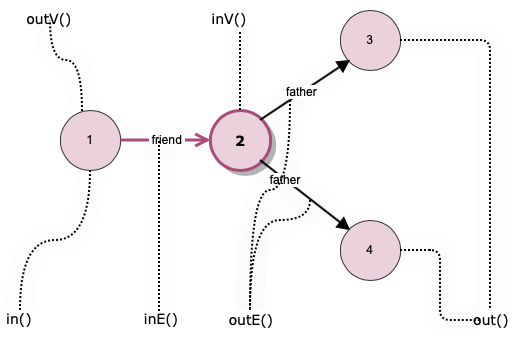
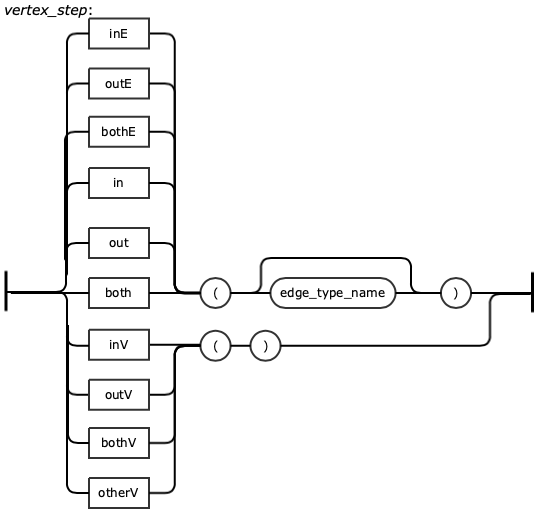
The real power of a graph comes into play when we start to walk or traverse the graph by looking at the connections (edges) between vertices. The term walking the graph is used to describe moving from one vertex to another vertex via an edge. Typically when using the phrase walking a graph the intent is to describe starting at a vertex traversing one or more vertices and edges and ending up at a different vertex or sometimes, back where you started in the case of a circular walk. It is very easy to traverse a graph in this way using Gremlin. The journey we take while on our walk is often referred to as our path. There are also cases when all you want to do is return edges or some combination of vertices and edges as the result of a query and Gremlin allows this as well. The figure and table below gives a brief summary of all the steps that can be used to walk or traverse a graph using Gremlin. More details on the steps and examples are presented in chapter Gremlin Steps.
Think of a graph traversal as moving through the graph from one place to one or more other places. These steps tell Gremlin which places to move to next as it traverses a graph for you.
In order to better understand these steps it is worth defining some terminology. One vertex is considered to be adjacent to another vertex if there is an edge connecting them. A vertex and an edge are considered incident if they are connected to each other.
The table below specifies all vertex steps and its meaning.
out(string…) | Move to the outgoing adjacent vertices given the edge labels. |
in(string…) | Move to the incoming adjacent vertices given the edge labels. |
both(string…) | Move to both the incoming and outgoing adjacent vertices given the edge labels |
outE(string…) | Move to the outgoing incident edges given the edge labels. |
inE(string…) | Move to the incoming incident edges given the edge labels |
bothE(string…) | Move to both the incoming and outgoing incident edges given the edge labels. |
outV() | Move to the outgoing vertex. |
inV() | Move to the incoming vertex. |
bothV() | Move to both vertices. |
otherV() | Move to the vertex that was not the vertex that was moved from. |
GQL supports basic statistical steps such as calculating the amount of a particular item that is present in the graph, calculating the average (mean) of a set of values and calculating a maximum or minimum value. The table below summarizes the available steps.
count | Count how many of something exists. |
sum | Sum (add up) a collection of values. |
max | Find the maximum value in a collection of values. |
min | Find the minimum value in a collection of values. |
mean | Find the mean (average) value in a collection. |
dedup | Distinct values in a collection |
order | Sort the collection |
group | Group the collection into smaller collection by organizing them based on certain functions or properties |
groupcount | Same as group, but count them |
The group step organizes the objects according to some function of the object. As traversers navigate across the graph as per the vertex steps defined above, some organizational collection may be required, group and groupcount are such steps that help organize. The organizational function may be qualified modulators as described in the Step Modulators section.
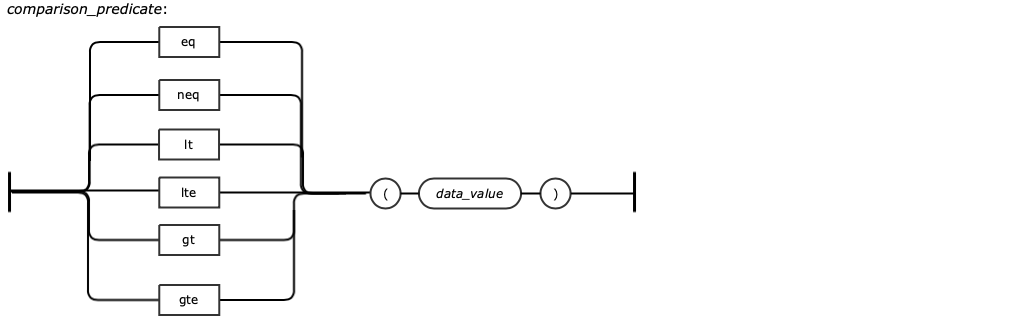
GQL provides steps that filter the output result using the “has” or “hasLabel” steps. In the context of Filter steps, the GQL supports functional expressions using Predicate steps. These steps are mathematical, logical, range related steps and are companion to the has or hasLabel.
and | Logical And |
or | Logical Or |
lt, lte | Less than, Less than equal to |
gt, gte | Greater than, Greater than equal to |
between | Value in between the range |
In the case of the example, path() step transforms the traverser as it moves through a series of steps within a traversal. The history of the traverser is realized by examining its path with path()-step. If edges are required in the path, then be sure to traverse those edges explicitly. It is possible to post-process the elements of the path in a round-robin fashion via by().
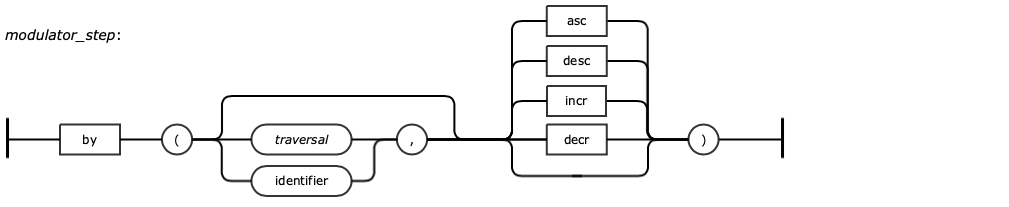
The behavior of the path step is influenced by the ‘by’ step.
The output of the path step can only be filtered by predicates or aggregates i.e it can only be followed by has() or by count()
A modulator is a step that influences the behavior of the step that it is associated with. Examples of such modulator steps are by and as.
The by modulator steps are processed in a round robin fashion. If there are not enough modulators specified for the total number of elements in the path, Gremlin just loops back around to the first ‘by’ step and so on. So even though there were three elements in the path that we wanted to have formatted, we only needed to specify two by modulators. This is because the first and third elements in the path are of the same type, namely airport vertices, and we wanted to use the same property name, code, in each of those cases. If we instead wanted to reference a different property name for each element of the path result, we would need to specify three explicit by modulator steps. This would be required if, for example, we wanted to reference the city property of the third element in the path rather than its code.
GQL provides steps to control the flow, repeat the number of times the same flow should be carried out either using a condition or using a count. These Flow Control steps are repeat-pattern-emit-until steps. These are usually used in a Path detection such as N-hops and the hop is the defined pattern. For instance in the example used if we were interested in 3 hops to Paris, we could use the Repeat step followed by the pattern and the terminating condition. As the Traverser is performing, one of the instructions could be collect the result set.
The query engine is a component in TIBCO Graph Database Server that handles data retrieval of graph data from the database. Data retrieval request is expressed in the form of GQL. Requests can come from database clients or stored procedures. The requester roles and privileges are used to ensure data security. Concurrent requests are supported where data consistency is maintained for each request. TGDB also supports both unique and non-unique indexes. Query engine utilizes indexes to improve query performance.
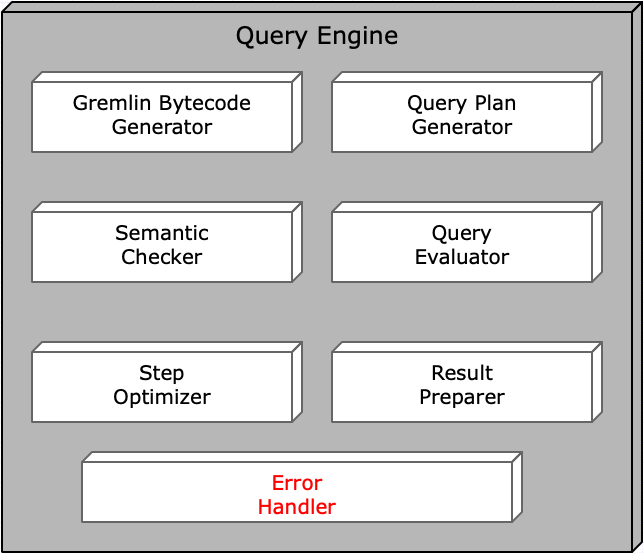
The below figure shows the components inside the Query Processor Engine.
If any errors are detected during processing of query request, the error handler is used to provide a common error handling and reporting mechanism to report errors to the query requester in the query response. TGDB client APIs provide interfaces to access information in the error message structure. Information captured in the structure includes the error type, error message and the server error code.
TGDB query engine supports Gremlin based query in its native language form such as Java and in string form as in GQL. Therefore, it processes Gremlin query requests in Gremlin bytecode form. When it receives a request in GQL, it first compiles GQL into Gremlin bytecode such that the query engine can understand. TGDB extends Apache Gremlin bytecode to include GQL specific extensions such as the ability to execute stored procedures. It means these extensions are not available to native language Gremlin query.
This checker validates any entity type and attribute names used in the query that actually exists in the system. It does additional checks to make sure that step sequence in the query is compatible and has the right input. In addition, it does explicit access control validation if types are specified in any of the filter conditions. Errors will be reported to the requester if any of these checks fail.
The optimizer analyzes the entire query step sequence to build an execution step sequence. It may combine multiple steps into a single step. For example, if multiple ‘has’ steps are used in a contiguous fashion, they are combined into a single logical step to be evaluated. The goal is to minimize the number of evaluations. The optimizer also determines how data should be maintained during query execution. Steps such as ‘dedup’, ‘order’ and ‘limit’ can affect how data are maintained. Queries which include ‘path’ steps are analyzed for different step execution models.
The plan generator analyzes the starting ‘g.V()’ filter condition. If indexes or primary keys are defined for that node type(s), the generator tries to select the appropriate database index to retrieve the initial set of data from the database. If no indexes are defined or none matched for the filter condition, all the nodes of the given type(s) will be retrieved to be evaluated.
Evaluation starting with the initial data retrieval using the plan selected by the query plan generator. Subsequent evaluation is based on the step sequence constructed by the step optimizer. Another access control validation is done during the evaluation where explicit node or edge types are not specified in the query filter conditions. Any entities that failed the access control check will be automatically filtered out.
Prepare query results in a result set structure. In addition to the results of the query, the preparer includes the result set annotation. In case of error, the preparer put the error information into the result set. At this point, the result is ready to be sent back to the requester.
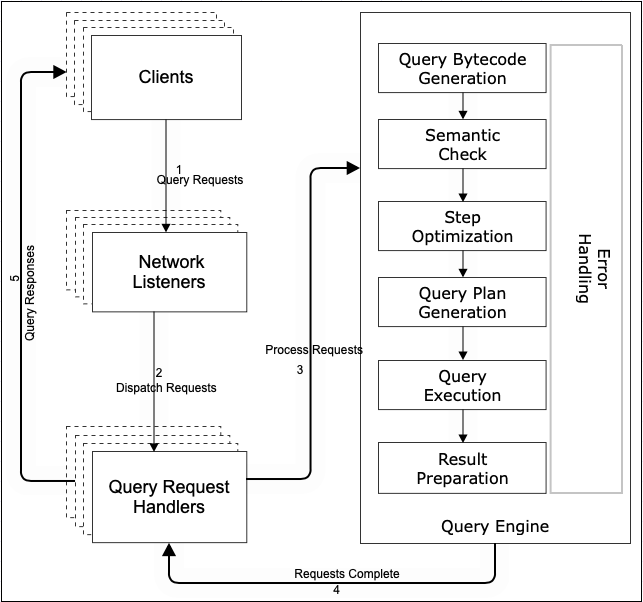
Below figure describes a Client’s Query Request and its processing sequence.
Step | Action |
1 | Client initiate a query request |
2 | Request received by one of the network listeners which validates the request and extracts the request type. Based on the request type, it dispatches the request to the query request handler. |
3 | One of the query request handlers picks up the request and extracts the request details from the incoming request. It uses the details to ask the query engine to process the query |
4 | Query engine processes the query request in the sequence shown in the diagram. After the last step, which is the result preparation step, is completed, it returns the results to the query requests handler. |
5 | Query request handler packages the results in the network format and sends them back to the client. |
The query request sequence starts when a client sends a query to the server. Network listener is a component of the server responsible for handling client requests over the network. Query is one of such requests. Another example is transaction requests when a client makes changes to the database data. Network listener has various configurable properties such as maximum number of connections that can be configured in the server configuration file under the ‘netlistener’ section. Please refer to the server configuration guide for details.
In order to handle various kinds of requests submitted over the network, the network listener delegates the request to different server components based on the request type. Query request handler is one of such components and it’s responsible for handling queries. Transaction handler is another example which handles transactions. The delegation is done asynchronously such that requests are processed by the handler in a separate thread. The network listener is not blocked waiting for the request to be completed such that it can quickly return to service another request. Query request handler extracts details of a request and uses the query engine to process it. Once the query engine completes the request, this handler packages the response and sends it back to the client. Similar to the network listener, the number of query handlers can be configured in the database configuration file under the ‘processors’ section.
Once the query engine receives a query request, it processes it in the order shown in the diagram. What happens in each step is described in the component section.
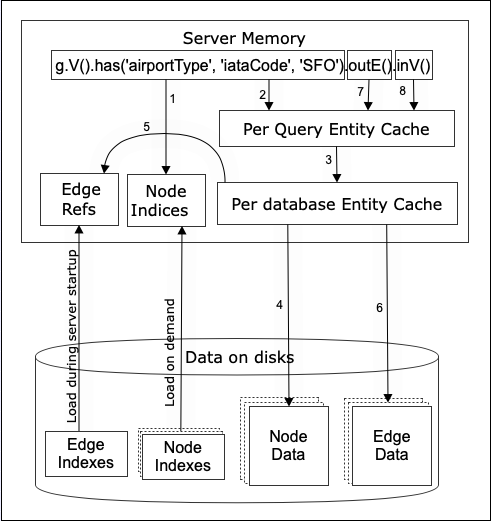
This section describes how a query processor executes a sample query “g.V().has(‘airportType’, ‘iataCode’, ‘SFO’).outE().inV();” It shows interaction between various server components such as memory, storage, page manager, network and others. The threading model of the Query Processor is based on the ‘Actor’ model. It has its own queue and thread to run. Query processor requests ‘read locks’ from the Page manager for entities that it requires to filter or process. Entities are reference counted as when the Query Processor deems it is needed for future processing or result preparations.
During server startup, edge id based edge index is loaded into server memory. For nodes, each node type can have multiple indexes besides their primary key indexes. Node indexes are loaded on demand into memory. The amount of memory allocated to the node indexes can be configured under the ‘cache’ section of the database configuration file.
Each database server can host multiple databases. Each database has its own entity cache. The purpose of the cache is to improve data access performance. The size of the cache can be configured under the ‘cache’ section of the database configuration file.
In order to maintain a consistent view of database data during a query, each query has a temporary entity cache which guarantees data consistency by providing a snapshot view of the data while the same data may be modified by another transaction concurrently. The size of the query entity cache can be configured under the ‘cache’ section of the database configuration file.
Using the query example g.V().has(‘airportType’,‘iataCode’,‘SFO’).outE().inV() shown in the diagram above, the following table describes how query engine retrieves data relevant to the request.
Step | Action |
1 | The starting V step always attempts to use node indexes to retrieve node data from the database. For this query example, there is an index defined for ‘iataCode’ attribute which returns the id for ‘SFO’ airport node. |
2 | Query engine uses the node id to lookup the ‘SFO’ node from its query entity cache. |
3 | If the node is not found in the query cache, look it up from the database entity cache. |
4 | If the node is not found in the database cache, retrieve the node from the database and use the node id to lookup edge ids containing the node from the edge index(step 5). Retrieve the edges from the database cache. For any edges not in the cache, get them from the database(step 6). Include edge objects in the node object before putting it in the cache. Return the node object to the query cache. Query processing continues to the next step with the returned node. |
7 | Retrieve all outgoing edges in the SFO node which is done in step 6 already. |
8 | For each outgoing edge, retrieve the ‘to’ node from the query cache. And repeat from step 3 if necessary. |
TGDB supports Datetime and with Timezone attribute types as shown below. All Date, Time and its combination are indexable and their properties with the range values are tabled as below
Attribute Type | Format | Range | Storage | Description |
Date | ISO-8601 Date ±YYYY-MM-DD | Year can be from -65535 to +65535 | 8-bytes | Standard Date. Representation/Format for Clients to exchange with the server. Clients can have specialized properties to help specify in locale specific style too. |
Time | ISO-8601 Time hh:mm:ss.nnnnnnn | Upto 0.5 microsecond precision | 8-bytes | Standard Time. Representation/Format for Clients to exchange with the server. |
Timestamp | ISO-8601 Datetime ±YYYY-MM-DD hh:mm:ss.nnnnnnn | Date Range is the same as the Date field. Time precision is the same as for the Time field | 8-bytes | Standard Date & Time specified together. Timezone is not saved in the database, and if the format string has a timezone specified, it will be dropped. Index lookup or comparison are done without any conversion, and compared on the values only. |
ZonedTimestamp | ISO-8601 with TZ | Same as Timestamp | 10-bytes | TGDB supports Timezone using the Olson Timezone facilities of the underlying Operating system it runs on. Source Timezone id is preserved, and the datetime is returned with the source timezone on query results. Source Data is converted to UTC timezone with its source timezone preserved and stored. Comparison and Index lookups are done at UTC timezone.Comparison strings are also converted to UTC. Query Results are converted from UTC to source timezone id and returned. |
ZonedLocalTimestamp | ISO-8601 with TZ | Same as ZonedTimestamp | 8-bytes | Source Timezone is not preserved. Source Data is converted to UTC timezone with its source timezone dropped. Comparison and Index lookups are done at UTC timezone.Comparison strings are also converted to UTC. Query Results are converted from UTC to local timezone id based on the session timezone properties either at Server or at Client whichever is applicable |
Predicates steps often require to filter out data based on certain date/datetime values, or between some date. TGDB GQL supports date, time, and datetime fields to specify data in ISO-8601 formatted string as ‘yyyy-mm-dd hh:mm:ss.nnn [TZname or Offset]’. Optional Timezone and DST is supported also.
Datetime attributes can be part of the index components, and the query engine will lookup if it can use the index. Depending on the string and the attribute, timezone conversions will be applied on the input string and then compared and/or searched.
A simple example is provided below
g.V()
.has('cdi','cdiid','039HDFJEYX87')
.inE('uses')
.has('createddatetime', gte('2018-02-07 17:13:02'))
.has('createddatetime',lt('2018-02-0810:00:00'))
.values('createddatetime')
.dedup()
.order();
GQL is a functional language i.e imperative language instructing the engine how to proceed in each step of the traversal. Each traversal is composed of multiple steps and these steps are categorized into
Each of these categories can have multiple steps depending on usages.
This chapter describes each step, the arguments needed for the step, a couple of examples, and potentially equivalent sql statements to help the reader map from GQL to SQL and vice-a-versa. This helps to understand the nuances and get familiarized with the GQL.
Note not all examples can be mapped to an SQL. Some of the SQL statements are very verbose, and inefficient in their execution even with indices defined. The SQL statements are run on a MySQL database.
Gets all of the attribute's values for the current traversal. Extract from each entity (node or edge) the attribute values into a single list of attribute values that is piped to the next step. This is typically the last step in the query. In Example 1, we return all the attributes for the entity identified by SFO. In Example 2, we project only iataCode, and city. | |||
Args | Name | Type | Description |
attributes | string[] | Optionally the attributes of the entities to pass on to the next step. If not specified, then all of the attributes are used. Invalid or undefined attribute names will be ignored. | |
GQL | gremlin://g.V().has('airportType', 'iataCode', 'SFO').values(); | ||
gremlin://g.V().has('airportType', 'iataCode', 'SFO').values('iataCode', 'city'); | |||
SQL | SELECT * FROM airportType WHERE iataCode='SFO'; | ||
SELECT iataCode, city FROM airportType WHERE iataCode='SFO'; | |||
Gets each entity's attributes as a map with the key being the attribute name and the value being the attribute. This is typically a last step in the query. While there is no direct SQL analog, the examples below have analogs that retrieve the same information in a different format as shown below. In the first example, the query will return a map of the attributes of the airport SFO. It would look something like this: {'city': 'San Francisco', 'country': 'United States', 'airportId': 'AIRPORT3469', 'name': 'San Francisco Internal Airport', ...}. For the second example, this query will restrict the attributes down to just {'city': 'San Francisco', 'iataCode': 'SFO'}. | |||
Args | Name | Type | Description |
attributes | string[] | Optionally the attributes of the entities to pass on to the next step. If not specified, then all of the attributes are used. | |
GQL | gremlin://g.V().has('airportType', 'iataCode', 'SFO').valueMap(); | ||
gremlin://g.V().has('airportType', 'iataCode', 'SFO').valueMap('iataCode', 'city'); | |||
SQL | SELECT * FROM airportType WHERE iataCode='SFO'; | ||
SELECT iataCode, city FROM airportType WHERE iataCode='SFO'; | |||
Only allows elements to pass this step if they meet the requirements specified in the arguments. Multiple "has" steps in sequence together form an implicit "and" condition. The first example makes use of the optional typename first parameter to simplify what would otherwise be a lengthy hasLabel('airportType').has('iataCode', 'SFO') is simplified into the more manageable has('airportType', 'iataCode', 'SFO'). The second one operates on edges and does not specify the optional typename argument. | |||
Args | Name | Type | Description |
typename | string | Optionally the type name (aka label) to filter out elements. When specified this step will act as a joint hasLabel(<typename>).has(<attrname>, <condition>). | |
attrname | string | The name for the attribute to filter on. | |
condition | string or expression | The value for that attribute must either be equal (if this argument is a string) or pass the condition of the expression (if this argument is a condition). | |
GQL | gremlin://g.V().has('airportType', 'iataCode', 'SFO'); | ||
gremlin://g.E().has('iataCode', 'UA'); Note: This query is a full scan of the global edge index. The server maintains a global Edge Index for fast lookup from a NodeType perspective. Calling E() is always a linear scan. | |||
SQL | SELECT * FROM airportType WHERE iataCode='SFO'; | ||
SELECT * FROM routeType WHERE iataCode='UA'; | |||
Only allows elements to pass this step if they have the typename (aka label) specified. The example below will get all "airportType" nodes. | |||
Args | Name | Type | Description |
typename | string | The type name (aka label) to filter out arguments. Multiple can be specified in a comma-separated list to act as an "or" of the <typename> specified. | |
GQL | gremlin://g.V().hasLabel('airportType'); | ||
SQL | SELECT * FROM airportType; | ||
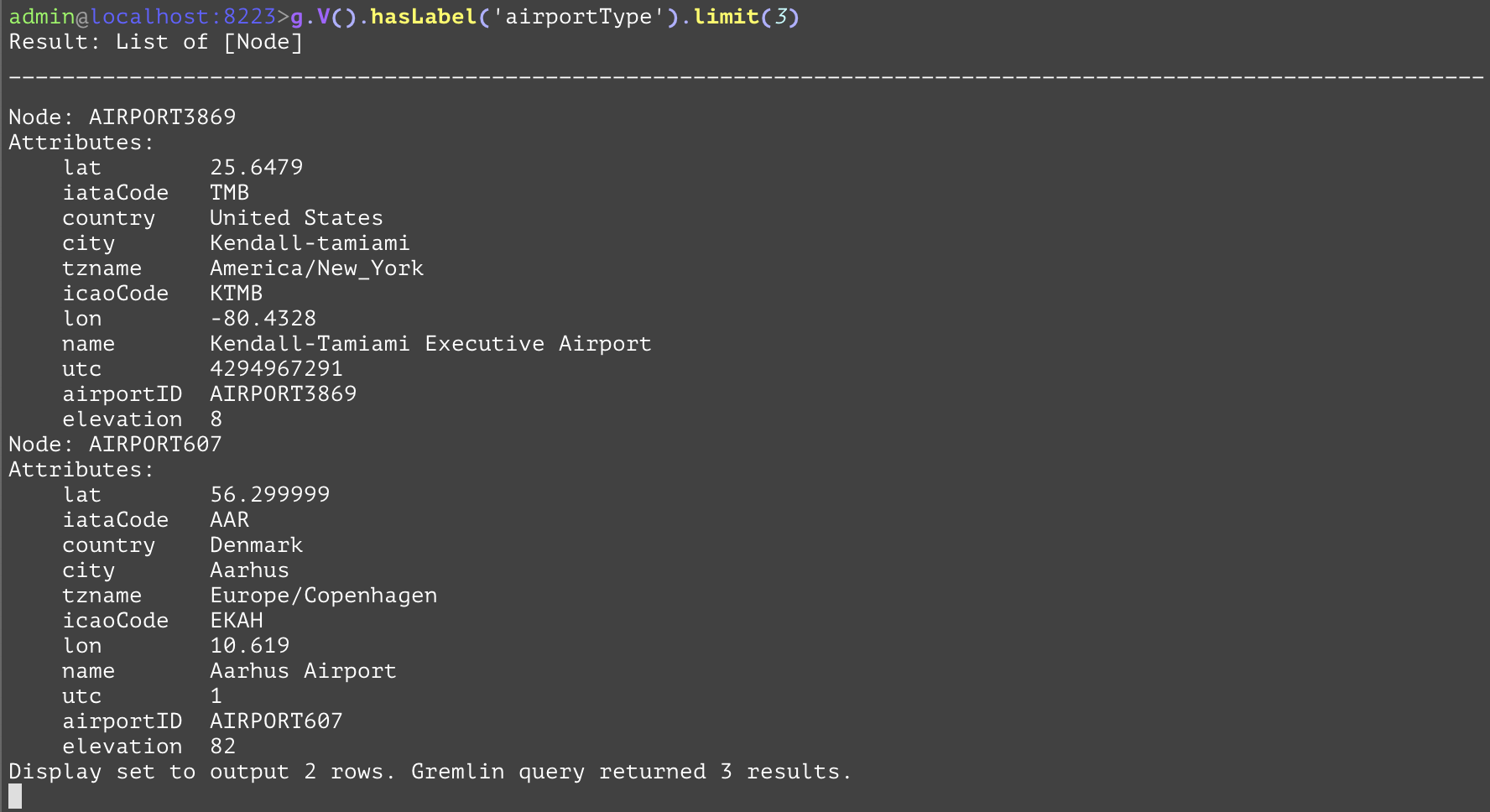
Only allows the first <traversal_limit> traversals to pass to the next step. The following example will only allow three arbitrary airports to return from the query. | |||
Args | Name | Type | Description |
traversal_limit | integer | The maximum number of traversals to pass on to the next step. | |
GQL | gremlin://g.V().hasLabel('airportType').limit(3); | ||
SQL | SELECT * FROM airportType LIMIT(3); | ||
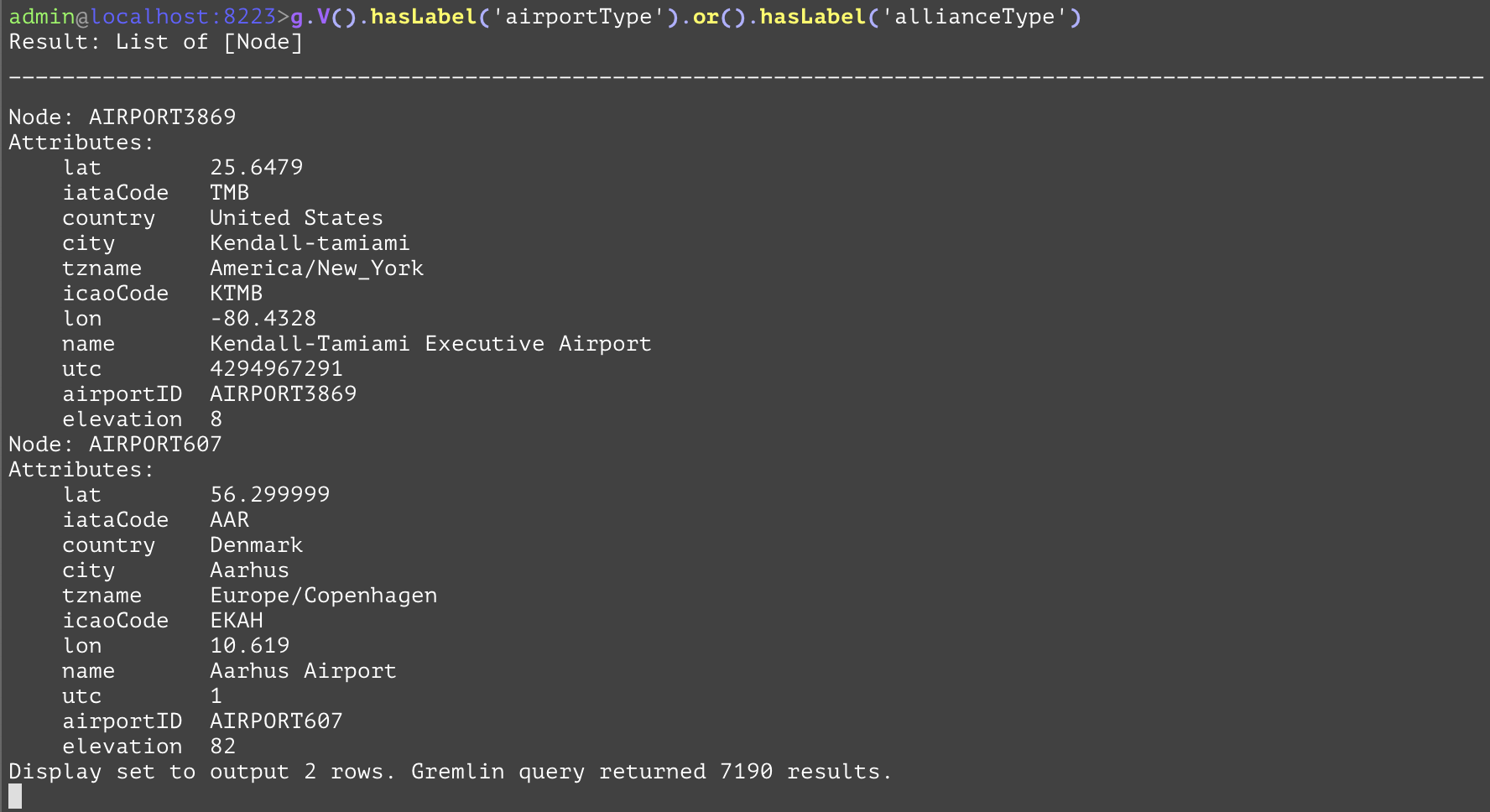
Allows the union of entities that pass the filters to pass on to the next step. This can be fairly useful when getting the union of distinct nodetypes. In the following example all of the nodes of both the "airportType" and the "allianceType" are retrieved. The SQL equivalent is again very verbose compared to its gremlin equivalent. | |||
GQL | gremlin://g.V().hasLabel('airportType').or().hasLabel('allianceType'); | ||
SQL | SELECT airportId, city, country, elevation, iataCode, iacoCode, lat, lon, name, tzname, utc, null AS allianceID, null AS launchDate, null AS website FROM airportType UNION SELECT null AS airportId, null AS city, null AS country, null AS elevation, null AS iataCode, null AS iacoCode, null AS lat, null AS lon, name, null AS tzname, null AS utc, allianceID, launchDate, website FROM allianceType; | ||
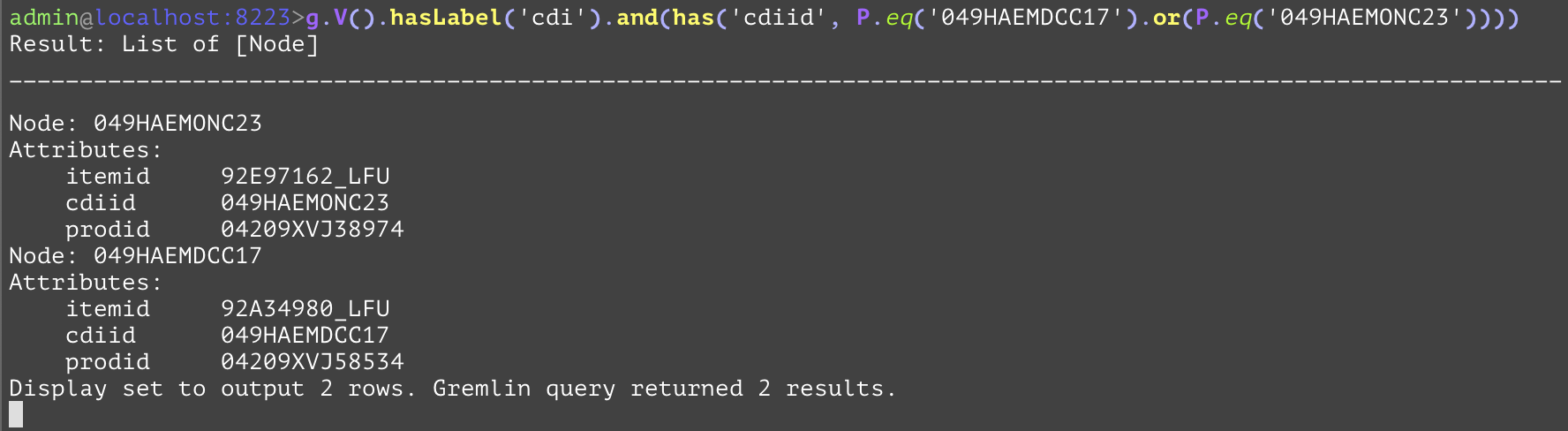
Allows the explicit and-ing of multiple has steps. Usually, this step is not required as multiple ”has” steps in sequence are implicitly and-ed together. | |||
Args | Name | Type | Description |
traversal_steps | steps or expression | The body of the ”and” statement. | |
GQL | gremlin://g.V().hasLabel(‘cdi’).and(has(‘cdiid’, P.eq(‘049HAEMDCC17’).or(P.eq(‘049HAEMONC23’)))); | ||
SQL | SELECT * FROM cdi WHERE cdiid=‘049HAEMDCC17’ OR cdiid=‘049HAEMONC23’; | ||
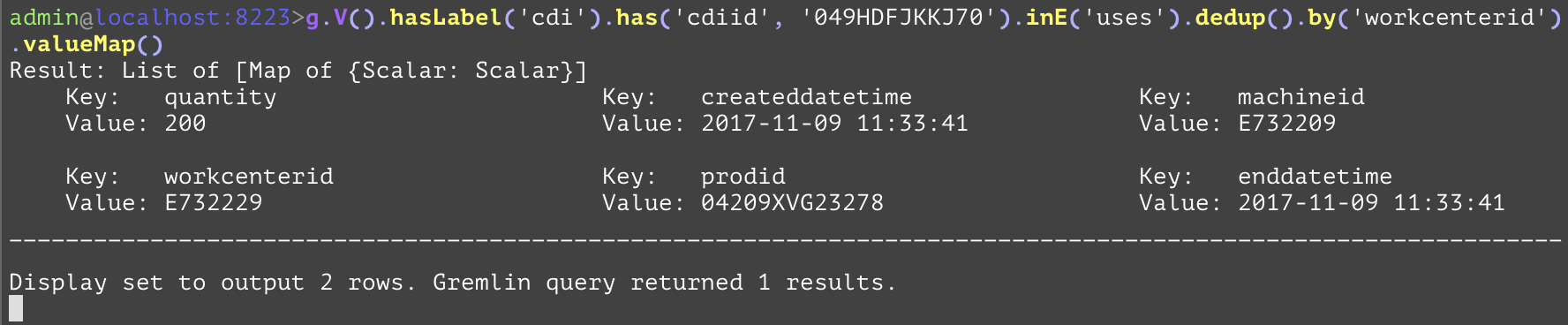
Removes duplicate elements from the traversals present at the current step. When acting on entities (nodes or edges) a proceeding "by" step can be specified to remove distinct entities that have overlapping attribute values (by specifying within the "by" step the attribute). The first example removes duplicate airports from the arriving airports where the SFO airport is the departing airport. In the second example, the "dedup" step is used on the "uses" edges that are inbound to the container with "cdiid" of "049HDFJKKJ70" and removes duplicates based on the "workcenterid" of those edges. While there is no direct SQL analog, one that retrieves the same information in a different format is shown below. | |||
GQL | gremlin://g.V().hasLabel('airportType').has('iataCode', 'SFO').out('routeType').dedup().values('iataCode'); | ||
gremlin://g.V().hasLabel('cdi').has('cdiid', '049HDFJKKJ70').inE('uses').dedup().by('workcenterid').valueMap(); | |||
SQL | SELECT DISTINCT(destAirport.iataCode) FROM airportType AS srcAirport INNER JOIN routeType AS hop ON hop.srcAirportId=srcAirport.airportId INNER JOIN airportType AS destAirport ON hop.destAirportId=destAirport.airportId WHERE srcAirport.iataCode='SFO'; | ||
SELECT DISTINCT(used.workcenterid), used.quantity, used.prodid, used.machineid, used.createddatetime, used.enddatetime FROM cdi AS cd INNER JOIN uses AS used ON used.destCdiid=cd.cdiid WHERE cd.cdiid='049HDFJKKJ70'; | |||
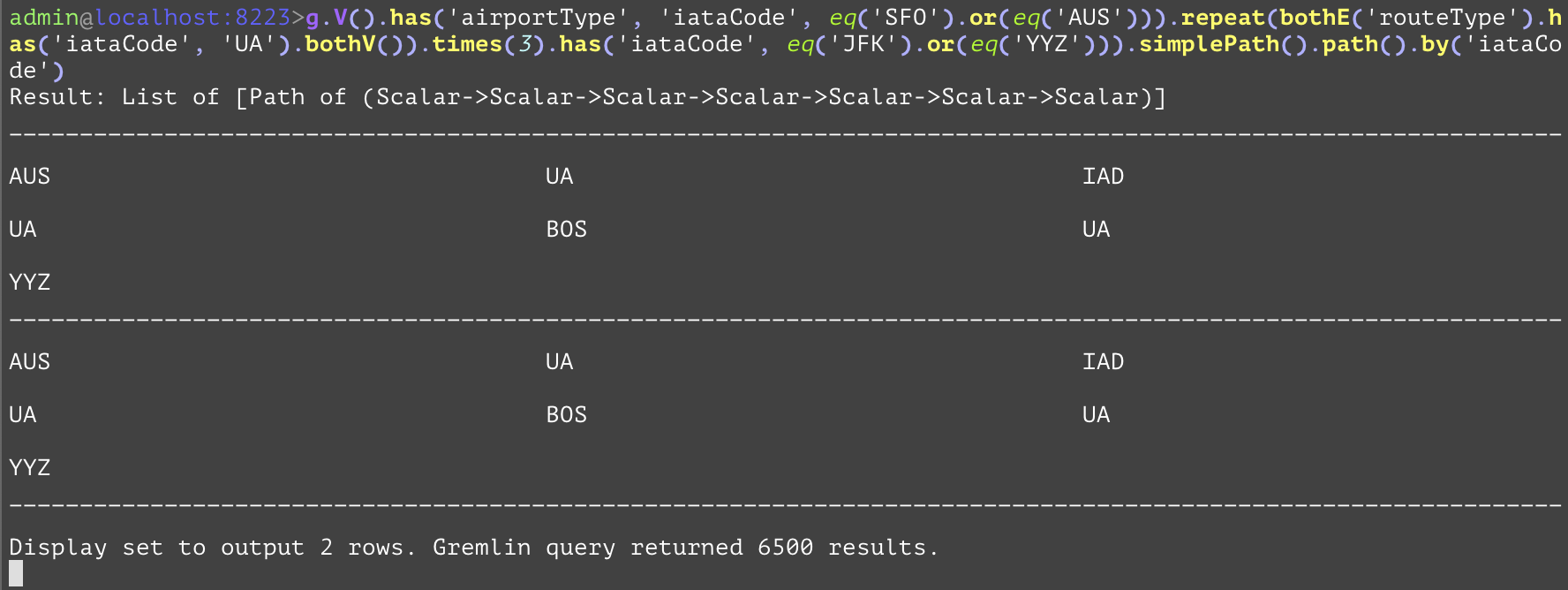
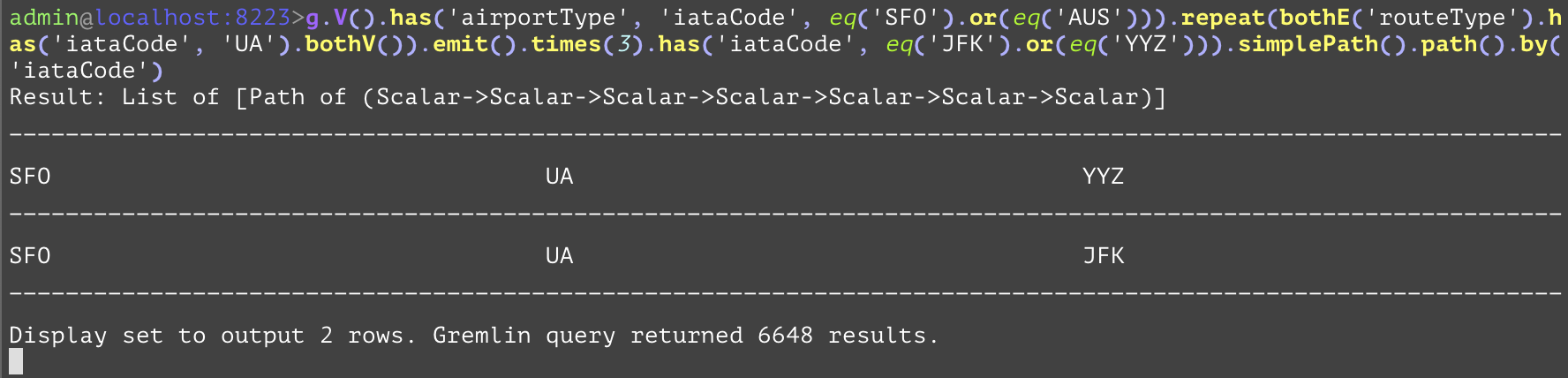
Compares the values, and if they are equal, the step will evaluate to True, otherwise False. The "eq" inside of the example is used as a predicate to convert the raw values of "SFO", "AUS", "JFK", and "YYZ" for use by the "or" step predicate. | |||
Args | Name | Type | Description |
value | string or number | The value for determining whether the filter step passes. | |
GQL | gremlin://g.V().has('airportType', 'iataCode', eq('SFO').or(eq('AUS'))).repeat(bothE('routeType').has('iataCode', 'UA').bothV()).times(3).has('iataCode', eq('JFK').or(eq('YYZ'))).simplePath().path().by('iataCode'); | ||
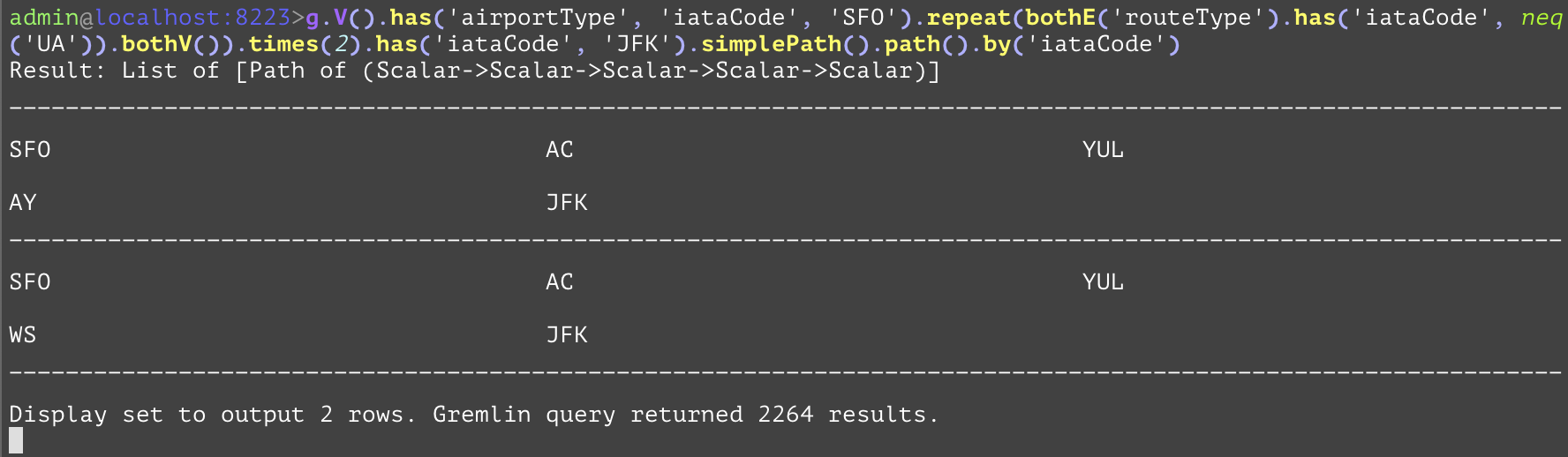
Compares the values, and if they are not equal, the step will evaluate to True, otherwise False. The "neq" inside of the example is used as a predicate to prevent any "UA" from being included. | |||
Args | Name | Type | Description |
value | string or number | The value for determining whether the filter step passes. | |
GQL | gremlin://g.V().has('airportType', 'iataCode', 'SFO').repeat(bothE('routeType').has('iataCode', neq('UA')).bothV()).times(2).has('iataCode', 'JFK').simplePath().path().by('iataCode'); | ||
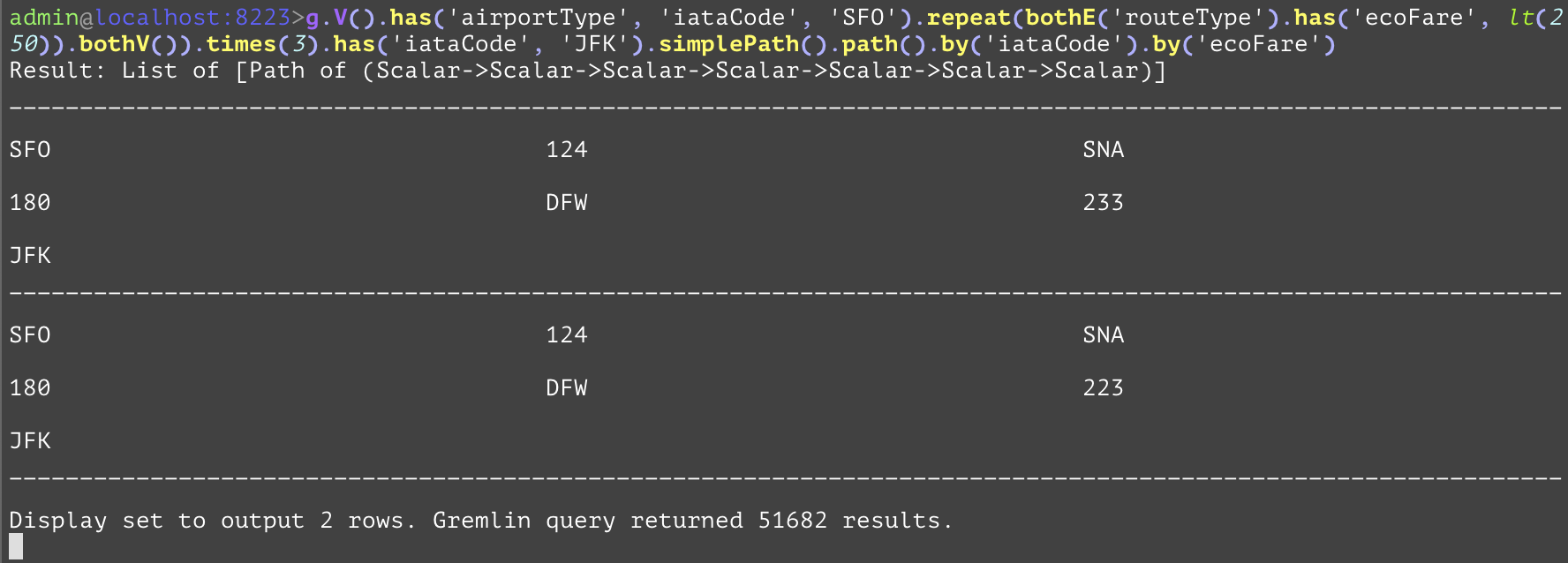
Compares the values, and if the current value is less than the value of the parameter, the step will evaluate to True, otherwise False. The "lt" inside of the example is used to compare the route’s economy fare and not include the route if the fare is over 250. | |||
Args | Name | Type | Description |
value | string or number | The value for determining whether the filter step passes. | |
GQL | gremlin://g.V().has('airportType', 'iataCode', 'SFO').repeat(bothE('routeType').has('ecoFare', lt(250)).bothV()).times(3).has('iataCode', 'JFK').simplePath().path().by('iataCode').by('ecoFare'); | ||
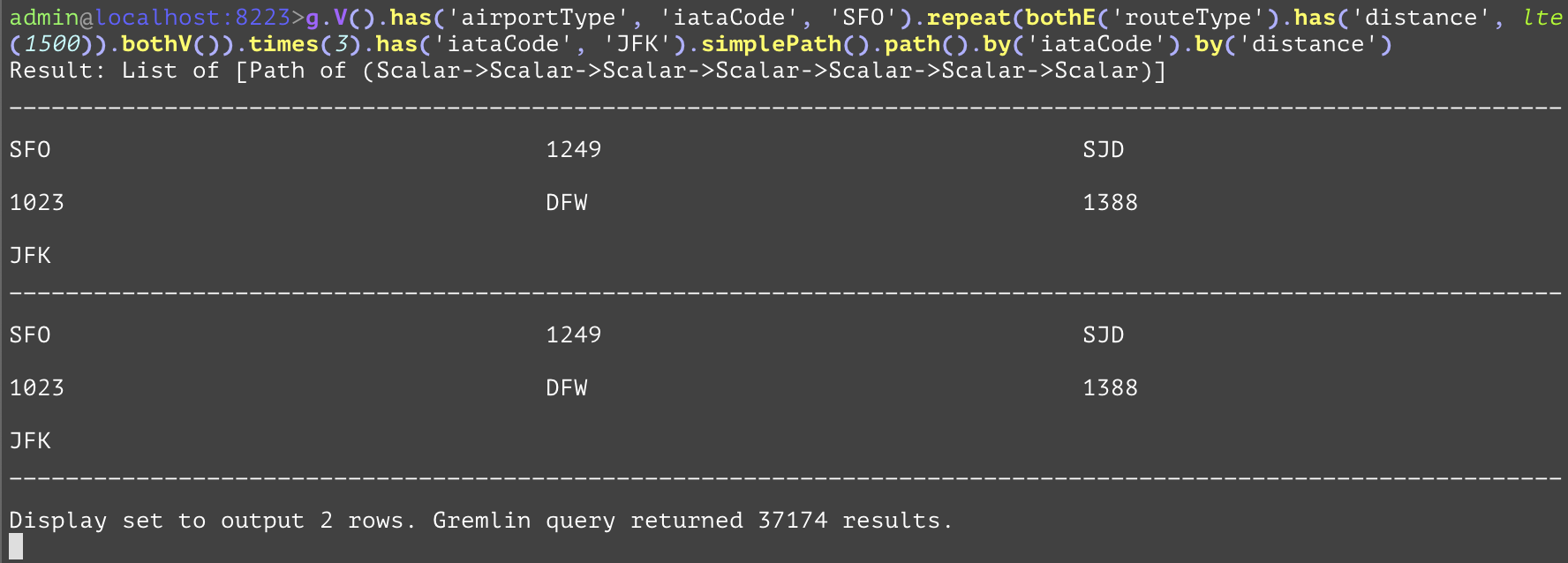
Compares the values, and if the current value is less than or equal to the value of the parameter, the step will evaluate to True, otherwise False. The "lte" inside of the example is used as a way to only allow routes of distance less than or equal to 1500. | |||
Args | Name | Type | Description |
value | string or number | The value for determining whether the filter step passes. | |
GQL | gremlin://g.V().has('airportType', 'iataCode', 'SFO').repeat(bothE('routeType').has('distance', lte(1500)).bothV()).times(3).has('iataCode', 'JFK').simplePath().path().by('iataCode').by('distance'); | ||
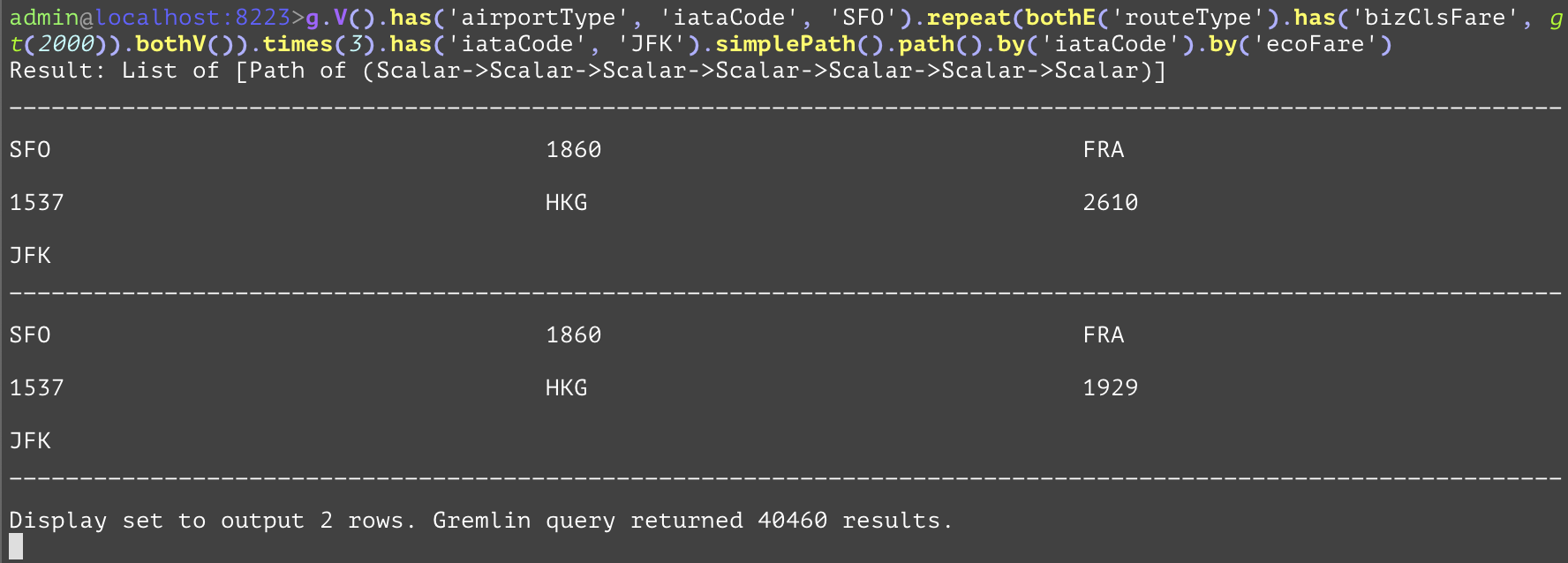
Compares the values, and if the current value is greater than the value of the parameter, the step will evaluate to True, otherwise False. The "gt" inside of the example is used to only allow business class fares greater than 2000 into the returned query. | |||
Args | Name | Type | Description |
value | string or number | The value for determining whether the filter step passes. | |
GQL | gremlin://g.V().has('airportType', 'iataCode', 'SFO').repeat(bothE('routeType').has('bizClsFare', gt(2000)).bothV()).times(3).has('iataCode', 'JFK').simplePath().path().by('iataCode').by('bizClsFare'); | ||
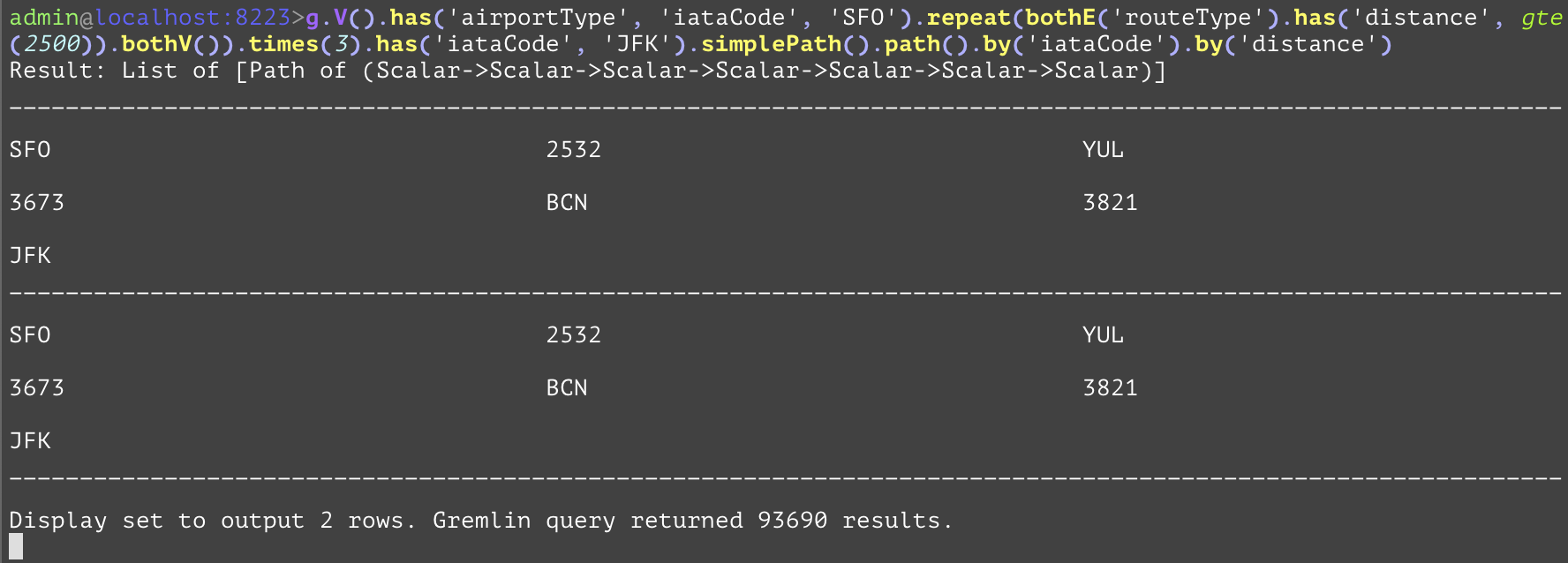
Compares the values, and if the current value is greater than or equal to the value of the parameter, the step will evaluate to True, otherwise False. The "gte" inside of the example is used as a predicate to only allow routes with distance greater than or equal to 2500 to pass. | |||
Args | Name | Type | Description |
value | string or number | The value for determining whether the filter step passes. | |
GQL | gremlin://g.V().has('airportType', 'iataCode', 'SFO').repeat(bothE('routeType').has('distance', gte(2500)).bothV()).times(3).has('iataCode', 'JFK').simplePath().path().by('iataCode').by('distance'); | ||
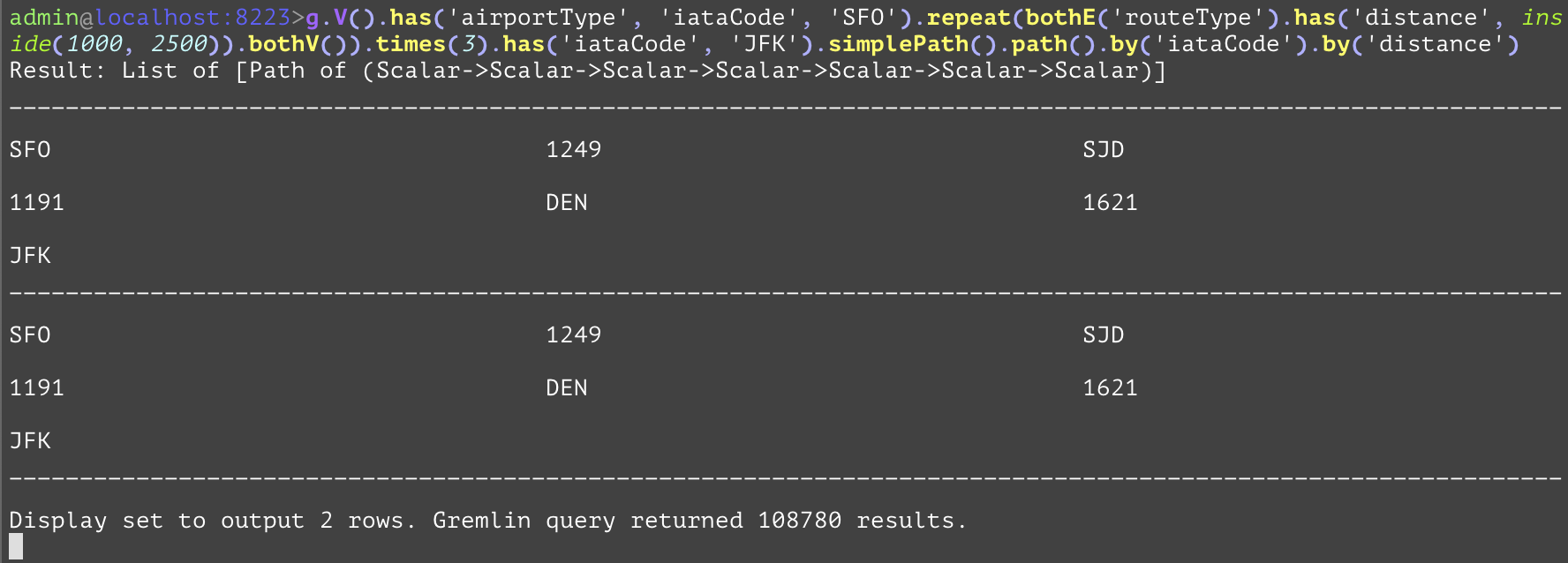
Compares the values, and if the current value is greater than the first parameter and less than the second parameter, the step will evaluate to True, otherwise False. The "inside" inside of the example is used as a predicate to only allow distances between 1000 and 2500 past the filter. | |||
Args | Name | Type | Description |
value1 | string or number | The first value for determining whether the filter step passes. | |
value2 | string or number | The second value for determining whether the filter step passes. | |
GQL | gremlin://g.V().has('airportType', 'iataCode', 'SFO').repeat(bothE('routeType').has('distance', inside(1000, 2500)).bothV()).times(3).has('iataCode', 'JFK').simplePath().path().by('iataCode').by('distance'); | ||
Compares the values, and if the current value is less than the first parameter and greater than the second parameter, the step will evaluate to True, otherwise False. The "outside" inside of the example is used as a predicate to filter out any routes with distance between 1000 and 2500. | |||
Args | Name | Type | Description |
value1 | string or number | The first value for determining whether the filter step passes. | |
value2 | string or number | The second value for determining whether the filter step passes. | |
GQL | gremlin://g.V().has('airportType', 'iataCode', 'SFO').repeat(bothE('routeType').has('distance', outside(1000, 2500)).bothV()).times(3).has('iataCode', 'JFK').count(); | ||
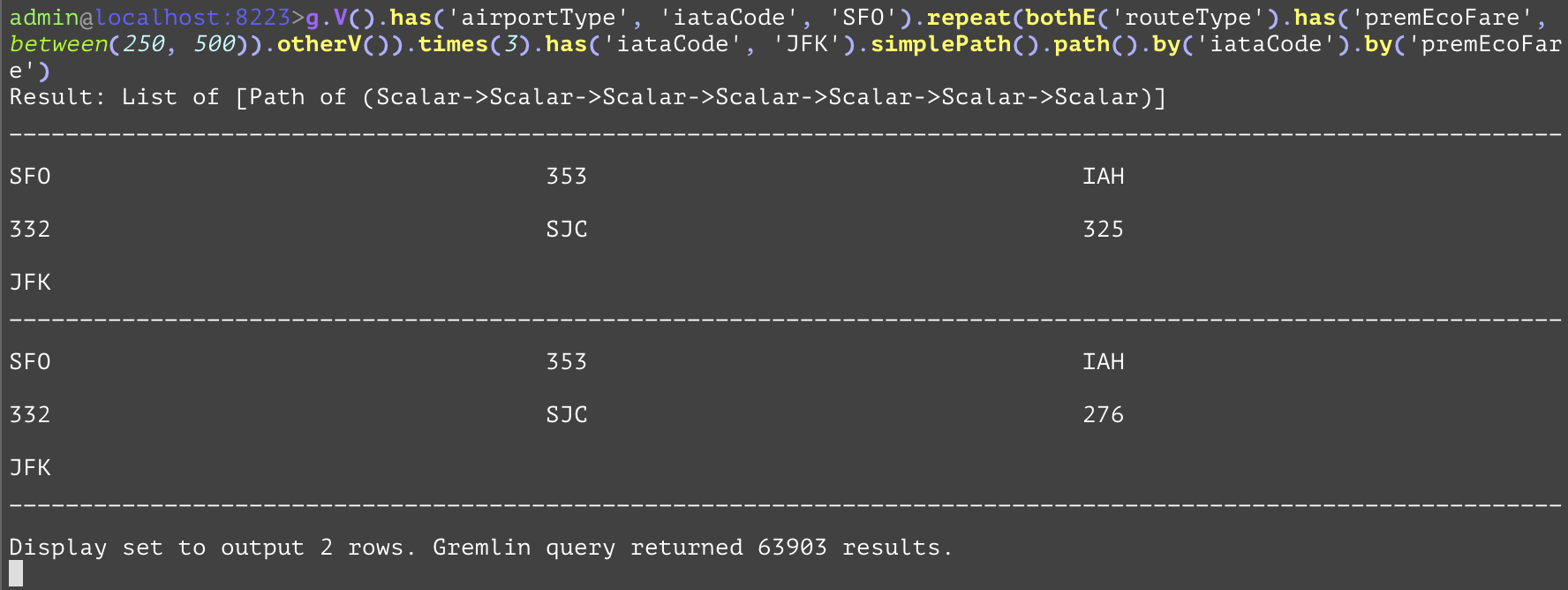
Compares the values, and if the current value is greater than or equal to the first parameter and less than the second parameter, the step will evaluate to True, otherwise False. The "between" inside of the example is used as a predicate to only allow premium economy fares between 250 inclusive and 500 exclusive into the result. | |||
Args | Name | Type | Description |
value1 | string or number | The first value for determining whether the filter step passes. | |
value2 | string or number | The second value for determining whether the filter step passes. | |
GQL | gremlin://g.V().has('airportType', 'iataCode', 'SFO').repeat(bothE('routeType').has('premEcoFare', between(250, 500)).otherV()).times(3).has('iataCode', 'JFK').simplePath().path().by('iataCode').by('premEcoFare'); | ||
Counts the number of traversals that get to this step. In example 1, it will get the number of airport type nodes in the database. For example 2, it will get the number of entries in a 2-join operation. The SQL equivalent is much more verbose for the second query when compared to the simple gremlin query. | |||
GQL | gremlin://g.V().hasLabel('airportType').count(); | ||
gremlin://g.V().hasLabel('airportType').out().out().count(); | |||
SQL | SELECT COUNT(airportId) FROM airportType; | ||
SELECT COUNT(destAirport.airportId) FROM airportType AS srcAirport JOIN routeType AS firstHop ON firstHop.fromAirportId=srcAirport.airportId JOIN airportType AS interAirport ON firstHop.toAirportId=interAirport.airportId JOIN routeType AS secondHop ON secondHop.fromAirportId=interAirport.airportId JOIN airportType AS destAirport ON secondHop.toAirportId=destAirport; | |||
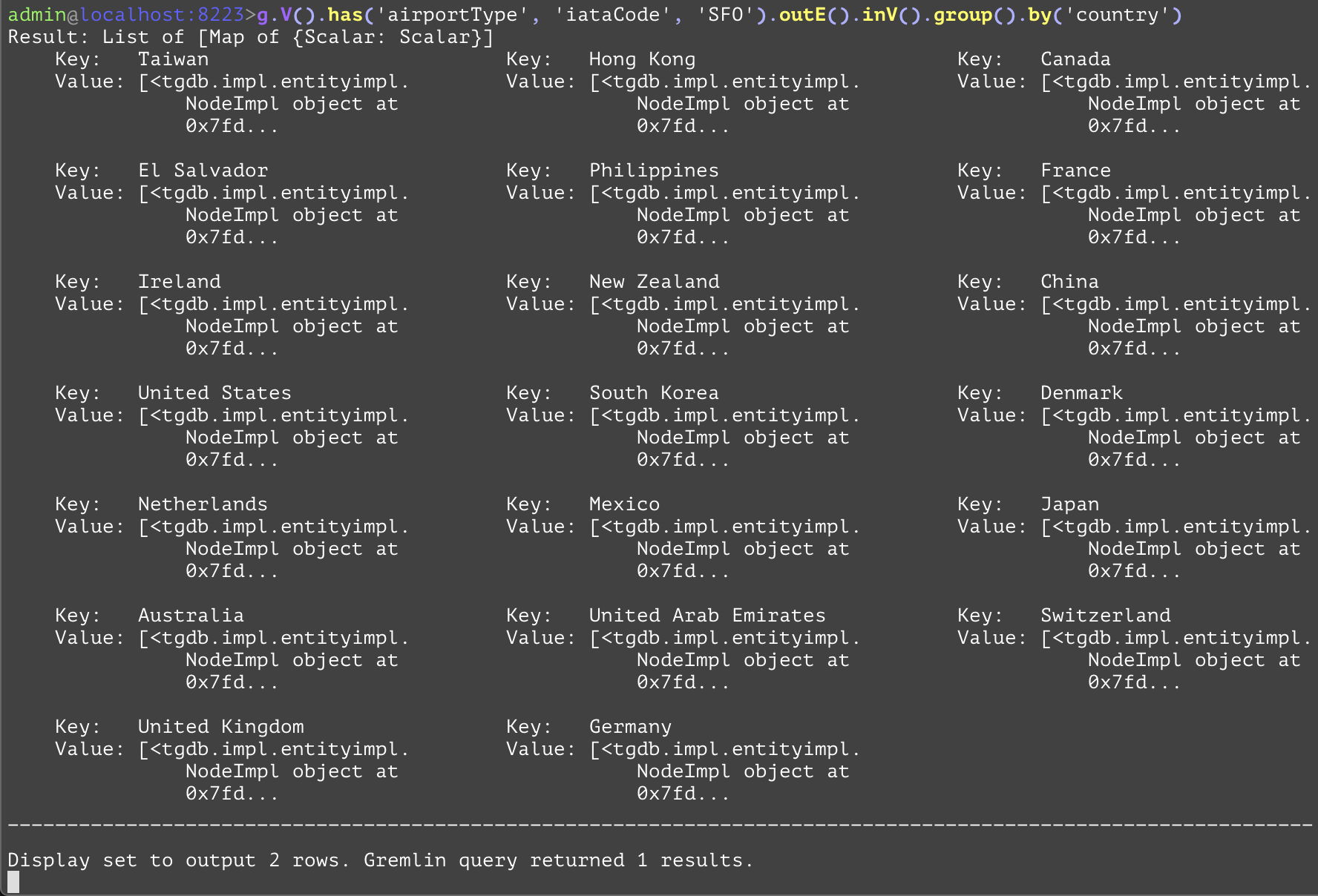
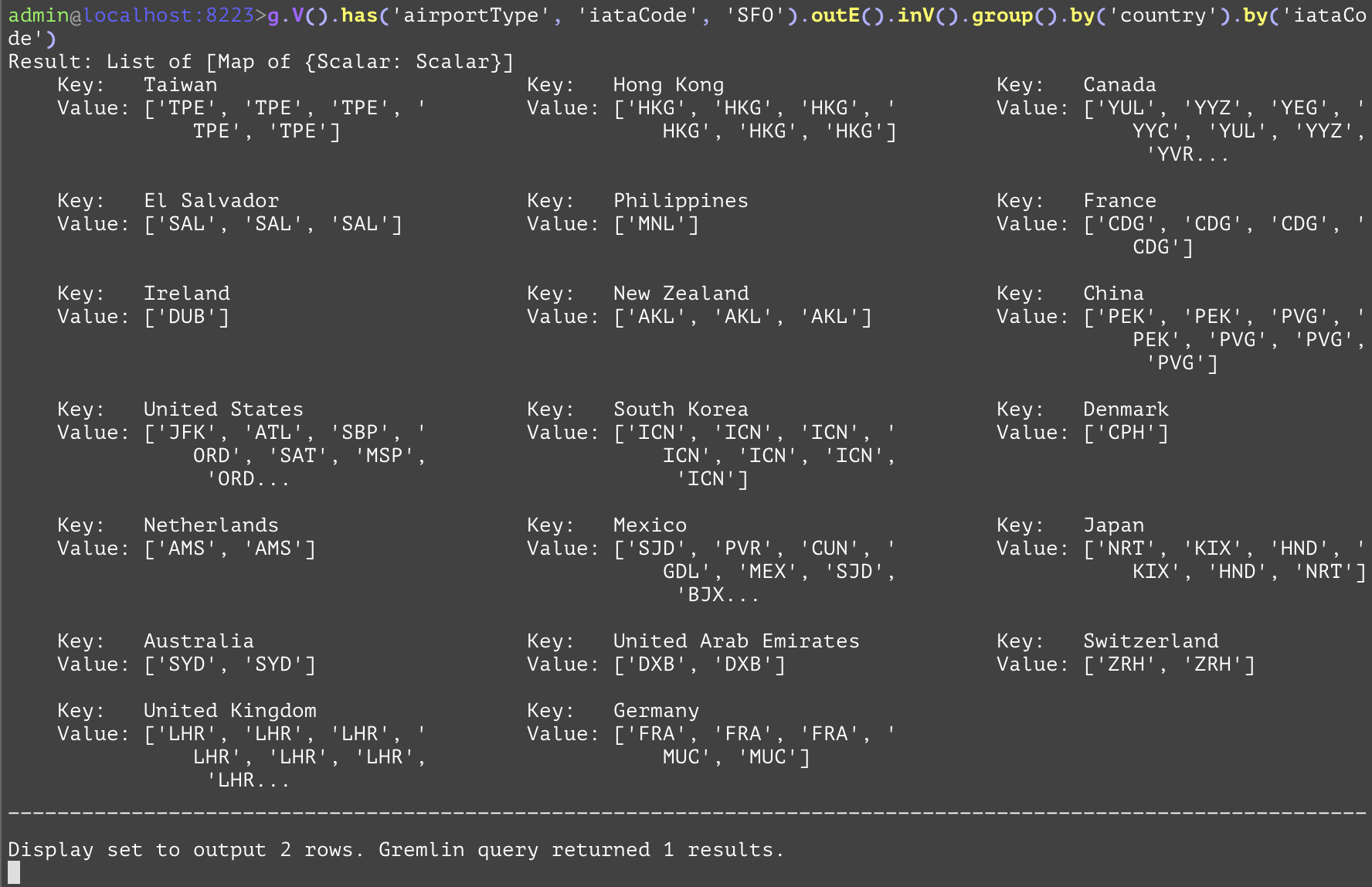
Groups together entities in the current traversal into a dictionary with keys being the attribute value specified in the first subsequent "by" step, and the values being a list of the entities that have the attribute with that value. Another "by" step would specify what each entity should be represented in the list. While there is no direct SQL analog, the examples below have analogs that retrieve the same information in a different format as shown below. In the first example, this will group all outbound destinations from flights originating at the airport SFO based on the country of the destination. In the second example, the list for each country will only contain the IATA codes for the airports within that country, instead of the entity objects. This can be used to reduce the amount of data sent over the network if all that is required are the IATA codes. | |||
GQL | gremlin://g.V().has('airportType', 'iataCode', 'SFO').outE().inV().group().by('country'); | ||
gremlin://g.V().has('airportType', 'iataCode', 'SFO').outE().inV().group().by('country').by('iataCode'); | |||
SQL | SELECT dest.* FROM airportType AS src INNER JOIN routeType AS hop ON hop.srcAirportId=src.airportId INNER JOIN airportType AS dest ON hop.destAirportId=dest.airportId WHERE src.iataCode='SFO' GROUP BY dest.airportId ORDER BY dest.country; | ||
SELECT dest.iataCode, dest.country FROM airportType AS src INNER JOIN routeType AS hop ON hop.srcAirportId=src.airportId INNER JOIN airportType AS dest ON hop.destAirportId=dest.airportId WHERE src.iataCode='SFO' GROUP BY dest.iataCode ORDER BY dest.country; | |||
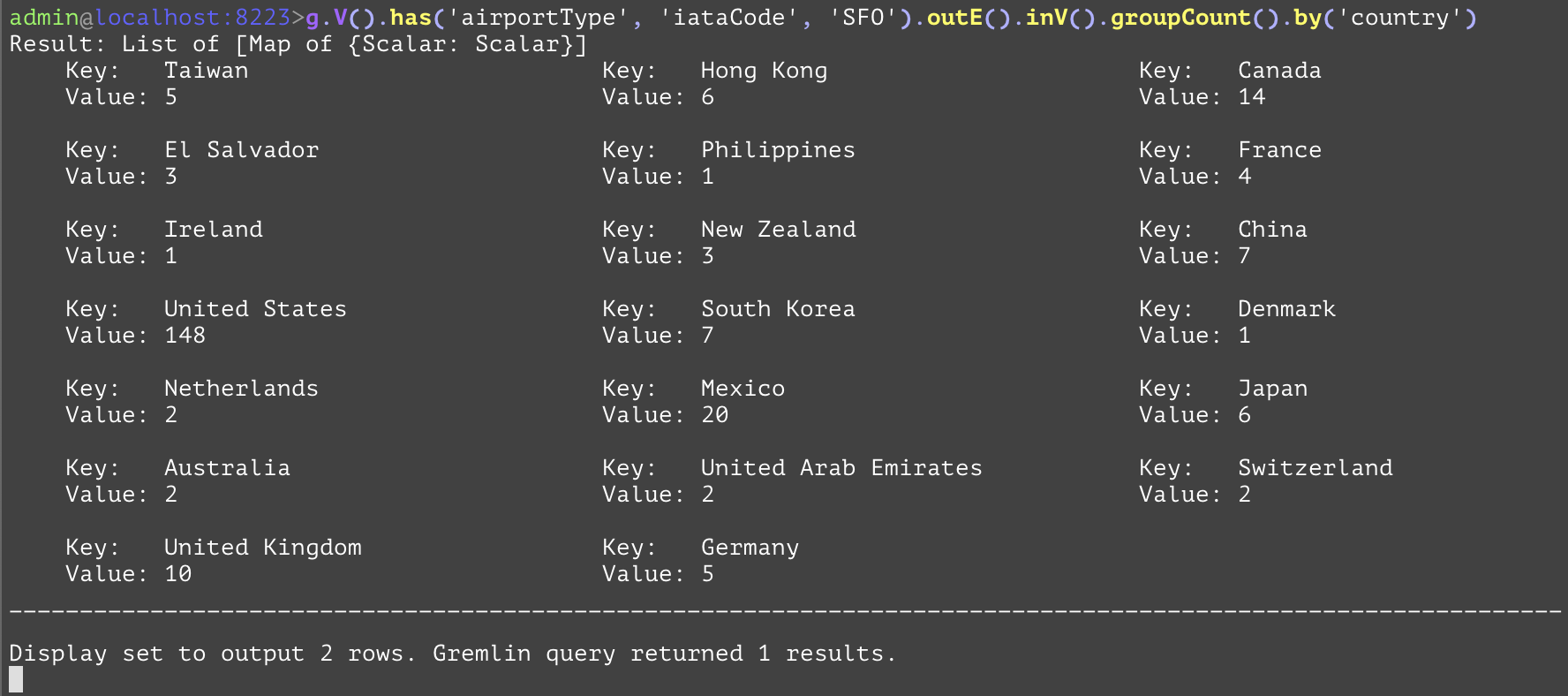
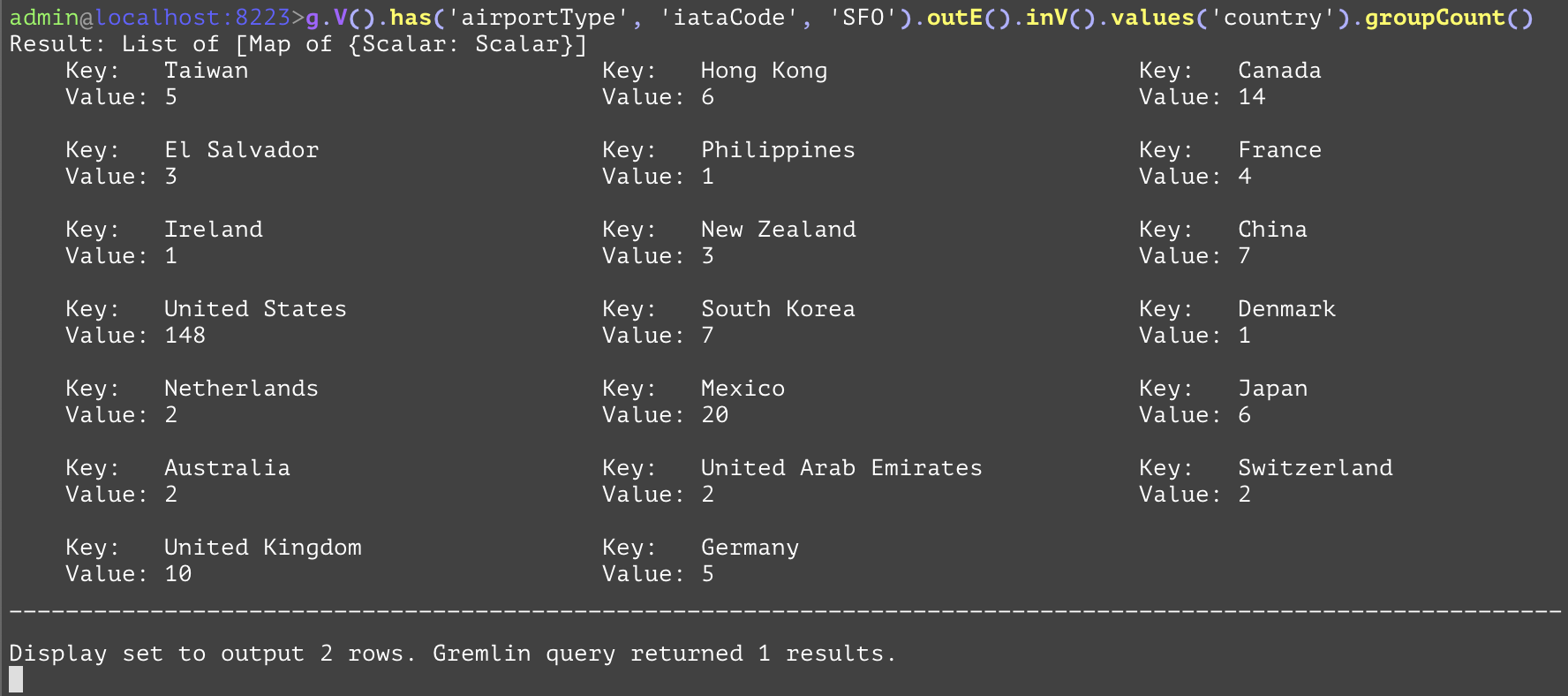
Groups together entities in the current traversal into a dictionary with keys being the attribute value specified in the first subsequent "by" if the current traversal is entities otherwise will group based on the values, and the values being an integer value for the number of times that value occurs. While in practice both examples have the same result, the difference is that the first one has entities as that point in the traversal and requires a "by" step to reduce those entities into something that can be counted and grouped together. The second example, in contrast, reduces each airport entity into its country, and then passes that result onto the "groupCount" step which no longer requires a "by" step to reduce the airport entities to a simpler value. Both examples count and display in a map the countries of the airports of the destination airports for flights originating from the SFO airport. Both examples have a single similar SQL equivalent. | |||
GQL | gremlin://g.V().has('airportType', 'iataCode', 'SFO').outE().inV().groupCount().by('country'); | ||
gremlin://g.V().has('airportType', 'iataCode', 'SFO').outE().inV().values('country').groupCount(); | |||
SQL | SELECT destAirport.country, COUNT(destAirport.country) FROM airportType AS srcAirport INNER JOIN routeType AS hop ON hop.fromAirportId=srcAirport.airportId INNER JOIN airportType AS destAirport ON hop.toAirportId=destAirport.airportId WHERE srcAirport.iataCode='SFO' GROUP BY destAirport.country; | ||
SELECT destAirport.country, COUNT(destAirport.country) FROM airportType AS srcAirport INNER JOIN routeType AS hop ON hop.fromAirportId=srcAirport.airportId INNER JOIN airportType AS destAirport ON hop.toAirportId=destAirport.airportId WHERE srcAirport.iataCode='SFO' GROUP BY destAirport.country; | |||
Gets the maximum element value out of the current traversal. Only works for numbers. In the following example, the query gets the maximum distance flight where SFO is the departing airport. | |||
GQL | gremlin://g.V().hasLabel('airportType').has('iataCode', 'SFO').outE('routeType').has('iataCode', 'UA').values('distance').max(); | ||
SQL | SELECT MAX(hop.distance) FROM airportType AS srcAirport INNER JOIN routeType AS hop ON hop.fromAirportId=srcAirport.airportId WHERE srcAirport.iataCode='SFO'; | ||
Gets the minimum element value out of the current traversal. Only works for numbers. In the following example, the query gets the minimum distance flight where SFO is the departing airport. | |||
GQL | gremlin://g.V().hasLabel('airportType').has('iataCode', 'SFO').outE('routeType').has('iataCode', 'UA').values('distance').min(); | ||
SQL | SELECT MIN(hop.distance) FROM airportType AS srcAirport INNER JOIN routeType AS hop ON hop.fromAirportId=srcAirport.airportId WHERE srcAirport.iataCode='SFO'; | ||
Gets the arithmetic mean element value out of the current traversal. Only works for numbers. In the following example, the query gets the mean (average) distance flight where SFO is the departing airport. | |||
GQL | gremlin://g.V().hasLabel('airportType').has('iataCode', 'SFO').outE('routeType').has('iataCode', 'UA').values('distance').mean(); | ||
SQL | SELECT AVG(hop.distance) FROM airportType AS srcAirport INNER JOIN routeType AS hop ON hop.fromAirportId=srcAirport.airportId WHERE srcAirport.iataCode='SFO'; | ||
Gets the sum of the elements at the current traversal. Only works for numbers. In the following example, the query gets the sum of all of the distances of flight where SFO is the departing airport. | |||
GQL | gremlin://g.V().hasLabel('airportType').has('iataCode', 'SFO').outE('routeType').has('iataCode', 'UA').values('distance').sum(); | ||
SQL | SELECT SUM(hop.distance) FROM airportType AS srcAirport INNER JOIN routeType AS hop ON hop.fromAirportId=srcAirport.airportId WHERE srcAirport.iataCode='SFO'; | ||
Sorts the preceding traversal based on the entity or value at the current step. A single successive "by" step to specify the attribute to sort on is required when the current traversal is an entity. A subsequent "by" step (or the second argument when specifying which attribute of an entity to sort on) can also specify the direction (either "asc" or "desc"), which by default is ascending. Both examples accomplish the same result: sort all arriving airports by their IATA codes of flights departing from the SFO airport. However, they do this task differently. In the first example, this is accomplished by sorting the airport entities on their "iataCode" attribute, and then extracting the "iataCode" attribute of each entity. Whereas for the second example, the query first extracts the "iataCode" attribute from each entity, creating a list, and then sorting that list. The SQL equivalent is shown below. | |||
GQL | gremlin://g.V().has('airportType','iataCode','SFO').out().order().by('iataCode').values('iataCode'); | ||
gremlin://g.V().has('airportType','iataCode','SFO').out().values('iataCode').order(); | |||
SQL | SELECT dest.iataCode FROM airportType AS src INNER JOIN routeType AS hop ON hop.srcAirportId=src.airportId INNER JOIN airportType AS dest ON hop.destAirportId=dest.airportId WHERE src.iataCode='SFO' ORDER BY dest.iataCode; | ||
SELECT dest.iataCode FROM airportType AS src INNER JOIN routeType AS hop ON hop.srcAirportId=src.airportId INNER JOIN airportType AS dest ON hop.destAirportId=dest.airportId WHERE src.iataCode='SFO' ORDER BY dest.iataCode; | |||
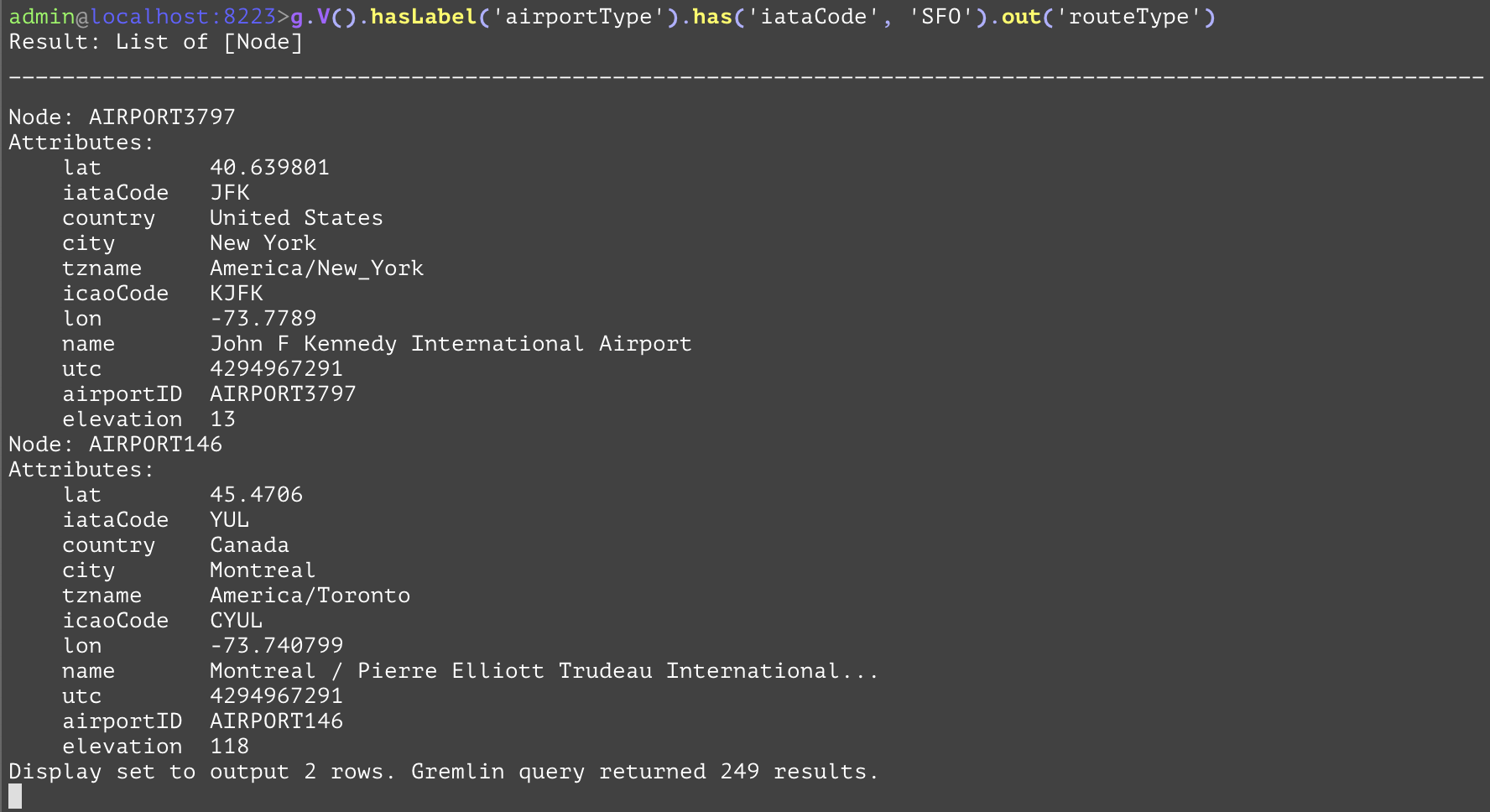
Traverses to all nodes from the current traversal using all outbound edges. For a given node, this is equivalent to traversing to all of the outbound edges' "to" nodes that have the current node as a "from" vertex. In the following example, the query is asking for all the destinations of all out-bound flights (departures) from the SFO airport. The SQL equivalent is a bit verbose, and requires an inner join. Whilst this step is join-free in GQL. | |||
Args | Name | Type | Description |
typenames | string[] | Optionally the edge type name(s) (aka edge label(s)) of the edges to traverse across. When specified, this will act as a joint outE().hasLabel(<typenames>).inV() | |
GQL | gremlin://g.V().hasLabel('airportType').has('iataCode', 'SFO').out('routeType'); | ||
SQL | SELECT dest.* FROM airportType AS src INNER JOIN routeType AS hop ON hop.srcAirportId=src.airportId INNER JOIN airportType AS dest ON hop.destAirportId=dest.airportId WHERE src.iataCode='SFO'; | ||
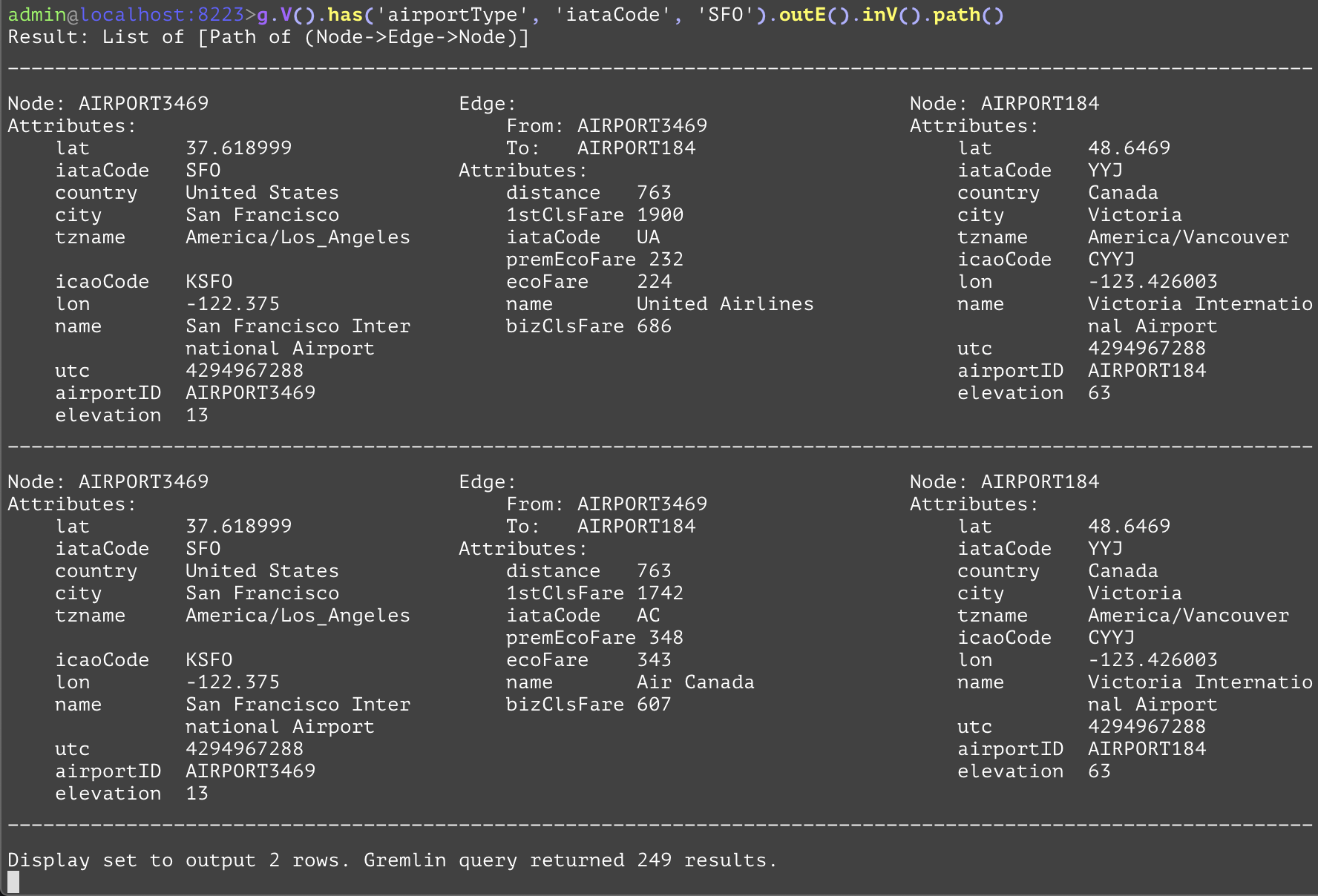
Traverses to all outbound edges from the current traversal. For a given node, this is equivalent to traversing to all of the edges that have the current node as a "from" vertex. The following example uses the "outE" step to include the outbound flight edges and the destinations of the flights outbound (departing) from SFO and their destination airports, grouped within a single path element. This allows the user to acquire useful information from the edges, such as the distance of the flight or the fare's cost, while also getting both of the departing and arriving destinations. | |||
Args | Name | Type | Description |
typenames | string[] | Optionally the edge type name(s) (aka edge label(s)) of the edges to traverse across. When specified, this will act as a joint outE().hasLabel(<typenames>) | |
GQL | gremlin://g.V().has('airportType', 'iataCode', 'SFO').outE().inV().path(); | ||
SQL | SELECT * FROM airportType AS src INNER JOIN routeType AS hop ON hop.srcAirportId=src.airportId INNER JOIN airportType AS dest ON hop.destAirportId=dest.airportId WHERE src.iataCode='SFO'; | ||
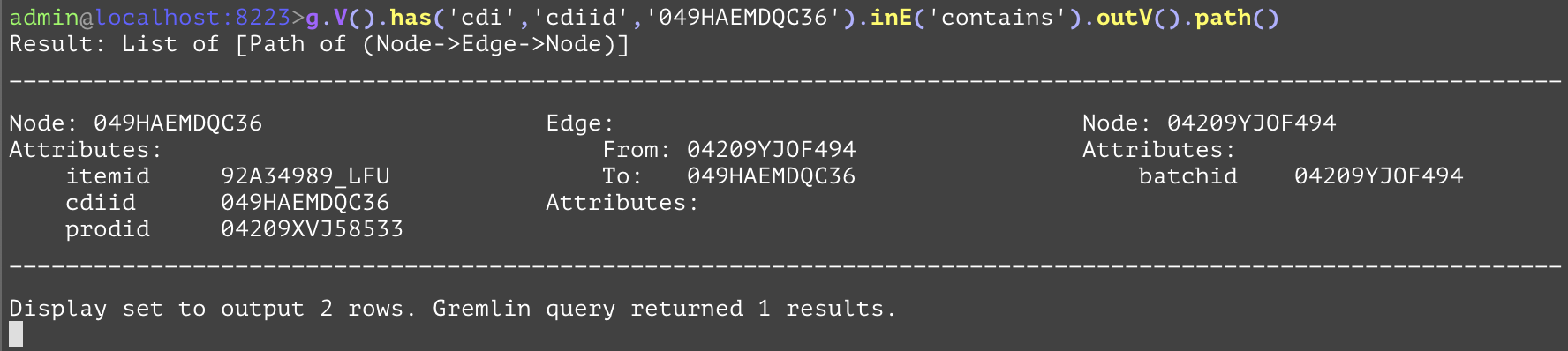
Traverses to all outbound vertices from the current traversal. For a given edge, this is equivalent to traversing to its "from" node. In the following example the outV() step is used to get the vertex that the "contains" edge is coming from. This gets all of the batches which contain the part with "cdiid" "049HAEMDQC36". | |||
GQL | gremlin://g.V().has('cdi','cdiid','049HAEMDQC36').inE('contains').outV().path(); | ||
SQL | SELECT * FROM cdi AS base INNER JOIN contains AS cont ON cont.destCdiid=base.cdiid INNER JOIN cdibatch AS batch ON cont.srcBatchid=batch.batchid WHERE base.cdiid='049HAEMDQC36'; | ||
Traverses to all nodes from the current traversal using all inbound edges. For a given node, this is equivalent to traversing to all of the inbound edges' "from" nodes that have the current node as a "to" vertex. In the following example the in() is getting all of the batches which contain the part with "cdiid" of value "049HAEMDQC36". The SQL equivalent becomes verbose as the query does more traversals. It increases the number of joins. | |||
Args | Name | Type | Description |
typenames | string[] | Optionally the edge type name(s) (aka edge label(s)) of the edges to traverse across. When specified, this will act as a joint inE().hasLabel(<typenames>).outV() | |
GQL | gremlin://g.V().has('cdi','cdiid','049HAEMDQC36').in('contains').has('batchid','04209YJOF494'); | ||
SQL | SELECT batch.* FROM cdi AS base INNER JOIN contains AS cont ON cont.destCdiid=base.cdiid INNER JOIN cdibatch AS batch ON cont.srcBatchid=batch.batchid WHERE base.cdiid='049HAEMDQC36' AND batch.batchid='04209YJOF494'; | ||
Traverses to all inbound edges from the current traversal. For a given node, this is equivalent to traversing to all of the edges that have the current node as a "to" vertex. For the following example, the "inE" step is used to get the edge connection for the inbound edges of containers that use the container with "cdiid" of "049HDFJKKJ70". | |||
Args | Name | Type | Description |
typenames | string[] | Optionally the edge type name(s) (aka edge label(s)) of the edges to traverse across. When specified, this will act as a joint inE().hasLabel(<typenames>) | |
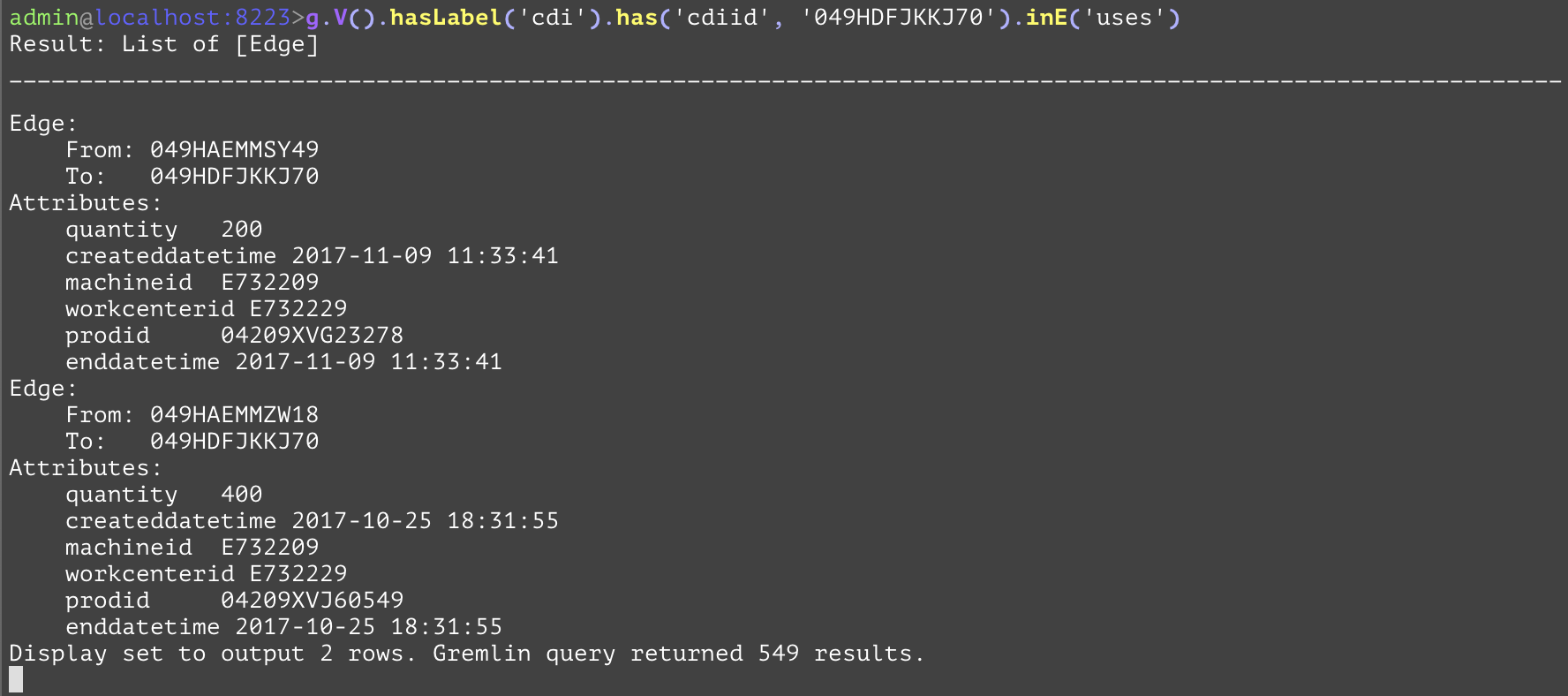
GQL | gremlin://g.V().hasLabel('cdi').has('cdiid', '049HDFJKKJ70').inE('uses'); | ||
SQL | SELECT firstUses.* FROM cdi AS base INNER JOIN uses AS firstUses ON firstUses.srcCdiid = base.cdiid WHERE base.cdiid='049HDFJKKJ70'; | ||
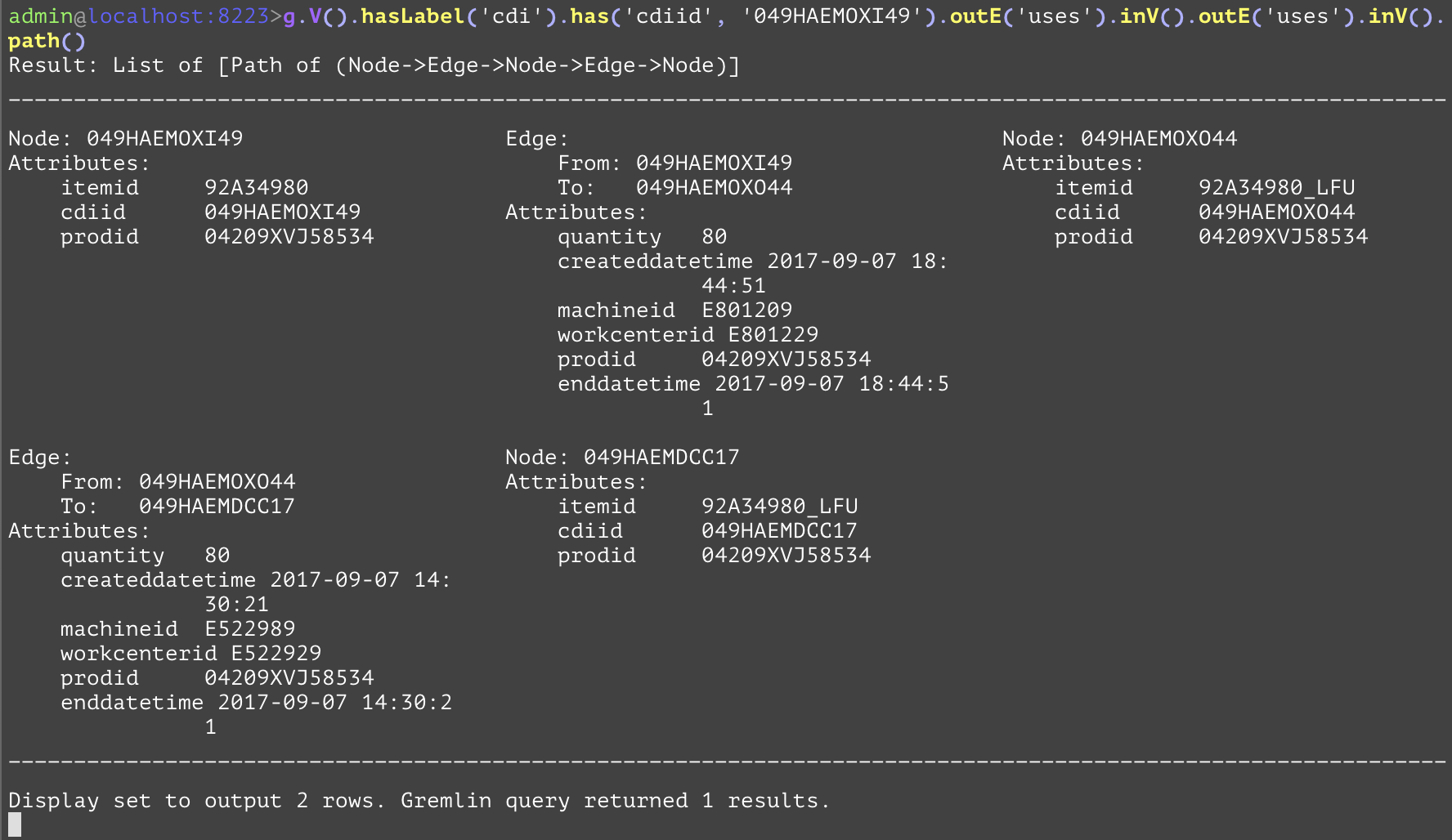
Traverses to all inbound vertices from the current traversal. For a given edge, this is equivalent to traversing to its "to" node. For the following example, the "inV" is used to get the containers which contain the container at the point in the traversal before the outE('uses'). The "outE" steps and "inV" are used in conjunction here to form a path with the included edges. | |||
GQL | gremlin://g.V().hasLabel('cdi').has('cdiid', '049HAEMOXI49').outE('uses').inV().outE('uses').inV().path(); | ||
SQL | SELECT * FROM cdi AS base INNER JOIN uses AS firstUses ON firstUses.srcCdiid=base.cdiid INNER JOIN cdi AS inter ON firstUses.destCdiid=inter.cdiid INNER JOIN uses AS secondUses ON secondUses.srcCdiid=inter.cdiid INNER JOIN cdi AS dest ON secondUses.destCdiid=dest.cdiid WHERE src.cdiid='049HAEMOXI49'; | ||
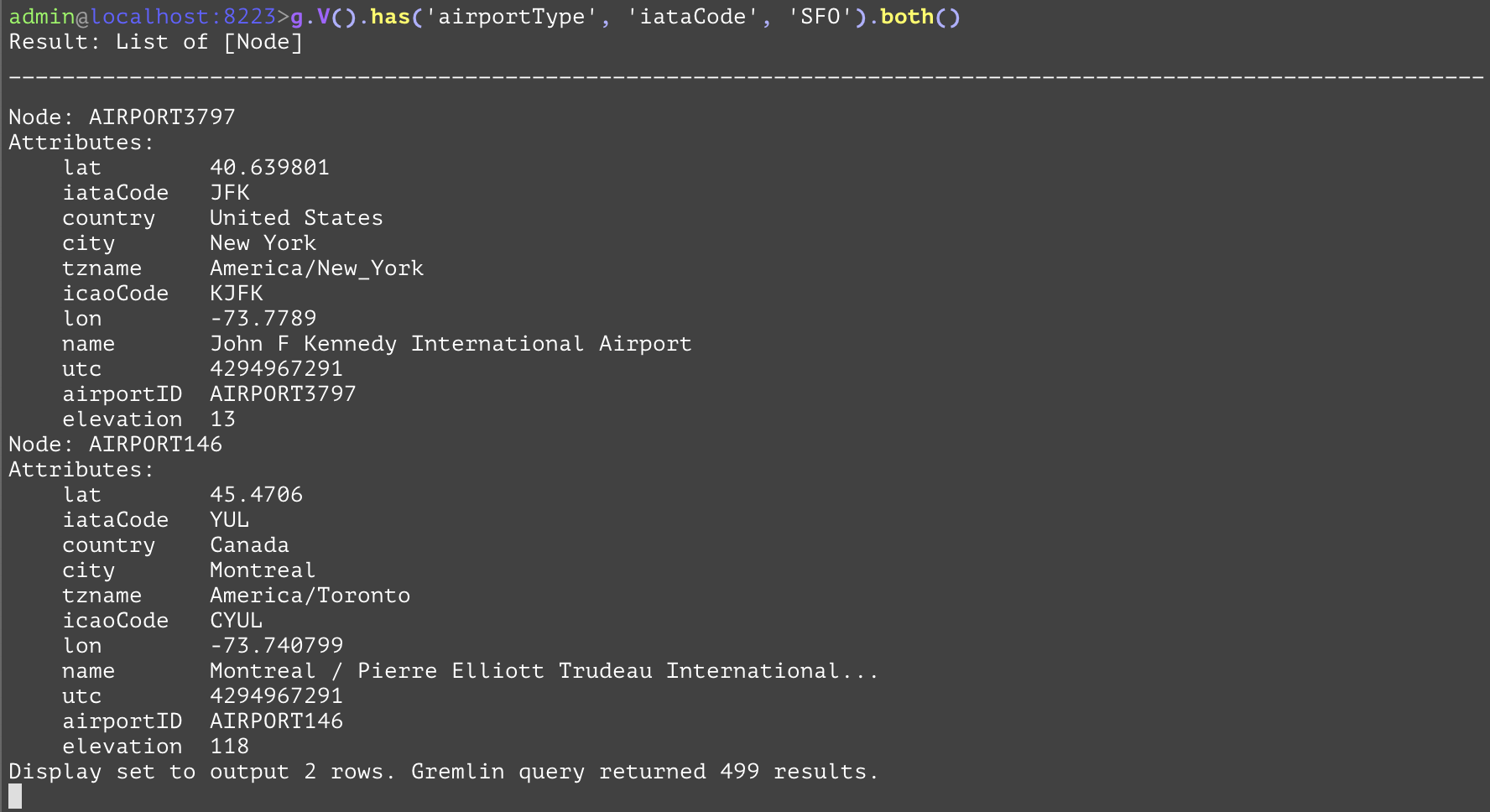
Traverses to all nodes from the current traversal using all edges. For a given node, this is equivalent to traversing to all of the edges' (both "from" and "to") nodes that have the current node as either a "from" or "to" vertex. In the example below, the "both" step is getting all the other airports where SFO is either a departing or arriving airport. | |||
Args | Name | Type | Description |
typename | string[] | Optionally the edge type name(s) (aka edge label(s)) of the edges to traverse across. When specified, this will act as a joint bothE().hasLabel(<typenames>).otherV() | |
GQL | gremlin://g.V().has('airportType', 'iataCode', 'SFO').both(); | ||
SQL | SELECT dest.* FROM airportType AS src INNER JOIN routeType AS hop ON hop.srcAirportId=src.airportId OR hop.destAirportId=src.airportId INNER JOIN airportType AS dest ON hop.srcAirportId=dest.airportId OR hop.destAirportId=dest.airportId WHERE src.iataCode='SFO'; | ||
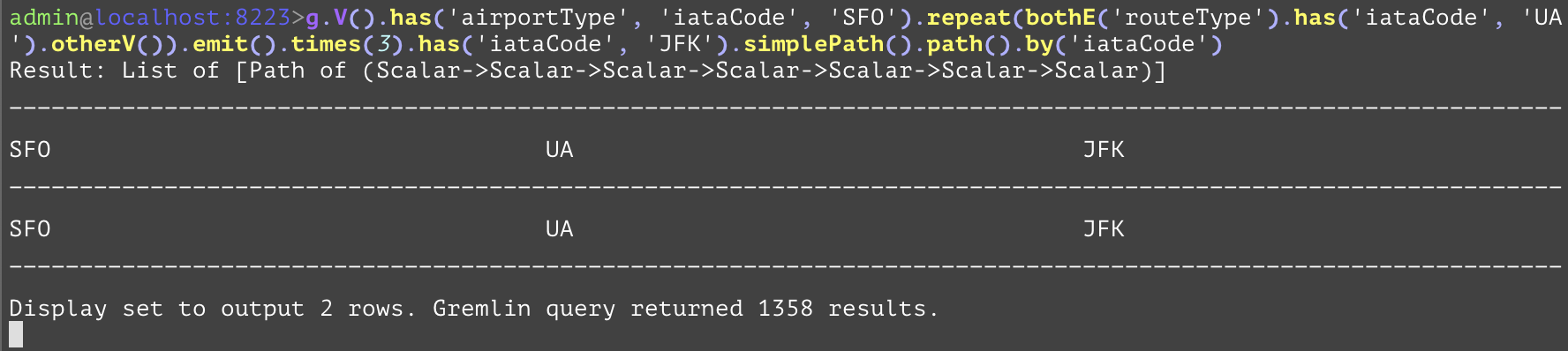
Traverses to all edges from the current traversal. For a given node, this is equivalent to traversing to all of the edges that have the current node as a vertex. In the following example, the "bothE" step is used in conjunction with a "bothV" step to create a path with the edges included. | |||
Args | Name | Type | Description |
typename | string[] | Optionally the edge type name(s) (aka edge label(s)) of the edges to traverse across. When specified, this will act as a joint bothE().hasLabel(<typenames>) | |
GQL | gremlin://g.V().has('airportType', 'iataCode', 'SFO').repeat(bothE('routeType').has('iataCode', 'UA').otherV()).emit().times(3).has('iataCode', 'JFK').simplePath().path().by('iataCode'); | ||
SQL | No known SQL equivalent without using some form of a stored procedure. | ||
Traverses to all vertices from the current traversal. For a given edge, this is equivalent to traversing to both of its vertices. The following example uses the "bothV" step to get both the arrival and departure airport of the current flight. This example demonstrates the power of GQL in simple easy to understand functional language, and compare and contrast the verbose and complex SQL declarative counterpart. Besides the intuitive way of expression, the GQL query will be orders of magnitude faster in execution to its SQL parts. | |||
GQL | gremlin://g.V().has('airportType', 'iataCode', eq('SFO').or(eq('AUS'))).repeat(bothE('routeType').has('iataCode', 'UA').bothV()).times(3).has('iataCode', eq('JFK').or(eq('YYZ'))).simplePath().path().by('iataCode'); | ||
SQL | SELECT src.iataCode, firstHop.iataCode, inter1.iataCode, secondeHop.iataCode, inter2.iataCode, thirdHop.iataCode, dest.iataCode FROM airportType AS src INNER JOIN routeType AS firstHop ON firstHop.srcAirportId=src.airportId OR firstHop.destAirportId=src.airportId INNER JOIN airportType AS inter1 ON firstHop.srcAirportId=inter1.airportId OR firstHop.destAirportId=inter1.airportId INNER JOIN routeType AS secondHop ON secondHop.srcAirportId=inter1.airportId OR secondHop.destAirportId=inter1.airportId INNER JOIN airportType AS inter2 ON secondHop.srcAirportId=inter2.airportId OR secondHop.destAirportId=inter2.airportId INNER JOIN routeType AS thirdHop ON thirdHop.srcAirportId=inter2.airportId OR thirdHop.destAirportId=inter2.airportId INNER JOIN airportType AS dest ON thirdHop.srcAirportId=dest.airportId OR thirdHop.destAirportId=dest.airportId WHERE (src.iataCode='SFO' OR src.iataCode='AUS') AND firstHop.iataCode='UA' AND secondHop.iataCode='UA' AND thirdHop.iataCode='UA' AND (dest.iataCode='JFK' OR dest.iataCode='YYZ') AND src.airportId<>inter1.airportId AND src.airportId<>inter2.airportId AND src.airportId<>dest.airportId AND inter1.airportId<>inter2.airportId AND inter1.airportId<>dest.airportId AND inter2.airportId<>dest.airportId; | ||
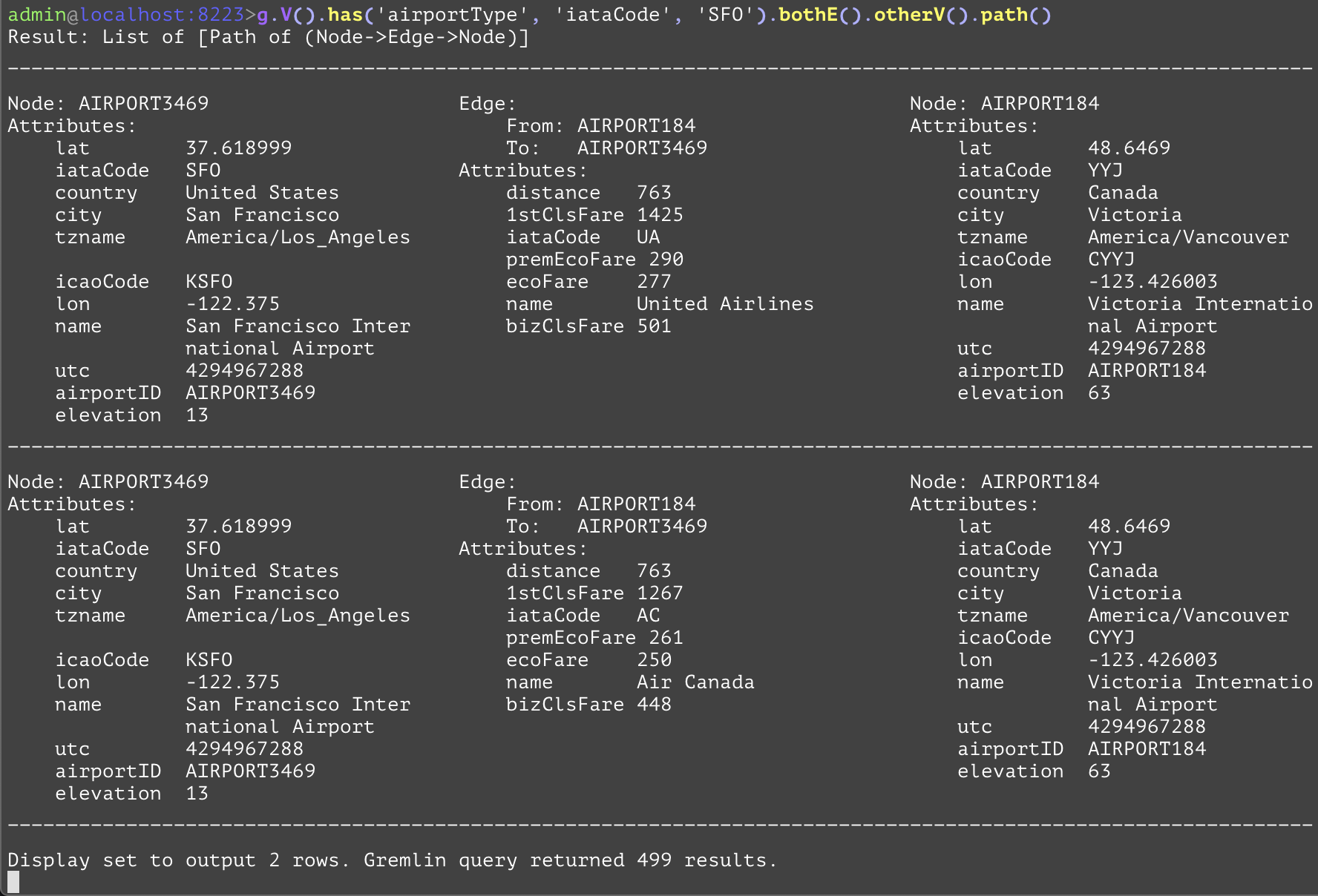
Traverses to the other vertex of this edge. For a given edge, this is equivalent to traversing to either vertex that has not been visited most recently by the traversal. It is extremely useful when used with "bothE" steps, as a "bothV" would also return the original vertex, while the "otherV" step will not. In the following example, the "otherV" is used to prevent also including the SFO airport. The "UNION" of two almost similar, but slightly different SQL queries is necessary because "otherV" is a union of out-bound edge's in-bound vertices or in-bound edge's out-bound vertices. | |||
GQL | gremlin://g.V().has('airportType', 'iataCode', 'SFO').bothE().otherV().path(); | ||
SQL | SELECT * FROM airportType AS src INNER JOIN routeType AS hop ON hop.srcAirportId=src.airportId INNER JOIN airportType AS dest ON hop.destAirportId=dest.airportId WHERE src.iataCode='SFO' UNION SELECT * FROM airportType AS src INNER JOIN routeType AS hop ON hop.destAirportId=src.airportId INNER JOIN airportType AS dest ON hop.srcAirportId=dest.airportId WHERE src.iataCode='SFO'; | ||
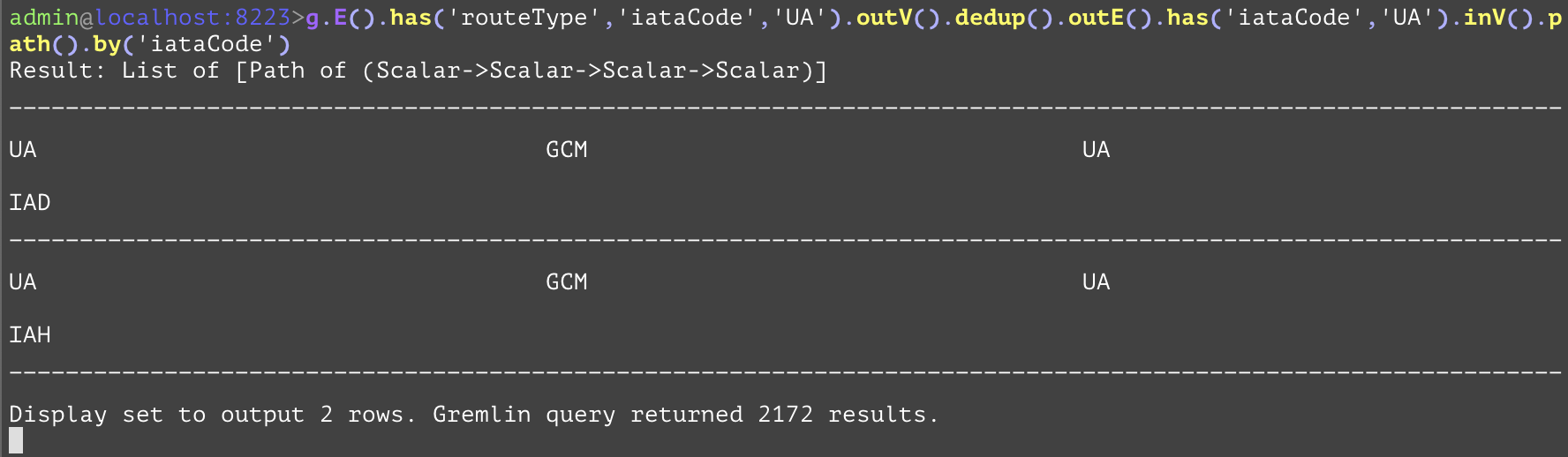
Creates a tuple of the path over each entity in the traversal. Subsequent "by" steps specify what to extract from each entity as in the tuple. The "by" steps are applied in a loop, with the first element in the path converted to a value by the first "by", the second element converted to a value by the second, etc. until the "by" steps are used up. Let's say there are N "by" steps and M elements in the path with M > N, then the N+1th element is converted to a value by the first "by" step, etc. until all M elements of the path are converted. In addition, the "by" step need not contain an attribute name argument. In this case, the entity itself is included at that stage of the path. In the example below, we get from all of the routes the ones with "iataCode" "UA", which is the code for United Airlines, their departing airports, and then gets the routes where those are the arrival airports that are also serviced by United Airlines, and finally get those second route's departing airports. Then, the "by" step reduces each of the entities in this path into its "iataCode" attribute. | |||
GQL | gremlin://g.E().has('routeType','iataCode','UA').outV().dedup().outE().has('iataCode','UA').inV().path().by('iataCode'); | ||
SQL | SELECT firstHop.iataCode, firstAirport.iataCode, secondHop.iataCode, secondAirport.iataCode FROM (SELECT DISTINCT(srcAirportId), iataCode FROM routeType) AS firstHop INNER JOIN airportType AS firstAirport ON firstHop.srcAirportId=firstAirport.airportId INNER JOIN routeType AS secondHop ON secondHop.destAirportId=firstAirport.airportId INNER JOIN airportType AS secondAirport ON secondHop.srcAirportId=secondAirport.airportId WHERE firstHop.iataCode='UA' AND secondHop.iataCode='UA'; | ||
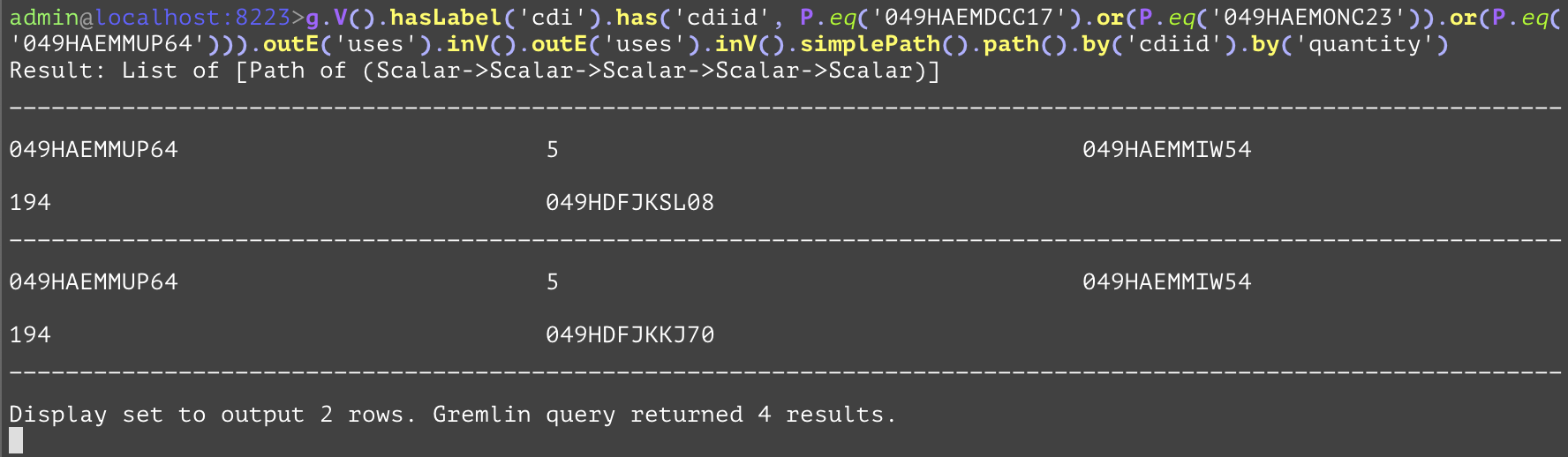
Specifies to disallow cycles during a traversal. This can be used to improve performance of the query by preventing unwanted cycles within the results. In the following example we want to get all of the contents of the containers and what those containers contain, and what those containers contain, the "simplePath" is used to prevent a container from containing itself, which it should not be able to do. | |||
GQL | gremlin://g.V().hasLabel('cdi').has('cdiid', P.eq('049HAEMDCC17').or(P.eq('049HAEMONC23')).or(P.eq('049HAEMMUP64'))).outE('uses').inV().outE('uses').inV().simplePath().path().by('cdiid').by('quantity'); | ||
SQL | SELECT outerMost.cdiid, firstUses.quantity, middle.cdiid, secondUses.quantity, innerMost.cdiid FROM cdi AS outerMost INNER JOIN uses AS firstUses ON firstUses.srcCdiid=outerMost.cdiid INNER JOIN cdi AS middle ON firstUses.destCdiid=middle.cdiid INNER JOIN uses AS secondUses ON secondUses.srcCdiid=middle.cdiid INNER JOIN cdi AS innerMost ON secondUses.destCdiid=innerMost.cdiid WHERE (outerMost.cdiid='049HAEMDCC17' OR outerMost.cdiid='049HAEMONC23' OR outerMost.cdiid='049HAEMMUP64') AND (outerMost.cdiid<>middle.cdiid) AND (outerMost.cdiid<>innerMost.cdiid) AND (middle.cdiid<>innerMost.cdiid); | ||
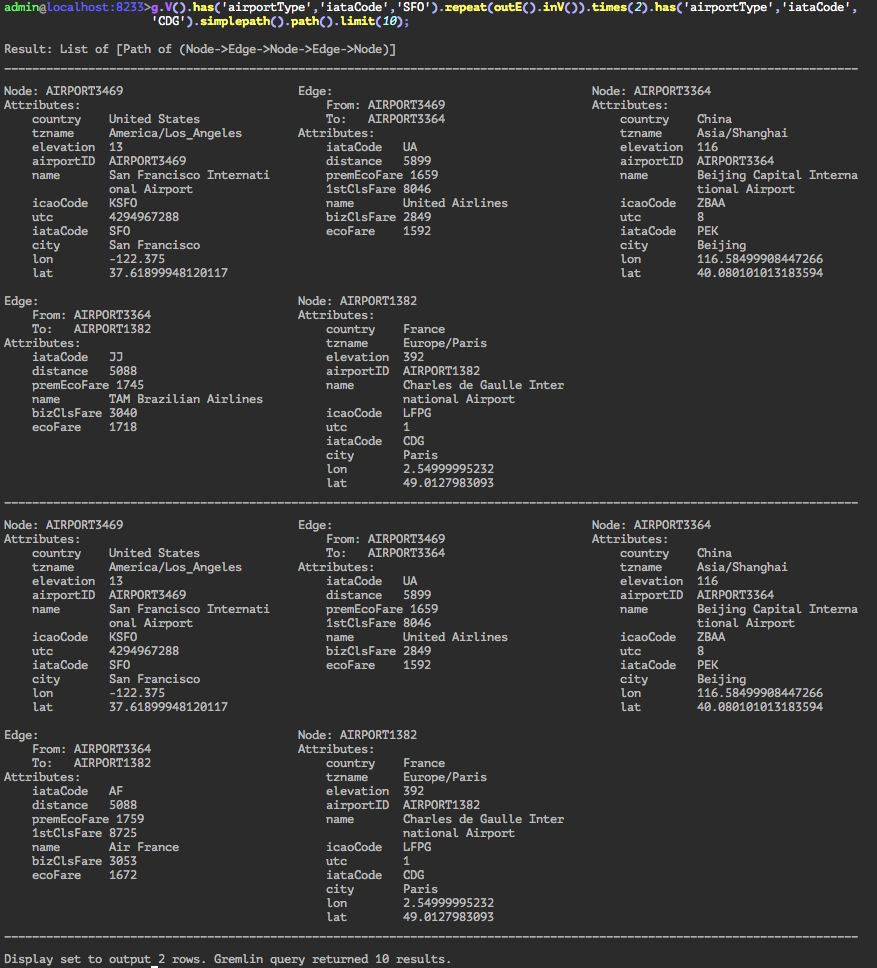
Acts as a step modulator for the repeat step. This step modulator will split the traversal at the end of each loop, one will continue to repeat (if it has not exceeded a "times" step), and the other will continue on to the next portion of the traversal. In the following example, each traversal in the "repeat" step is emitted past the times(2) step on the first iteration of the loop to the has('airportType','iataCode','CDG') step, even though the looping portion (outE().inV()) has not yet looped twice. | |||
Args | Name | Type | Description |
condition | expression | The condition to emit (pass on to next step). | |
GQL | gremlin://g.V().has('airportType','iataCode','SFO').repeat(outE().inV()).emit().times(2).has('airportType','iataCode','CDG').simplepath().path().limit(10); | ||
SQL | No known SQL equivalent without using some form of a procedure. | ||
A step modifier for specifying optional arguments to previous steps. The "by" steps can be applied to the "group", "groupCount", "dedup", "order", and "path" steps. In the first example, the "by" step is used first (by('country')) to specify on what attribute to group the entities into, while the second "by" step (by('iataCode')) reduces each airport entity into its IATA code. There is no direct SQL equivalent due to the dictionary with values of lists that standard SQL does not support, although a similar one is shown below. In the second example, the "by" step is used to reduce each element (airport or route) in a path to its IATA code. For a single iteration of the repeat step. For the third example, the "by" step is used as a way to specify to the "dedup" step what attribute to deduplicate on. This query gets the iataCode of the airlines that have flights originating from the SFO airport. | |||
Args | Name | Type | Description |
step_modifier | string, expression, or sort order | Modifies the previous step. Can also be a <sort_order> which is one of "asc", "incr", "desc", or "decr". | |
sort_order | sort order | Optional when following an order step. <sort_order> must be one of "asc", "incr", "desc", or "decr". | |
GQL | gremlin://g.V().has('airportType', 'iataCode', 'SFO').outE().inV().group().by('country').by('iataCode'); | ||
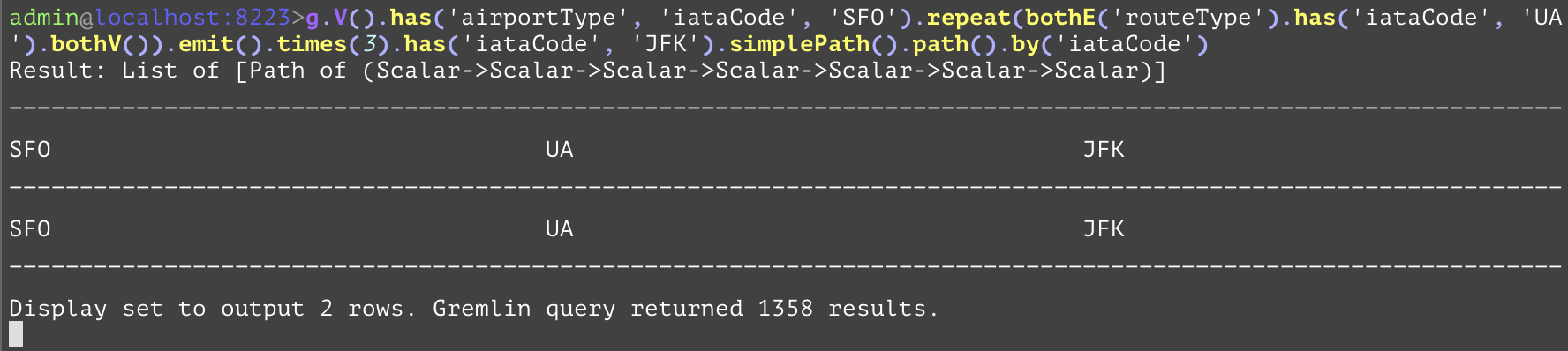
gremlin://g.V().has('airportType', 'iataCode', 'SFO').repeat(bothE('routeType').has('iataCode', 'UA').bothV()).emit().times(3).has('iataCode', 'JFK').simplePath().path().by('iataCode'); | |||
gremlin://g.V().hasLabel('airportType').has('iataCode', 'SFO').outE('routeType').dedup().by('iataCode').values('iataCode'); | |||
SQL | SELECT destAirport.country, destAirport.iataCode FROM airportType AS srcAirport INNER JOIN routeType AS hop ON hop.fromAirportId=srcAirport.airportId INNER JOIN airportType AS destAirport ON hop.toAirportId=destAirport.airportId WHERE srcAirport.iataCode='SFO' GROUP BY destAirport.country; | ||
SELECT srcAirport.iataCode, route.iataCode, destAirport.iataCode FROM airportType AS srcAirport INNER JOIN routeType AS route ON route.srcAirportId=srcAirport.airportId INNER JOIN airportType AS destAirport ON route.destAirportId=destAirport.airportId WHERE srcAirport.iataCode='SFO' AND destAirport.iataCode='JFK' AND route.iataCode='UA'; | |||
SELECT route.iataCode FROM airportType AS srcAirport INNER JOIN routeType AS route ON route.srcAirportId=srcAirport.airportID WHERE srcAirport.iataCode='SFO' GROUP BY route.iataCode; | |||
A step modifier for the "repeat" step that specifies the number of times the repeat is looped. The argument specifies the maximum number of times to loop within the "repeat" step. The first example below gets all of the paths of flights (regardless of direction) between the SFO airport and the JFK airport with at most 3 flights and using only flights from the airline with iataCode UA (United Airlines). In the second example, the query gets all paths (regardless of direction) made of flights between either of the SFO or AUS airports to either of the JFK or YYZ airports with at most 3 flights and using only flights from the airline with iataCode UA (United Airlines). | |||
Args | Name | Type | Description |
num_times | integer | The number of times to loop. | |
GQL | gremlin://g.V().has('airportType', 'iataCode', 'SFO').repeat(bothE('routeType').has('iataCode', 'UA').bothV()).emit().times(3).has('iataCode', 'JFK').simplePath().path().by('iataCode'); | ||
gremlin://g.V().has('airportType', 'iataCode', eq('SFO').or(eq('AUS'))).repeat(bothE('routeType').has('iataCode', 'UA').bothV()).times(3).has('iataCode', eq('JFK').or(eq('YYZ'))).simplePath().path().by('iataCode'); | |||
SQL | No known SQL equivalent without using some form of a procedure. The second gremlin query is somewhat translated to a verbose SQL form using INNER joins, and execution times are order of magnitudes slower than its gremlin form of writing. | ||
The SQL below is equivalent to the gremlin query gremlin://g.V().has('airportType', 'iataCode', eq('SFO').or(eq('AUS'))).repeat(bothE('routeType').has('iataCode', 'UA').bothV()).times(3).has('iataCode', eq('JFK').or(eq('YYZ'))).simplePath().path().by('iataCode'); SELECT src.iataCode, firstHop.iataCode, inter1.iataCode, secondeHop.iataCode, inter2.iataCode, thirdHop.iataCode, dest.iataCode FROM airportType AS src INNER JOIN routeType AS firstHop ON firstHop.srcAirportId=src.airportId OR firstHop.destAirportId=src.airportId INNER JOIN airportType AS inter1 ON firstHop.srcAirportId=inter1.airportId OR firstHop.destAirportId=inter1.airportId INNER JOIN routeType AS secondHop ON secondHop.srcAirportId=inter1.airportId OR secondHop.destAirportId=inter1.airportId INNER JOIN airportType AS inter2 ON secondHop.srcAirportId=inter2.airportId OR secondHop.destAirportId=inter2.airportId INNER JOIN routeType AS thirdHop ON thirdHop.srcAirportId=inter2.airportId OR thirdHop.destAirportId=inter2.airportId INNER JOIN airportType AS dest ON thirdHop.srcAirportId=dest.airportId OR thirdHop.destAirportId=dest.airportId WHERE (src.iataCode='SFO' OR src.iataCode='AUS') AND firstHop.iataCode='UA' AND secondHop.iataCode='UA' AND thirdHop.iataCode='UA' AND (dest.iataCode='JFK' OR dest.iataCode='YYZ') AND src.airportId<>inter1.airportId AND src.airportId<>inter2.airportId AND src.airportId<>dest.airportId AND inter1.airportId<>inter2.airportId AND inter1.airportId<>dest.airportId AND inter2.airportId<>dest.airportId; | |||
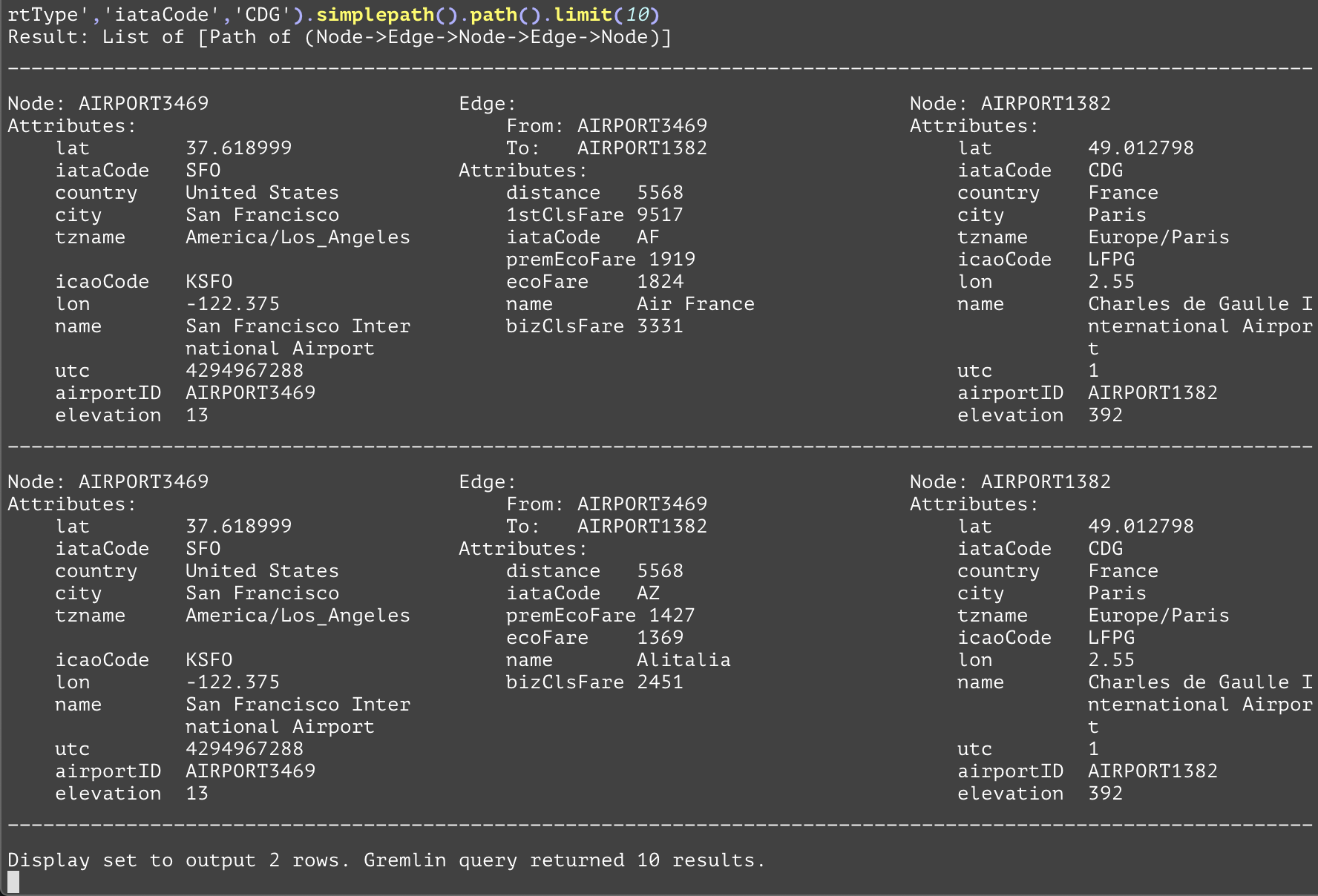
Repeats the steps in the <traversal_steps> argument until it is either emitted or the number of times is reached. The "repeat" step can be modified with the "times" and "emit" steps. The "times" step specifies the maximum number of times the loop is repeated. The "emit" step splits the traversal at the end of each loop, one performs the loop, and the other exits the looping to continue with whatever is after the repeat steps. This is useful when multiple hops across a graph are desired but the exact number is not known. For the first example, the query returns the first 10 paths that have flights outbound from the SFO airport, stop at another airport, and then arrive at the CDG airport. The reason for the outE().inV() inside the "repeat" step instead of a simpler out() step is that the former will include the edges inside of the tuple returned by the path() step that will not be returned by the later. For the second example, the "repeat" step has two separate conditions that cause it to exit: one is when the number of times is reached i.e (3 in this case) and the other is at the end of each section of the loop via the emit() step. The gist of this query is that it gets all paths (regardless of direction) made of flights between either of the SFO or AUS airports to either of the JFK or YYZ airports with at most 3 flights and using only flights from the airline with iataCode UA (United Airlines), and returns each of these entities by its "iataCode" attribute. | |||
Args | Name | Type | Description |
traversal_steps | steps or expression | The body of the repeat loop. Repeat these steps until the loop is exited. | |
GQL | gremlin://g.V().has('airportType', 'iataCode',eq('SFO').or(eq('AUS'))).repeat(bothE('routeType') .has('iataCode','UA').bothV()).emit().times(3).has('iataCode', eq('JFK').or(eq('YYZ'))) .simplePath().path().by('iataCode'); | ||
gremlin://g.V().has('airportType','iataCode','SFO').repeat(outE().inV()).times(2).has('airportType','iataCode','CDG').simplepath().path().limit(10); | |||
SQL | No known SQL equivalent without using some form of a stored procedure. | ||
SELECT * FROM airportType AS srcAirport INNER JOIN routeType AS firstHop ON firstHop.srcAirportId=srcAirport.airportId INNER JOIN airportType AS interAirport ON firstHop.destAirportId=interAirport.airportId INNER JOIN routeType AS secondHop ON secondHop.srcAirportId=interAirport.airportId INNER JOIN airportType AS destAirport ON secondHop.destAirportId=destAirport.airportId WHERE srcAirport.iataCode='SFO' AND destAirport.iataCode='CDG' AND srcAirport.airportId<>interAirport.airportId AND srcAirport.airportId<>destAirport.airportId AND interAirport.airportId<>destAirport.airportId LIMIT 10; | |||
Executes a stored procedure that is currently registered in the database. In the first example, the "getAirports" stored procedure returns a list of all of the airports with the first parameter (in this case United States) as the country for that airport, and the second parameter (in this case "Seattle") as the city for that airport. In the second example, the "retD" stored procedure simply returns a double value of 8.24. This stored procedure has no parameters needed. | |||
Args | Name | Type | Description |
stored_proc_name | string | The stored procedure to run. | |
stored_proc_args | string[] | Optionally, the stored procedure arguments to pass in as parameters to the stored procedure. Can specify multiple arguments. Keyword arguments are specified within the string by using an equal sign between the argument name and value, like keyword_arg_name=keyword_arg_value. | |
GQL | gremlin://g.V().has('airportType', 'iataCode', 'SEA').execSP('getAirports', 'United States', 'Seattle').values(); | ||
gremlin://g.V().has('airportType', 'iataCode', 'SEA').execSP('retD'); | |||
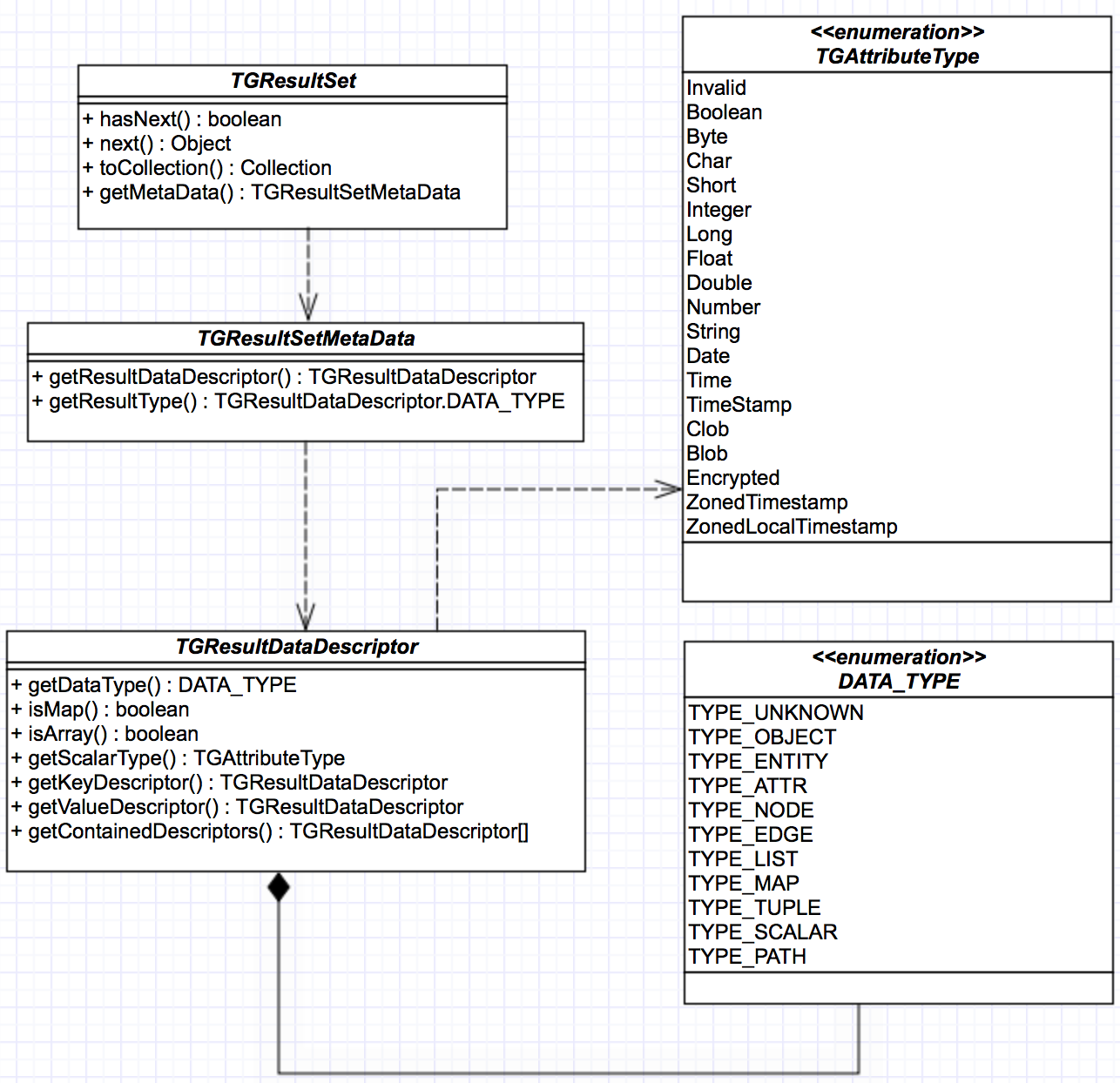
Result from a query is returned in the form of TGResultSet. Below shows a class diagram related to the TGResulSet. For more information, please see the Java API Reference
This is the interface returned from a query. It implements an iterator interface. All the information about the result is accessed through TGResultSet.
Here is an example of retrieving query results.
‘hasNext’ method is used to check any available data in the result. ‘Next’ is used to retrieve the result. In this example, the query returns the ‘SFO’ airport node which implements ‘TGEntity’ interface. Besides result data, metadata about the results can be retrieved using ‘TGResultSet’. ‘TGResultSetMetaData’ and ‘TGResultDataDescriptor’ maintain the result metadata.
It serves as the starting point for retrieving metadata about the result. Since the query result is currently returned in a list, ‘getResultType’ of ‘TGResultSet’ always returns ‘TYPE_LIST’. ‘getResultDataDescriptor’ of ‘TGResultSet’ returns the ‘TGResultDataDescriptor’ which contains additional information about the data in the list.
The information presented in this interface is defined internally by data type annotations described in Annotation reference. This interface is recursive in nature because query results can contain complex objects such as a list of mixed data types of scalar data and entity objects. When stored procedures are used in a query, a stored procedure can return data which Python allows.
Here is an example of retrieving query metadata.
TGResultSet<TGEntity> resultSet = conn.executeQuery("gremlin://g.V().has('airportType','iataCode','SFO').” + "outE('routeType').inV().path().by('iataCode').by('distance').by();", null); | ||
TGResultSetMetaData rsmd = resultSet.getMetaData(); | ||
TGResultDataDescriptor.DATA_TYPE dataType = rsmd.getResultType(); out.printf("Result data type : %s\n", dataType); | ||
TGResultDataDescriptor rsdd = rsmd.getResultDataDescriptor(); System.out.printf("Type : %s, isArray : %b\n", rsdd.getDataType(), rsdd.isArray()); | ||
TGResultDataDescriptor[] ndd = rsdd.getContainedDescriptors(); for (int i=0; i<ndd.length; i++) { System.out.printf("Type : %s, isArray : %b\n", ndd[i].getDataType(), ndd[i].isArray()); | ||
TGResultDataDescriptor[] pathdd = ndd[i].getContainedDescriptors(); for (int j=0; j<pathdd.length; j++) { System.out.printf(" Type : %s, scalar type : %s\n", pathdd[j].getDataType(), pathdd[j].getDataType() == TYPE_SCALAR ? pathdd[j].getScalarType() : "none"); } | ||
} | ||
Step | Objective |
1 | Execute a query to return a list of paths representing routes from ‘SFO’. Each path contains three elements. Element types in each path are in the order of string, integer and node. |
2 | Retrieve the metadata object from the result set. |
3 | Retrieve the data type of the result set. Currently it is always of LIST type. |
4 | Retrieve the top level result data descriptor object which describes the result list. It also contains the descriptor objects of the data in the list. |
5 | In this example, there is only one element in the contained descriptor array because the result is a list of paths. Each data element in the query result list is a path. |
6 | Repeat the same ‘getContainedDescriptors’ call to get an array of data descriptors to find out what kind of data is captured in each path. In this example, each path is made up of three data elements, namely, a string, an integer and a node. |
The output of the executed code is as below:
Result data type : TYPE_LIST Type : TYPE_LIST, isArray : true Type : TYPE_PATH, isArray : false Type : TYPE_SCALAR, scalar type : String Type : TYPE_SCALAR, scalar type : Integer Type : TYPE_NODE, scalar type : none |
The syntax diagram for TGDB Gremlin Query is shown below.
❗The and_step currently only allows ‘has’ step as argument. For correctness, we have shown traversal.
❗The modular_step currently only allows identifier as argument. For correctness, we have shown traversal.
Legend:
Italics text inside a rounded rectangle indicates a statement | |
small circle with a single text is a literal character terminal | |
rectangle with a regular text is a string literal terminal | |
Indicates an identifier terminal. See the rules for identifier terminal | |
Identifier Terminal | |
edge_type_name | A valid edge type name in the database |
type_name | A valid edge or node type name in the database |
attr_name | A valid attribute descriptor name in the database |
sp_name | A valid stored procedure name in the database |
sp_arg | A stored procedure argument. If the argument is named argument, then it should be of the form ‘name=value’ |
number | any integer or decimal number. The regular expression for matching this is: -?[0-9]+(\.[0-9]+)? |
integer | an integer. The regular expression for matching this is: -?[0-9]+ |
identifier | a single-quote enclosed string. The regular expression for matching this is: '(\\.|[^'\\])+'|‘(\\.|[^’\\])+’ |
comment | a comment used to document what a query does or how it works.Single line comments only. Comments starts with # Can be at the end of the query or at the beginning. |
Annotation Codes that can be returned as a Sequence of characters as result of Query string or from an execution of a Stored Procedure.
Annotation Symbol | Annotation Type (Server-side) | Python Type | Description |
"" | void | -- | def rVoid(g,...) -> "": pass |
c | Char | str | def rChar(g,..) → "c" : |
b | signed byte | bytes |
|
B * | unsigned byte |
|
|
? | Boolean | bool |
|
h | short. | int | Optionally specify the width using the ":" and size |
H * | unsigned short |
|
|
i | int | int |
|
I * | unsigned int |
|
|
l | long | int |
|
L * | unsigned long |
|
|
f | float | float |
|
d | Double | float |
|
s | string | str |
|
n:size_t * | number with precision |
|
|
q * | long long (64 bit) |
|
|
Q * | unsigned long long (64) |
|
|
p * | Pointer (64 bit) |
|
|
G * | Graph |
|
|
P | Path | list | A path may be annotated as a generic path: "P". The list elements are limited to nodes, edges, entities, and scalar values. It may not include tuples, or otherwise nested objects - this is just for annotation purposes. If the path has a fixed number of elements it can be expressed as e.g. "P(V,E,V,V,E,V)" or "P(V,d,d,s,E,i)". Alternatively, path elements may be defined explicitly: If the path has a fixed number of elements it can be expressed as e.g. "P(V,E,V,V,E,V)" or "P(V,d,d,s,E,i)". For variable size paths, list annotation may be used, e.g. "P([s])" - any number of strings. P(d,[(s,V)]) means a path starts with a double and then with zero or more tuples of string and vertex combination. It means P(d,s,V) and P(d,s,V,s,V) are both represented by P(d,[(s,V)]). Path elements are restricted to scalar types, nodes, edges, and entities. |
O * | Generic object |
|
|
S * | Scalar. |
| Primitive types and string |
A * | Attribute |
| Any Generic TGDB Attribute |
A:name * | Named Attribute |
| A valid TGDB attribute of the specified name def rAttributeAge(g:, ...) → "A:age" |
T * | Node or Edge entity |
| This annotation previously included attribute as well - may need to revert in the future |
V | Any Node Type | TGNode |
|
V:name * | Named Node Type |
| A Node of a specific type |
E | Any Edge | TGEdge |
|
E:name * | Named Edge Type |
| A Edge of specific type |
[ ] | A List of values. | list | The values can be any of types. It is an indefinite set and the count is only known at runtime. To specify a type use any of annotation symbol including "[]" for itself Examples: def rGenericList(g:, ...) → "[]"* def rListofNames(g:, ...) → "[ s ]" def rListofPeoples(g:, ...) → "[V:people]" |
() | Declares a Tuple. | tuple | An ordered set of finite values. Finite set, count known at compile or pre-execution time. The values can be specified as any annotation symbol from the table including itself. def rTuple(g:, ...) → "(A:name, A:age, d:8)" |
{K,V} | Set of unique (key, value) pairs | dict | A map of key and values. Key is one of the scalar or primitive types. i.e not a list, set, or a map |
This section tables the differences between the supported steps in Apache Gremlin and TIBCO Graph Database Gremlin Query Language. TGDB Query Language is based on the Apache Gremlin. Albeit, we strive to remain as consistent and completely at par with the Apache Gremlin, certain differences arise in the way of supporting steps due to design, security and time constraints. Some of the steps have workarounds, or have a better counterpart through elegant design. For instance TGDB supports Stored Procedures and also has built-in Graph Algorithms, they are all accessible via the ‘execsp’ command. This makes the VertexProgram of Gremlin completely redundant.
The table below outlines the differences between the two and should be used as reference. As TIBCO releases newer versions of TGDB, the product will aim to support as many as steps necessary to increase the end-user productivity and ease of use.
Step | Supported in TGDB | Apache Gremlin 3.5.2 | Comments |
Start Steps | |||
addE() | N | Y | TGDB supports a CRUD API in Java, Go, and Python separately from Gremlin. Gremlin is used for querying purpose only TGDB support a fast and efficient bulk operation |
addV() | N | Y | |
E() | Y | Y | |
inject() | N | Y | |
V() | Y | Y | |
Terminal Steps | |||
fill() | N | Y | TGDB supports the default toList terminal step. Since the Gremlin is a functional API model, some of the steps aren’t appropriate. Also toBulkSet is supported through a fast and efficient bulk export mechanism. |
hasNext() | N | Y | |
iterate() | N | Y | |
next() | N | Y | |
toBulkSet() | N | Y | |
toList() | Y | Y | |
toSet() | N | Y | |
tryNext() | N | Y | |
Vertex Steps | |||
both | Y | Y | |
bothE | Y | Y | |
in | Y | Y | |
inE | Y | Y | |
inV | Y | Y | |
otherV | Y | Y | |
out | Y | Y | |
outE | Y | Y | |
outV | Y | Y | |
Projection Steps | |||
elementMap | N | Y | Other than Select, which is more than a Project Step as it is required to hold state vectors, the functionality of ElementMap, Properties, and PropertyMap are encapsulated in the default Entity object. Values and ValueMap helps to filter out the needed attributes |
id | N | Y | |
identity | N | Y | |
key | N | Y | |
label | N | Y | |
project | N | Y | |
properties | N | Y | |
propertyMap | N | Y | |
select | N | Y | |
value | N | Y | |
valueMap | Y | Y | |
values | Y | Y | |
Filter Steps | |||
and | Y | Y | |
dedup | Y | Y | |
has | Y | Y | |
hasLabel | Y | Y | |
is | N | Y | |
limit | Y | Y | |
none | N | Y | |
not | N | Y | |
or | Y | Y | |
tail | N | Y | |
timeLimit | N | Y | |
FlowControl & Predicate Steps | |||
barrier | N | Y | Most of the unsupported steps can be worked around using stored procedures. |
between | Y | Y | |
choose | N | Y | |
containing | N | Y | |
emit | Y | Y | |
endingWith | N | Y | |
eq | Y | Y | |
fold | N | Y | |
gt | Y | Y | |
gte | Y | Y | |
inside | Y | Y | |
local | N | Y | |
loops | N | Y | |
lt | Y | Y | |
lte | Y | Y | |
match | N | Y | |
neq | Y | Y | |
notEndingWith | N | Y | |
notStartingWith | N | Y | |
option | N | Y | |
optional | N | Y | |
outside | Y | Y | |
repeat | Y | Y | |
sack | N | Y | |
skip | N | Y | |
startingWith | N | Y | |
times | Y | Y | |
unfold | N | Y | |
until | N | Y | |
where | N | Y | |
Aggregation Steps | |||
aggregate | N | Y | |
coalesce | N | Y | |
count | Y | Y | |
group | Y | Y | |
groupcount | Y | Y | |
max | Y | Y | |
mean | Y | Y | |
min | Y | Y | |
order | Y | Y | |
sum | Y | Y | |
union | N | Y | |
Path Steps | |||
cyclicPath | N | Y | Tree and Subgraph steps can be efficiently customized to the application needs using stored procedures. |
path | Y | Y | |
simplePath | Y | Y | |
subgraph | N | Y | |
tree | N | Y | |
Modulator Steps | |||
as | N | Y | With step is supported using query options, since it is applicable only with ‘g.’ |
by | Y | Y | |
from | N | Y | |
to | N | Y | |
with | N | Y | |
write | N | Y | |
StoredProcedure Steps | |||
execSP | Y | N | This allows complex python code to be executed inline with the Gremlin query |
Graph Analytics | |||
Betweenness Centrality | Y | N | Built-in stored procedures supports standard Vertex Programs and Graph Analytics |
Closeness Centrality | Y | N | |
PageRank | Y | Y | |
Triangle Counts | Y | N | |
Connected Components | Y | Y | |
Peer Pressure | Y | Y | |
Single Source/All Pairs Shortest Path | Y | Y | |
Math Functions | |||
abs | N | Y | Workaround is to use stored procedures. |
acos | N | Y | |
asin | N | Y | |
atan | N | Y | |
cbrt | N | Y | |
ceil | N | Y | |
cos | N | Y | |
cosh | N | Y | |
exp | N | Y | |
floor | N | Y | |
log | N | Y | |
log10 | N | Y | |
log2 | N | Y | |
sin | N | Y | |
sinh | N | Y | |
sqrt | N | Y | |
tan | N | Y | |
tanh | N | Y | |
signum | N | Y | |
Miscellaneous Functions | |||
Sample | N | Y | |
Coin | N | Y | |
Constant | N | Y | |
Profile | N | Y | |
Explain | N | Y | |
Data Management Steps | |||
AddE | N | Y | TGDB supports transactional and bulk Data Management, Metadata Management operations using native API functionality. It does not rely on Gremlin’s functional API semantics. The CRUD API is available on Java, Go, and Python. Transactional Update is not available on Gremlin, and relies on Drop followed by Add. Python supports High Performance bulk-io operations through the Panda framework. |
AddProperty | N | Y | |
AddV | N | Y | |
Drop | N | Y | |
Update | N | N | |
BulkIO | N | Y | |
The following table lists the reserved words that are used by the Gremlin Query. Any identifier with the prefix ‘@’ is considered to be a system identifier.
__ | bothV | group | inV | otherV | to |
. | by | groupCount | is | out | to |
( | choose | gt | key | outE | unfold |
) | decr | gte | label | outside | until |
@id | desc | hasKey | lt | outV | V |
and | emit | hasNot | lte | range | valueMap |
asc | execSP | id | match | repeat | values |
barrier | explain | in | max | sum | where |
between | fold | incr | mean | tail | with |
both | from | inE | min | timeLimit | within |
bothE | g | inside | or | times | without |
Documentation for TIBCO products is available on the TIBCO Product Documentation website, mainly in HTML and PDF formats.
The TIBCO Product Documentation website is updated frequently and is more current than any other documentation included with the product. To access the latest documentation, visit https://docs.tibco.com.
Documentation for TIBCO Graph Database is available on https://docs.tibco.com/products/tibco-graph- database-enterprise-edition-latest page.
This feature is available to both Enterprise edition and Community. The guidelines specified for Clustering is applicable only to Enterprise edition.
The following documents form the documentation set:
You can contact TIBCO Support in the following ways:
TIBCO Community is the official channel for TIBCO customers, partners, and employee subject matter experts to share and access their collective experience. TIBCO Community offers access to Q&A forums, product wikis, and best practices. It also offers access to extensions, adapters, solution accelerators, and tools that extend and enable customers to gain full value from TIBCO products. In addition, users can submit and vote on feature requests from within the TIBCO Ideas Portal. For a free registration, go to https://community.tibco.com.
SOME TIBCO SOFTWARE EMBEDS OR BUNDLES OTHER TIBCO SOFTWARE. USE OF SUCH EMBEDDED OR BUNDLED TIBCO SOFTWARE IS SOLELY TO ENABLE THE FUNCTIONALITY (OR PROVIDE LIMITED ADD-ON FUNCTIONALITY) OF THE LICENSED TIBCO SOFTWARE. THE EMBEDDED OR BUNDLED SOFTWARE IS NOT LICENSED TO BE USED OR ACCESSED BY ANY OTHER TIBCO SOFTWARE OR FOR ANY OTHER PURPOSE.
USE OF TIBCO SOFTWARE AND THIS DOCUMENT IS SUBJECT TO THE TERMS AND CONDITIONS OF A LICENSE AGREEMENT FOUND IN EITHER A SEPARATELY EXECUTED SOFTWARE LICENSE AGREEMENT, OR, IF THERE IS NO SUCH SEPARATE AGREEMENT, THE CLICKWRAP END USER LICENSE AGREEMENT WHICH IS DISPLAYED DURING DOWNLOAD OR INSTALLATION OF THE SOFTWARE (AND WHICH IS DUPLICATED IN THE LICENSE FILE) OR IF THERE IS NO SUCH SOFTWARE LICENSE AGREEMENT OR CLICKWRAP END USER LICENSE AGREEMENT, THE LICENSE(S) LOCATED IN THE “LICENSE” FILE(S) OF THE SOFTWARE. USE OF THIS DOCUMENT IS SUBJECT TO THOSE TERMS AND CONDITIONS, AND YOUR USE HEREOF SHALL CONSTITUTE ACCEPTANCE OF AND AN AGREEMENT TO BE BOUND BY THE SAME.
ANY SOFTWARE ITEM IDENTIFIED AS THIRD PARTY LIBRARY IS AVAILABLE UNDER SEPARATE SOFTWARE LICENSE TERMS AND IS NOT PART OF A TIBCO PRODUCT. AS SUCH, THESE SOFTWARE ITEMS ARE NOT COVERED BY THE TERMS OF YOUR AGREEMENT WITH TIBCO, INCLUDING ANY TERMS CONCERNING SUPPORT, MAINTENANCE, WARRANTIES, AND INDEMNITIES. DOWNLOAD AND USE OF THESE ITEMS IS SOLELY AT YOUR OWN DISCRETION AND SUBJECT TO THE LICENSE TERMS APPLICABLE TO THEM. BY PROCEEDING TO DOWNLOAD, INSTALL OR USE ANY OF THESE ITEMS, YOU ACKNOWLEDGE THE FOREGOING DISTINCTIONS BETWEEN THESE ITEMS AND TIBCO PRODUCTS.
This document contains confidential information that is subject to U.S. and international copyright laws and treaties. No part of this document may be reproduced in any form without the written authorization of Cloud Software Group, Inc.
TIBCO, the TIBCO logo, the TIBCO O logo, and Graph Database are either registered trademarks or trademarks of Cloud Software Group, Inc. in the United States and/or other countries.
All other product and company names and marks mentioned in this document are the property of their respective owners and are mentioned for identification purposes only.
THIS SOFTWARE MAY BE AVAILABLE ON MULTIPLE OPERATING SYSTEMS. HOWEVER, NOT ALL OPERATING SYSTEM PLATFORMS FOR A SPECIFIC SOFTWARE VERSION ARE RELEASED AT THE SAME TIME. SEE THE README FILE FOR THE AVAILABILITY OF THIS SOFTWARE VERSION ON A SPECIFIC OPERATING SYSTEM PLATFORM.
THIS DOCUMENT IS PROVIDED “AS IS” WITHOUT WARRANTY OF ANY KIND, EITHER EXPRESS OR IMPLIED, INCLUDING, BUT NOT LIMITED TO, THE IMPLIED WARRANTIES OF MERCHANTABILITY, FITNESS FOR A PARTICULAR PURPOSE, OR NON-INFRINGEMENT.
THIS DOCUMENT COULD INCLUDE TECHNICAL INACCURACIES OR TYPOGRAPHICAL ERRORS. CHANGES ARE PERIODICALLY ADDED TO THE INFORMATION HEREIN; THESE CHANGES WILL BE INCORPORATED IN NEW EDITIONS OF THIS DOCUMENT. TIBCO SOFTWARE INC. MAY MAKE IMPROVEMENTS AND/OR CHANGES IN THE PRODUCT(S) AND/OR THE PROGRAM(S) DESCRIBED IN THIS DOCUMENT AT ANY TIME.
THE CONTENTS OF THIS DOCUMENT MAY BE MODIFIED AND/OR QUALIFIED, DIRECTLY OR INDIRECTLY, BY OTHER DOCUMENTATION WHICH ACCOMPANIES THIS SOFTWARE, INCLUDING BUT NOT LIMITED TO ANY RELEASE NOTES AND "READ ME" FILES.
Copyright © 2022. Cloud Software Group, Inc. All Rights Reserved.